
MyFitnessPal product-design dossier
Research date: October 7, 2026. Scope: United States first, with platform and rollout restrictions preserved.
This is public-source desk research, not a tested account walkthrough. The companion app.json distinguishes visually observed screens from documented transitions; screenshots.html supplies annotated official imagery and links to unmodified originals. Forty-eight first-party help articles were fetched through MyFitnessPal’s public help API and read. Twelve curated images come from an eighteen-image inspection pool. No login, subscription, native installation, synchronization, export or destructive operation was performed.
1. Product model and the important 2026 change
The useful model is a dated ledger of food grouped into meals, with a nutrition budget above it and interpretation around it.mfp-05 Free accounts support logging and personal food objects; Premium adds capture methods, target precision and analysis; Premium+ adds planning and groceries.mfp-05 This is not simply one paid/unpaid split.mfp-05
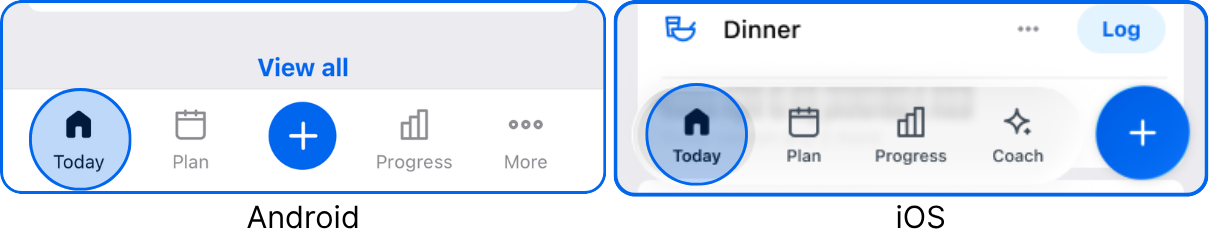
The official new-experience announcement replaces Dashboard with Today.mfp-01 Older screenshots must therefore not be used as the current navigation specification.mfp-01
Premium documentation emphasizes continuity: existing friends, personal foods and diary history remain when upgrading.mfp-36 It also states that one subscription spans mobile and web, while individual capabilities can still be restricted by platform or language.mfp-36 Entitlement portability therefore does not establish identical functionality.mfp-36
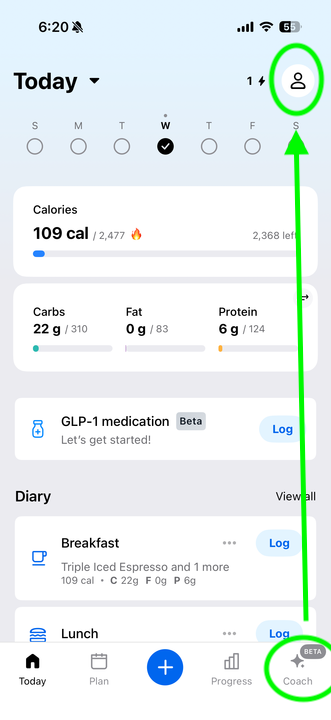
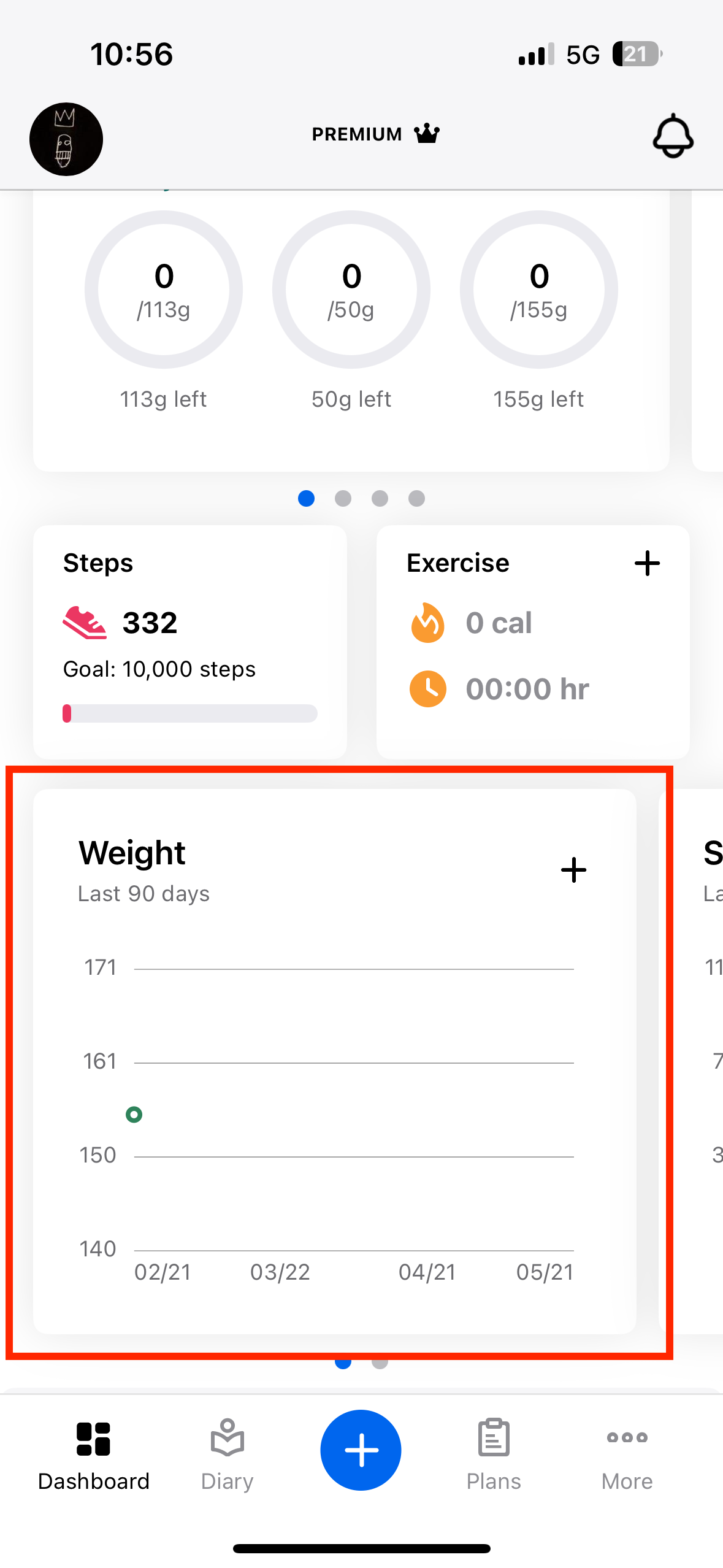
Visual evidence: v01 shows refreshed platform-specific navigation; v12 retains Dashboard/Diary/Plans.mfp-02mfp-28 The latter is historical despite its article’s recent update.mfp-02mfp-28
Research implication: article freshness and screenshot freshness are independent fields. A team reproducing these flows should capture the account’s platform, version, country, language and subscription before comparing navigation. The inventory intentionally does not flatten the native apps and website into one imagined interface.
2. Information architecture and visual hierarchy
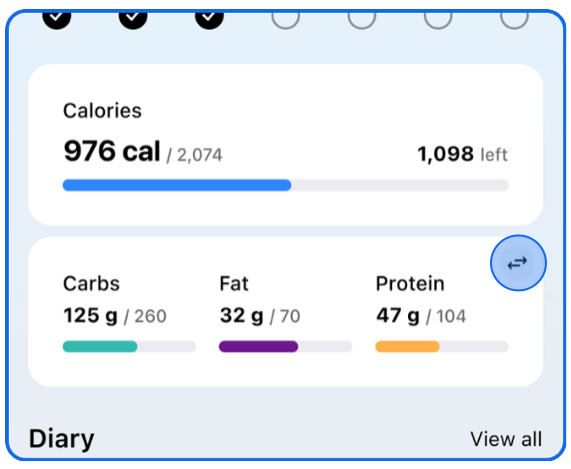
Today uses white cards, calorie and macro bars, meal-level Log and a global plus.mfp-02 These are observed affordances, not measured usability results.mfp-02
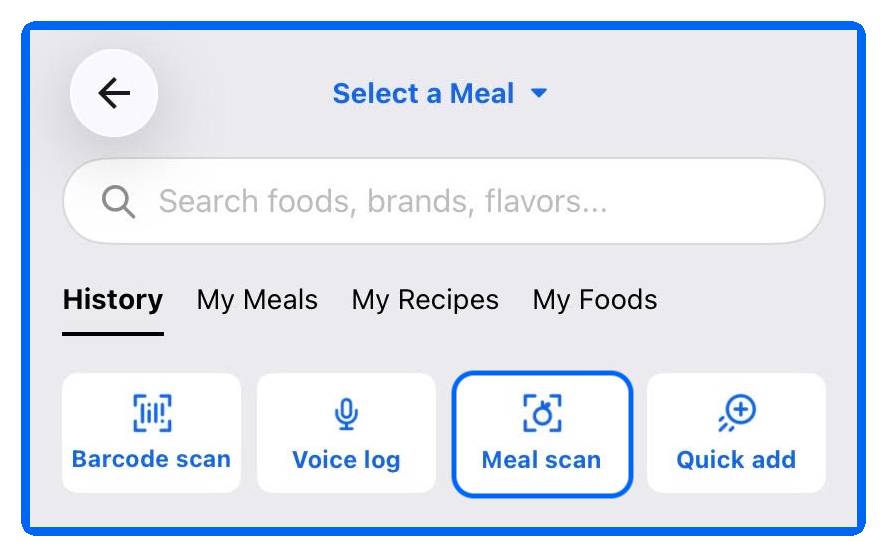
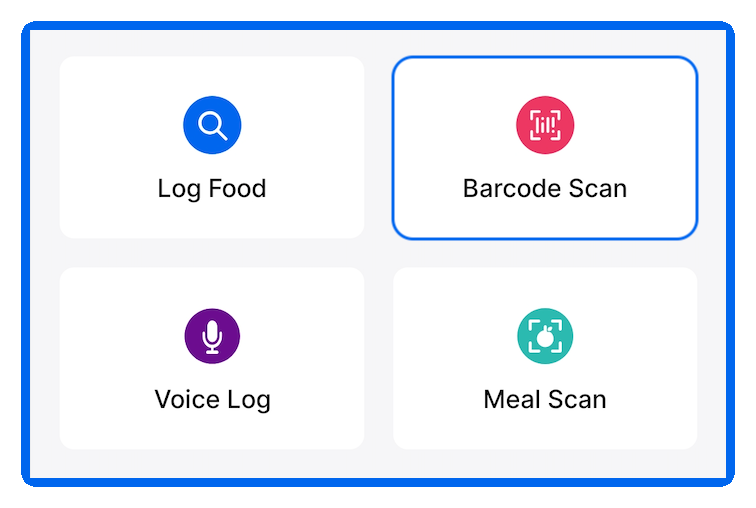
The food-entry crop v09 contains a meal selector, search field, personal-library tabs and four method tiles.mfp-10mfp-09 The Android crop v10 instead presents a two-by-two method grid.mfp-10mfp-09 A global logging shortcut therefore does not imply the same intermediate screen on both platforms.mfp-10mfp-09
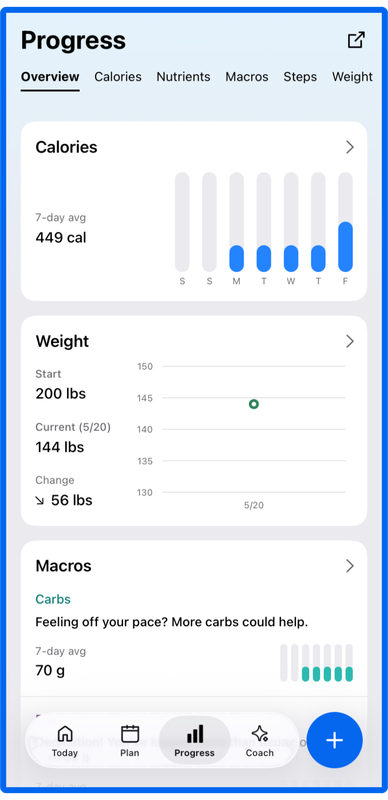
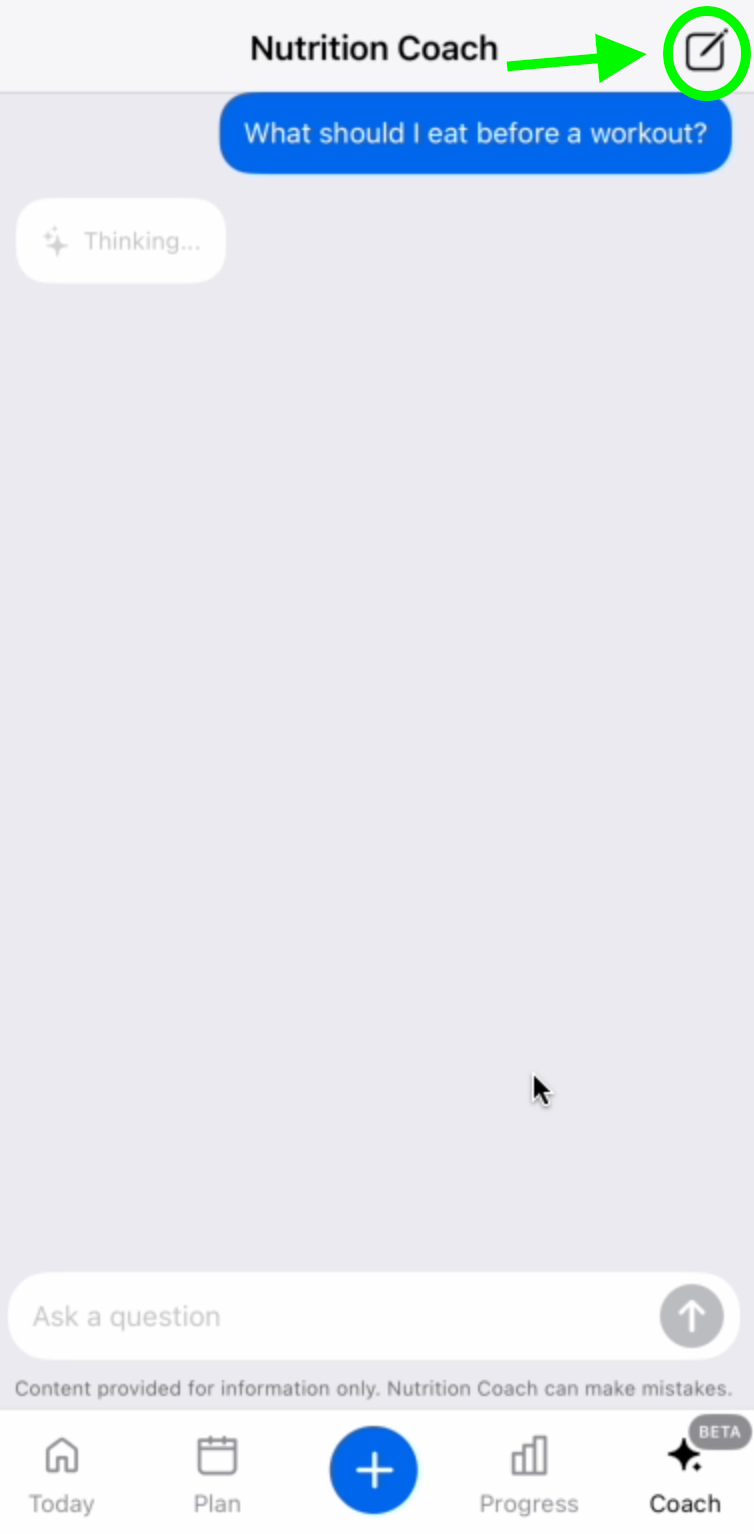
The Progress screen v05 uses a horizontal category strip and vertically stacked charts.mfp-03mfp-04 Coach screenshots show a chat composer and pending-response state; their centered-plus navigation differs from the floating-right-plus crops.mfp-03mfp-04 This suggests multiple documented visual variants, not proof that one specific version is installed for every user.mfp-03mfp-04
Design interpretation: the architecture separates execution, retrospective understanding and future decision support. That can make the daily task clearer, but it also creates handoffs. A useful evaluation must follow an insight until it becomes a corrected diary record or changed target, rather than stopping at a chart or recommendation.
3. Setup, goals and the meaning of “adaptive”
Profile calculations use body attributes, normal activity and desired weekly weight change.mfp-06 Goal weight is used for reporting remaining progress rather than directly determining the initial calorie calculation.mfp-06 Exercise is treated separately from baseline activity.mfp-06
Custom goals exist on mobile and web.mfp-07
The free/paid precision split is detailed in the canonical macro-target record (macro_targets).
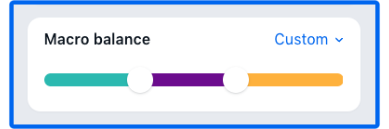
The updated iOS instructions include a Recommended Calories toggle and macro-balance presets; the small inspected v08 crop shows a custom three-color slider but not a complete goal-setting sequence.mfp-07
The daily budget can increase when cardio is logged.mfp-24 Premium adds controls over those additions.mfp-24 This is an exercise-adjusted allowance, not evidence of a continuously learned expenditure model.mfp-24
Help also describes recalculation offers after recorded weight loss and a manual route to refresh targets.mfp-40mfp-47 Separately, target changes apply from the current day onward; previous target history should remain unchanged and cannot simply be edited retrospectively.mfp-40mfp-47
Design interpretation: distinguish four concepts in any comparison: starting estimate, exercise adjustment, weight-based recalculation and intake/weight-derived expenditure learning. Only the first three are supported here. A target that moves is not, by itself, proof of the fourth. Historical target preservation is a valuable test because an apparent trend can change meaning if old reference values are rewritten.
4. Manual entry, portions and database trust
Search supports names and brands.mfp-08 A result’s plus can log immediately, while opening its name permits nutritional inspection, serving adjustment and meal selection before saving.mfp-08 This creates a real speed-versus-inspection choice.mfp-08
Portion options depend on the underlying food record.mfp-48 The documented fallbacks include changing the number of servings, choosing another match or creating a food.mfp-48 Saved meals can retain adjusted amounts.mfp-48 App-wide unit preferences should not be mistaken for universal conversion of every community record.mfp-48
A check mark means the vendor reviewed or added an entry and considers it complete and accurate; the vendor explicitly allows that checked records can still be wrong.mfp-20 Conversely, an unchecked item is not automatically inaccurate.mfp-20 This is a trust signal, not a nutritional guarantee.mfp-20
Reporting an incorrect food is a separate workflow: choose an issue category, supply corrected information and submit for review.mfp-39 Corrections are not immediate.mfp-39 Therefore “reported the record” and “repaired today’s meal” are different completion criteria.mfp-39
Personal custom foods can be created without Premium.mfp-45 Public sharing has separate consequences: shared foods cannot subsequently be removed from My Foods in the same way, and an unmatched barcode creation can supply a public association.mfp-45 The current custom-food article explicitly distinguishes personal and public records.mfp-45
Design interpretation: database scale is less useful than recovery quality for evaluating trust. Test a recognizable wrong serving, missing nutrient and duplicate brand record. Observe whether the user can reach a correct durable log without accidentally changing a shared object. No accuracy benchmark was conducted for this dossier.
5. Barcode, photo, voice and non-food chat
Barcode Scan is Premium-only in the current documentation, requires a rear camera and is mobile-only.mfp-09 Camera access is an operating-system permission.mfp-09 Search remains the fallback when the package cannot be read.mfp-09
A wrong barcode match exposes Find a better match at different locations on iOS and Android.mfp-38 Importantly, replacing the association affects future scans for other users.mfp-38 That is materially different from modifying a private diary portion.mfp-38
Meal Scan proposes matching foods rather than silently committing an inferred meal.mfp-10 Users select candidates, repair portions and add omissions through search.mfp-10 Current help restricts it by subscription, language and OS; iOS explicitly documents uploading an existing photo, while Android instructions describe capture.mfp-10
Voice Logging resolves spoken foods through the database and exposes a review step.mfp-11 It needs connectivity and excludes personal saved foods, meals and recipes, as well as water, exercise, weight and Quick Add.mfp-11 A spoken saved-meal name is consequently not equivalent to selecting that meal from the library.mfp-11
Quick Add is distinct again: free calorie totals, paid macro totals and no normal food lookup.mfp-12 Its documented lack of labels means notes may carry the missing context.mfp-12 “Quick Add” should not be conflated with the search-result plus action called Quick Log.mfp-12
Coach accepts conversational questions but cannot write food entries or change goals.mfp-04mfp-16 Standalone typed natural-language food logging and label OCR were not established by the retrieved evidence.mfp-04mfp-16 Neither is marked absent; recipe text import and Coach chat do not prove either feature.mfp-04mfp-16
Visual gap: available scanner and voice screenshots show entry controls, not camera framing, transcription, matched candidates or correction results. The annotated atlas does not pretend to supply an end-to-end recognition sequence. A product-design benchmark should measure all the way through reviewing and repairing the saved meal.
6. Correction and repeated-use paths
For deletion, current instructions route through View all/View diary.mfp-13 iOS swipes left to a trash control; Android long-presses; web uses a red removal control.mfp-13 The gesture difference belongs in platform-specific testing.mfp-13
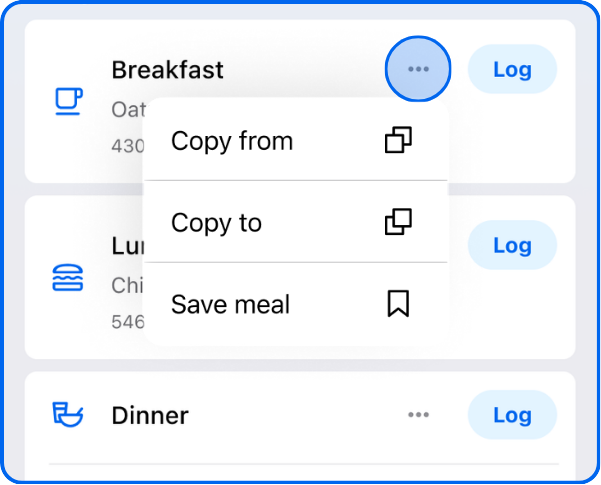
Copying documentation conflicts: refreshed Today says meal-level only; the older dedicated guide allows individual selections.mfp-02mfp-14 Installed behavior needs testing.mfp-02mfp-14
Premium multi-day logging adds a food to selected dates, up to a week.mfp-37 Personal foods and recipes are supported, but saved meals are not.mfp-37 Each resulting entry can be edited; there is no documented whole-operation undo.mfp-37 A mistaken batch selection can therefore require visiting each date.mfp-37
Recent and frequent history populate automatically, while personal lists provide intentional reuse.mfp-44 The free-feature guide also warns that language can change how these lists are grouped.mfp-44 This is another reason screenshots from one locale should not define all navigation.mfp-44
Design interpretation: repeated logging is more than a shortcut feature. It establishes what the user expects to remain linked. Copying a diary meal, saving a reusable group and logging several future dates are different persistence models. Test whether changing one result changes siblings, the template, neither or both. The retrieved text does not resolve every propagation rule.
7. Meals, recipes and planning are separate objects
A saved meal groups foods that are logged as individual entries.mfp-15 Its personally chosen meal name does not become the diary entry title.mfp-15 Mobile supports copying a saved meal to make a variation; web creation begins from foods already grouped in the diary.mfp-15
Recipes combine ingredients into a serving-based object.mfp-16
Manual entry and bulk ingredient matching are available, and yield affects the per-serving result.mfp-16
See the recipe records (recipes, flow recipe) for storage and reuse details.
URL import is English-dependent and includes ingredient review before saving.mfp-17 It is not reliable nutrition extraction merely because a page loads: the user still needs to check the matched records and serving yield.mfp-17
Editing a recipe has platform-specific controls for adding, removing and changing ingredients.mfp-18 The read documentation does not establish whether changing the recipe rewrites previously logged servings; that remains a high-priority test rather than an assumed behavior.mfp-18
See the planner record (meal_planning) for subscription, platform and regional eligibility.
It collects preferences, builds selected meals over a date range, supports swaps and grocery preparation, and requires an explicit logging action to transfer a planned meal into the diary.mfp-19
Grocery partners differ by platform and location.mfp-19
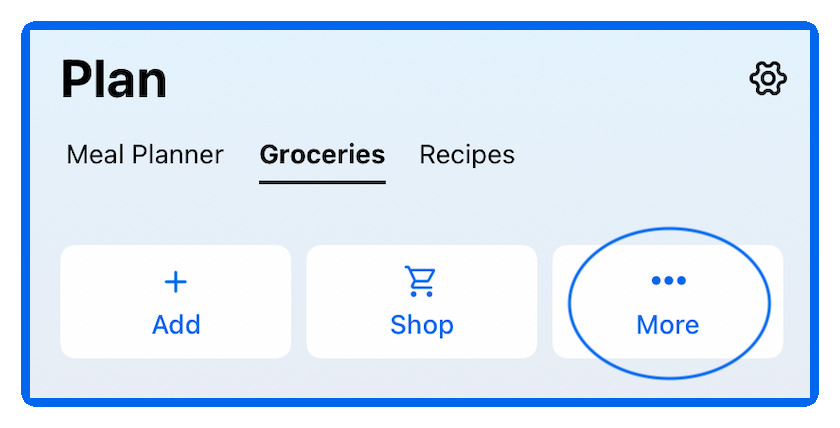
Design interpretation: a plan is an intention, not consumption. The safest comparison checks missed meals, leftovers, serving changes and household quantities after planning—not just initial plan generation. The inspected groceries crop confirms tabs and actions but not shopping-list contents, fulfillment success or allergen exclusion accuracy.
8. Review, body data and behavioral support
Progress Overview combines calories, weight and macros for eligible English-language mobile accounts.mfp-03 It is not a logging or target-editing surface.mfp-03 Premium adds actionable macro tips; visibility is constrained by region and application version.mfp-03
The Nutrition screen’s charts are free, while Premium Food Lists rank the foods contributing to a selected calorie or nutrient total.mfp-42 Empty dates have no real contributors; free accounts see sample lists rather than their own ranked list.mfp-42
Weekly Digest is a different review artifact, with free access to recent reports and paid historical access.mfp-41 Its documentation notes that custom meal names can affect interpretation and that email preferences and in-app notification behavior are not identical.mfp-41
Weight and other measurements support date-based history; help describes daily recording and timeframe selection.mfp-28 A chart of recorded weights is documented, but a specific smoothed trend algorithm is not.mfp-28
Progress photos attach to weigh-ins and are private unless shared.mfp-29 They are stored with the account rather than automatically copied to the camera roll.mfp-29 Mobile availability does not imply equivalent web viewing.mfp-29
Water has platform-specific save and unit controls.mfp-30mfp-31mfp-32 Reminders are conditional on not logging a selected meal and require OS notification permission.mfp-30mfp-31mfp-32 Widgets expose summary information; the interactive iOS water widget has its own OS requirement.mfp-30mfp-31mfp-32
Fasting is a separate Premium timer/history feature for phones.mfp-33 It does not change nutrition targets, stopping is manual, and turning the tracker off preserves logged fasts.mfp-33 This boundary matters when comparing “fasting support” with adaptive nutrition behavior.mfp-33
Design interpretation: inspect empty and partially logged weeks before judging chart clarity. A low weekly average may reflect incomplete records rather than actual intake. The sample values visible in official screenshots are illustrative; they are neither user outcomes nor recommendations.
9. Exercise, integrations and data boundaries
Standard strength entries do not automatically produce estimated calorie burn.mfp-46 The documentation distinguishes cardio logging and Workout Routines, which can aggregate strength movements differently.mfp-46 A nutrition diary should therefore not be treated as a full training-load system.mfp-46
Apple Health exports meal summaries from MyFitnessPal, imports exercise and sleep, and synchronizes weight in both directions.mfp-22 The guide excludes historical import and documents same-day constraints for exercise.mfp-22 A successful connection is not proof that every nutrient, timestamp or workout transfers.mfp-22
Health Connect has different boundaries: Android-only, meal-summary output, step input and specific exercise/water behavior.mfp-23 Custom meal headers can map to Other.mfp-23 Its troubleshooting warns that unsynchronized data can be lost during reinstall, making server verification essential before recovery actions.mfp-23
Current tracker help uses Google Health, formerly Fitbit, and distinguishes account connection from choosing the step source.mfp-43 New connections transfer future information.mfp-43 Web may be used to establish a connection that appears in the app.mfp-43
Offline help establishes that the food database is unavailable without connectivity and that diary changes reach the website after synchronization.mfp-21 It does not establish a comprehensive offline catalog, local-only ownership or offline AI inference.mfp-21
Design interpretation: synchronization should be tested as a directional contract, not a checklist tick. Use deliberately different food times, custom meal headings and duplicate activity sources. Then compare app, partner and exported records. No such interoperability experiment was performed here.
10. Portability, privacy and leaving safely
Premium export emails a ZIP containing nutrition, progress and exercise CSV files.mfp-25 Nutrition is described at meal level, so a claim of complete item-by-item migration would exceed the evidence.mfp-25 Date range is configurable; file delivery and schema were not exercised.mfp-25
The website is a genuine synchronized account surface for food/exercise diaries, reports and community, not merely a marketing companion.mfp-35mfp-44 Free printable reporting is documented separately from paid CSV export.mfp-35mfp-44
Diary sharing has explicit public, friends and key-controlled modes.mfp-34 Friend access and copying are intentional sharing workflows; they are not evidence that every diary or progress photo is public by default.mfp-34
Cancellation follows the original billing channel: Apple, Google Play or web.mfp-26mfp-05 It stops renewal rather than immediately removing the remaining paid period.mfp-26mfp-05 Downgrading does not erase recorded history.mfp-26mfp-05
Account deletion is another operation, available through mobile Help or web Settings and described as irreversible.mfp-27 The dossier neither clicked deletion nor inferred the exact confirmation dialogs.mfp-27 Export, cancellation and deletion should be evaluated as separate user jobs.mfp-27
11. Design assessment and hands-on acceptance checklist
The strongest design opportunity suggested by this evidence is not another generic capture button. It is clear correction ownership: show what was inferred, what will change, whether that change is private or shared, and whether old records will remain stable. This is an analytical conclusion, not a measured competitor defect.
Second, reduce confusion between object types. A food is a database record; a meal is a reusable group; a recipe has a yield; a plan is future intent; chat is advice. They should not be collapsed into one feature-parity row. The structured inventory preserves these distinctions and makes the uncertain transitions explicit.
A follow-up test should capture:
- US iOS/Android free and paid navigation, including rollout variants and empty states.
- A wrong barcode association, incorrect portion and report submission, recording the scope of each change.
- Noisy voice and mixed-dish photo logging through review, save, reopen and correction.
- A repeated meal across several dates, then a template edit and single-date correction.
- Recipe yield changes after logging, checking old diary values and exported records.
- Goal changes midweek, incomplete logging days and contributor drill-downs.
- Health permissions denied/re-enabled, cross-midnight exercise and duplicate-source handling.
- Offline edits followed by reconnection, with server verification before reinstall.
- CSV contents, cancellation ownership and deletion warnings using authorized test accounts only.
- Screen-reader labels, large text, chart color dependence and gesture discoverability.
These are proposed validation tasks, not completed tests. The dossier is complete as desk research; the native interaction and durability gaps remain explicitly open in app.json.
Sources
mfp-01 New App Experience: Today Tab and More — https://support.myfitnesspal.com/hc/en-us/articles/45276346234637-New-App-Experience-Today-Tab-and-More (retrieved 2026-10-07; updated 2026-09-15T10:08:53Z). mfp-02 Your Today tab — https://support.myfitnesspal.com/hc/en-us/articles/39985611667341-Your-Today-tab (retrieved 2026-10-07; updated 2026-10-02T00:11:57Z). mfp-03 Introducing Progress Overview: Your Progress, Personalized — https://support.myfitnesspal.com/hc/en-us/articles/45246617814669-Introducing-Progress-Overview-Your-Progress-Personalized (retrieved 2026-10-07; updated 2026-08-02T05:32:04Z). mfp-04 Introducing Nutrition Coach: Your Nutrition Assistant — https://support.myfitnesspal.com/hc/en-us/articles/45212266254221-Introducing-Nutrition-Coach-Your-Nutrition-Assistant (retrieved 2026-10-07; updated 2026-10-02T02:25:49Z). mfp-05 The difference between Free, Premium, and Premium + — https://support.myfitnesspal.com/hc/en-us/articles/34889191368077-The-difference-between-Free-Premium-and-Premium (retrieved 2026-10-07; updated 2026-10-05T18:16:14Z). mfp-06 How does MyFitnessPal calculate my initial goals? — https://support.myfitnesspal.com/hc/en-us/articles/360032625391-How-does-MyFitnessPal-calculate-my-initial-goals (retrieved 2026-10-07; updated 2026-09-29T22:33:58Z). mfp-07 Customize your nutritional goals — https://support.myfitnesspal.com/hc/en-us/articles/360032274432-Customize-your-nutritional-goals (retrieved 2026-10-07; updated 2026-08-27T00:27:21Z). mfp-08 How to log food to your diary — https://support.myfitnesspal.com/hc/en-us/articles/360032274592-How-to-log-food-to-your-diary (retrieved 2026-10-07; updated 2026-10-05T17:50:42Z). mfp-09 How to use the Barcode Scanner — https://support.myfitnesspal.com/hc/en-us/articles/360032624771-How-to-use-the-Barcode-Scanner (retrieved 2026-10-07; updated 2026-09-03T21:30:11Z). mfp-10 How to use the Meal Scanner — https://support.myfitnesspal.com/hc/en-us/articles/360045761612-How-to-use-the-Meal-Scanner (retrieved 2026-10-07; updated 2026-09-16T18:08:57Z). mfp-11 How to log food with your voice — https://support.myfitnesspal.com/hc/en-us/articles/30332897072269-How-to-log-food-with-your-voice (retrieved 2026-10-07; updated 2026-09-21T21:25:13Z). mfp-12 Getting started with Quick Add — https://support.myfitnesspal.com/hc/en-us/articles/360032621971-Getting-started-with-Quick-Add (retrieved 2026-10-07; updated 2026-09-25T17:37:43Z). mfp-13 How to delete an entry from your food diary — https://support.myfitnesspal.com/hc/en-us/articles/360032624311-How-to-delete-an-entry-from-your-food-diary (retrieved 2026-10-07; updated 2026-08-27T00:25:50Z). mfp-14 How do I copy a meal from one day to another? — https://support.myfitnesspal.com/hc/en-us/articles/360032622131-How-do-I-copy-a-meal-from-one-day-to-another (retrieved 2026-10-07; updated 2026-10-04T21:41:50Z). mfp-15 Create, find, and log your saved meals. — https://support.myfitnesspal.com/hc/en-us/articles/360032625331-Create-find-and-log-your-saved-meals (retrieved 2026-10-07; updated 2026-09-26T17:55:58Z). mfp-16 How to create and find your recipes — https://support.myfitnesspal.com/hc/en-us/articles/360032271452-How-to-create-and-find-your-recipes (retrieved 2026-10-07; updated 2026-09-29T20:26:49Z). mfp-17 How the Recipe Importer works in the iOS and Android apps — https://support.myfitnesspal.com/hc/en-us/articles/360032623231-How-the-Recipe-Importer-works-in-the-iOS-and-Android-apps (retrieved 2026-10-07; updated 2026-09-29T20:22:00Z). mfp-18 How to edit or delete a recipe — https://support.myfitnesspal.com/hc/en-us/articles/360032271372-How-to-edit-or-delete-a-recipe (retrieved 2026-10-07; updated 2026-10-05T18:38:11Z). mfp-19 How to use the Meal Planner — https://support.myfitnesspal.com/hc/en-us/articles/34603055097869-How-to-use-the-Meal-Planner (retrieved 2026-10-07; updated 2026-10-01T22:03:27Z). mfp-20 Check Marked items — https://support.myfitnesspal.com/hc/en-us/articles/360032273292-Check-Marked-items (retrieved 2026-10-07; updated 2026-09-21T11:47:32Z). mfp-21 Can I access MyFitnessPal when I don't have an internet connection? — https://support.myfitnesspal.com/hc/en-us/articles/360032622851-Can-I-access-MyFitnessPal-when-I-don-t-have-an-internet-connection (retrieved 2026-10-07; updated 2026-08-27T14:38:31Z). mfp-22 Apple Health connection and syncing — https://support.myfitnesspal.com/hc/en-us/articles/360032271092-Apple-Health-connection-and-syncing (retrieved 2026-10-07; updated 2026-09-24T14:13:08Z). mfp-23 Health Connect FAQ and Troubleshooting — https://support.myfitnesspal.com/hc/en-us/articles/10553948248973-Health-Connect-FAQ-and-Troubleshooting (retrieved 2026-10-07; updated 2026-07-10T20:10:22Z). mfp-24 Why your daily nutrient values and calorie goal change you log exercise — https://support.myfitnesspal.com/hc/en-us/articles/360032623851-Why-your-daily-nutrient-values-and-calorie-goal-change-you-log-exercise (retrieved 2026-10-07; updated 2026-10-01T20:32:34Z). mfp-25 Export your nutrition, progress, and exercise data — https://support.myfitnesspal.com/hc/en-us/articles/360032273352-Export-your-nutrition-progress-and-exercise-data (retrieved 2026-10-07; updated 2026-08-27T00:24:58Z). mfp-26 How to cancel your Premium subscription renewal — https://support.myfitnesspal.com/hc/en-us/articles/360032625371-How-to-cancel-your-Premium-subscription-renewal (retrieved 2026-10-07; updated 2026-10-05T14:21:25Z). mfp-27 How to delete your MyFitnessPal account — https://support.myfitnesspal.com/hc/en-us/articles/360032622451-How-to-delete-your-MyFitnessPal-account (retrieved 2026-10-07; updated 2026-09-30T16:58:59Z). mfp-28 How do I record my weight and other measurements? — https://support.myfitnesspal.com/hc/en-us/articles/360032624431-How-do-I-record-my-weight-and-other-measurements (retrieved 2026-10-07; updated 2026-09-29T22:20:21Z). mfp-29 Progress Photos FAQs — https://support.myfitnesspal.com/hc/en-us/articles/360032625271-Progress-Photos-FAQs (retrieved 2026-10-07; updated 2026-08-27T00:20:44Z). mfp-30 How to track how much water you drink — https://support.myfitnesspal.com/hc/en-us/articles/360032270732-How-to-track-how-much-water-you-drink (retrieved 2026-10-07; updated 2026-10-04T07:20:05Z). mfp-31 How to set up logging reminders — https://support.myfitnesspal.com/hc/en-us/articles/360032622391-How-to-set-up-logging-reminders (retrieved 2026-10-07; updated 2026-10-01T19:49:42Z). mfp-32 How to add a Widget to mobile Home Screen — https://support.myfitnesspal.com/hc/en-us/articles/6886354417165-How-to-add-a-Widget-to-mobile-Home-Screen (retrieved 2026-10-07; updated 2026-08-27T00:23:44Z). mfp-33 Track Intermittent Fasting with MyFitnessPal Premium — https://support.myfitnesspal.com/hc/en-us/articles/10983207647117-Track-Intermittent-Fasting-with-MyFitnessPal-Premium (retrieved 2026-10-07; updated 2026-08-17T18:22:15Z). mfp-34 How do I make my diary visible to other users? — https://support.myfitnesspal.com/hc/en-us/articles/360032273872-How-do-I-make-my-diary-visible-to-other-users (retrieved 2026-10-07; updated 2026-09-01T14:36:10Z). mfp-35 Can I access my MyFitnessPal account on the web? — https://support.myfitnesspal.com/hc/en-us/articles/360032623131-Can-I-access-my-MyFitnessPal-account-on-the-web (retrieved 2026-10-07; updated 2026-09-30T19:18:25Z). mfp-36 MyFitnessPal Premium features — https://support.myfitnesspal.com/hc/en-us/articles/360032625951-MyFitnessPal-Premium-features (retrieved 2026-10-07; updated 2026-09-18T20:04:09Z). mfp-37 Multi-Day Logging with MyFitnessPal Premium — https://support.myfitnesspal.com/hc/en-us/articles/33535658002061-Multi-Day-Logging-with-MyFitnessPal-Premium (retrieved 2026-10-07; updated 2026-09-16T21:25:33Z). mfp-38 The barcode scanner returned the wrong item — https://support.myfitnesspal.com/hc/en-us/articles/360032270912-The-barcode-scanner-returned-the-wrong-item (retrieved 2026-10-07; updated 2026-10-01T17:23:03Z). mfp-39 How to report incorrect food items in the database — https://support.myfitnesspal.com/hc/en-us/articles/360032274312-How-to-report-incorrect-food-items-in-the-database (retrieved 2026-10-07; updated 2026-10-01T19:11:41Z). mfp-40 How can I force my calorie goals to update? — https://support.myfitnesspal.com/hc/en-us/articles/360032271472-How-can-I-force-my-calorie-goals-to-update (retrieved 2026-10-07; updated 2026-09-12T04:46:23Z). mfp-41 Weekly Digest — https://support.myfitnesspal.com/hc/en-us/articles/360032622591-Weekly-Digest (retrieved 2026-10-07; updated 2026-08-27T00:20:44Z). mfp-42 Using Food Lists with MyFitnessPal Premium — https://support.myfitnesspal.com/hc/en-us/articles/360032272712-Using-Food-Lists-with-MyFitnessPal-Premium (retrieved 2026-10-07; updated 2026-08-27T00:20:13Z). mfp-43 Google Health (Fitbit) connection and step source — https://support.myfitnesspal.com/hc/en-us/articles/360039592171-Google-Health-Fitbit-connection-and-step-source (retrieved 2026-10-07; updated 2026-08-29T20:17:19Z). mfp-44 What is included in the free version? — https://support.myfitnesspal.com/hc/en-us/articles/15457546881805-What-is-included-in-the-free-version (retrieved 2026-10-07; updated 2026-09-06T19:49:09Z). mfp-45 How to log a food that's not in the database — https://support.myfitnesspal.com/hc/en-us/articles/360032271992-How-to-log-a-food-that-s-not-in-the-database (retrieved 2026-10-07; updated 2026-09-30T20:30:40Z). mfp-46 Why calories burned from strength training aren't calculated — https://support.myfitnesspal.com/hc/en-us/articles/360032625431-Why-calories-burned-from-strength-training-aren-t-calculated (retrieved 2026-10-07; updated 2026-07-20T19:02:38Z). mfp-47 Can I change my calorie goal without affecting my historical entries? — https://support.myfitnesspal.com/hc/en-us/articles/360032624071-Can-I-change-my-calorie-goal-without-affecting-my-historical-entries (retrieved 2026-10-07; updated 2026-09-29T13:27:16Z). mfp-48 What to do if the serving size you need isn't available — https://support.myfitnesspal.com/hc/en-us/articles/360032272852-What-to-do-if-the-serving-size-you-need-isn-t-available (retrieved 2026-10-07; updated 2026-09-24T20:53:51Z).