MacroFactor Nutrition — product and interaction dossier
Research snapshot: October 7, 2026. Scope: Nutrition, with an explicit boundary around the separate Workouts product. This is public-source desk research, not an app test. No account, trial, payment or native device session was used. The companion app.json contains the structured feature matrix, screen inventory, flows and verification questions. visuals.html presents researcher-annotated copies of real vendor help media; unchanged originals remain in assets/.
Evidence labels matter: documented means a first-party explanation was read; visual means supplied vendor imagery was inspected, not that the interaction was executed.[12]
Navigation paths below are documentation-derived.[12]
Screen appearance can be historical even when the help page remains live.[12]
Numeric citations map mechanically to the isolated ledger; source [12] corresponds to mf-12 in JSON.
1. The central product model
MacroFactor is best understood as a measurement-and-adjustment loop, not merely a calorie allowance with a food diary.[2] Logged nutrition and weight feed an expenditure estimate; a separate goal expresses intended weight change; the macro program translates that intention into eating targets.[2] The core expenditure article describes recommendations as adherence-neutral: the calculation uses what was actually consumed rather than assuming the prescribed budget was followed.[2]
That distinction changes the user's job.[19]
Honest data entry matters more than producing a visually perfect diary.[19]
For product design, the question is not only capture speed but whether users can represent uncertainty and repair incomplete data. See the canonical check-in flow mf-f-review and section 11 for its evidence.[19]
There is also a second, smaller transaction model: food can be staged on a Plate before it becomes a diary record.[4] This creates a review boundary for mixed entry methods.[4] The design implication is useful beyond nutrition: fast capture and deliberate commitment need not be the same event.[4] The unified logger documents this staging boundary, but its “fastest” claims were not benchmarked here.[4]
2. Commercial and platform scope
Nutrition is a paid product with a trial, not a freemium logger whose advanced functions are scattered across several nutrition tiers.[46] Official marketing explicitly describes a premium-only, advertising-free model; that is a vendor statement about the business model, not an independent privacy audit.[46]
The subscription help lists individual-app options at USD $11.99 monthly, $47.99 half-yearly or $71.99 yearly, and an annual two-app bundle at $89.99.[26] It warns that local exchange rates and taxes can change pricing.[26] Legacy Nutrition subscribers continuously active since before January 1, 2026 are described as receiving Workouts access through January 12, 2027.[26] These are published plan terms, not a verified US checkout quote.[26]
The September 30, 2026 annual report documents more responsive tablet layouts, landscape support, device display scaling and availability on Apple Silicon Macs.[48] Those are native-app platform extensions, not evidence of a browser web app.[48] Screen-reader behavior, keyboard navigation and minimum supported OS versions were not verified.[48]
3. Information architecture and starting state
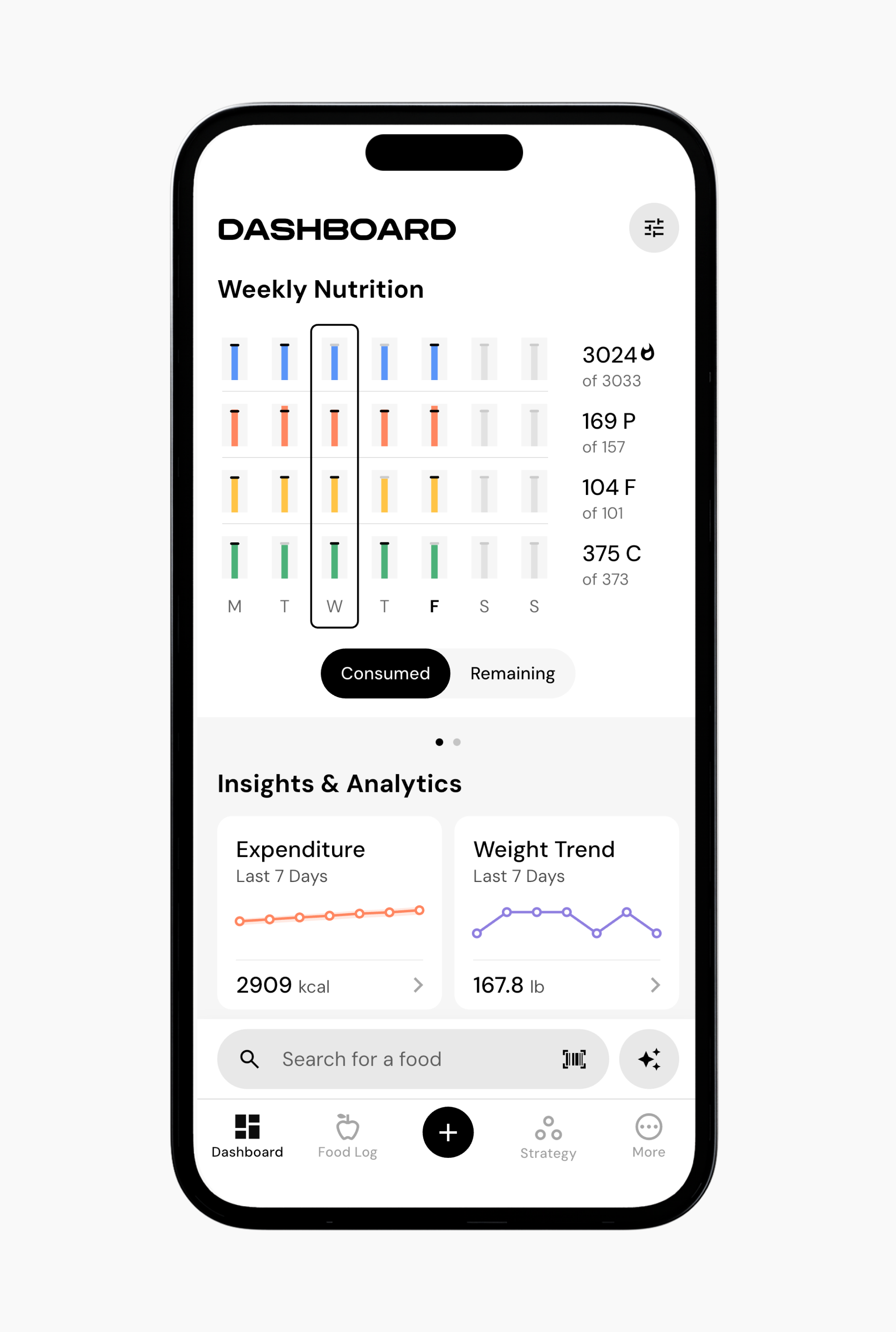
The dashboard combines daily/weekly nutrition framing with interpreted insight cards, habits and body measurements.[1]
Its calorie and macro bars can be viewed as consumed or remaining, while expenditure and weight trend occupy separate analytical destinations.[1]
In mf-v01, weekly bars precede insight cards; a food-search affordance remains near the bottom.[1]
This is an inspected vendor illustration rather than the result of opening today's app.[1]
The broader navigation separates recording from deciding: Food Log is the diary surface; Strategy houses goals, programs and check-ins; More provides feature settings and data management.[15][17] The most important conceptual distinction is between a goal and a program: changing desired weight/rate is not equivalent to simply changing protein distribution.[15][17] That separation offers flexibility but increases the explanatory burden for new users.[15][17]
4. Onboarding, calibration and changing direction
The welcome guide says initial energy needs are estimated from personal and lifestyle information; existing weight and nutrition history can accelerate calibration.[45] It describes an initial learning period rather than a fully individualized estimate on the first day.[45] The exact sequence of authentication, permissions, questions and paywall transitions remains uninspected; it would be misleading to present a complete onboarding screen recording from these documents.[45]
The new-goal flow is clearer: Strategy → New Goal → lose/maintain/gain → target weight and rate where applicable → review.[15] After saving, the user can create a new program for an immediate realignment, or allow the next coached/collaborative check-in to align the program.[15] This is a subtle returning-user edge case: a newly visible goal does not necessarily mean targets have already changed.[15]
5. Control levels rather than separate products
Coached, Collaborative and Manual are behavior modes.[16] Coached manages recommendations; Collaborative keeps an adaptive weekly calorie budget while handing daily distribution to the user; Manual leaves target setting to the user while retaining tracking and analytics.[16] The documentation explicitly notes that Collaborative lacks some of Coached's calorie-floor and fat-intake guardrails.[16] More control is therefore not simply a strictly better tier.[16]
Creating a new program does not reset the expenditure system.[17] Program preferences can change without creating a new weight goal, but changes to the total intended deficit/surplus belong to the goal/rate model.[17] Design implication: confirmation copy should explain which object changed and which remained intact, rather than saying only that a “new plan” was saved.[17]
6. Food lookup and packaged-food recovery
The shared logger combines search, barcode/label capture, quick entry and personal-library access.[4] Search prioritizes prior/custom foods before broad common/branded results; those categories serve different jobs and different levels of micronutrient completeness.[4] The useful design pattern is not the category count itself but the prioritization of familiar user-specific records over an undifferentiated database.[4]
Barcode failure is a recovery path, not necessarily an endpoint: help describes moving into label capture when lookup fails.[7][48] The older scanner guide emphasizes standardized US/Canadian labels and problems such as glare, curvature and small printing.[7][48] That older regional guidance must be read alongside the newer annual report, which describes wider label-format/language handling; neither establishes a measured recognition rate.[7][48]
Custom-food creation is correspondingly more than naming calories.[40] It can use manual entry or AI packaging photos, support per-serving/per-100g/per-100ml nutrition, associate a barcode and distinguish label conventions.[40] The implication is that the app has a substantive database-repair escape hatch.[40] The remaining research question is how clearly the current UI prevents users from mixing a package's serving values with its per-100g basis.[40]
7. AI, voice and the freshness problem
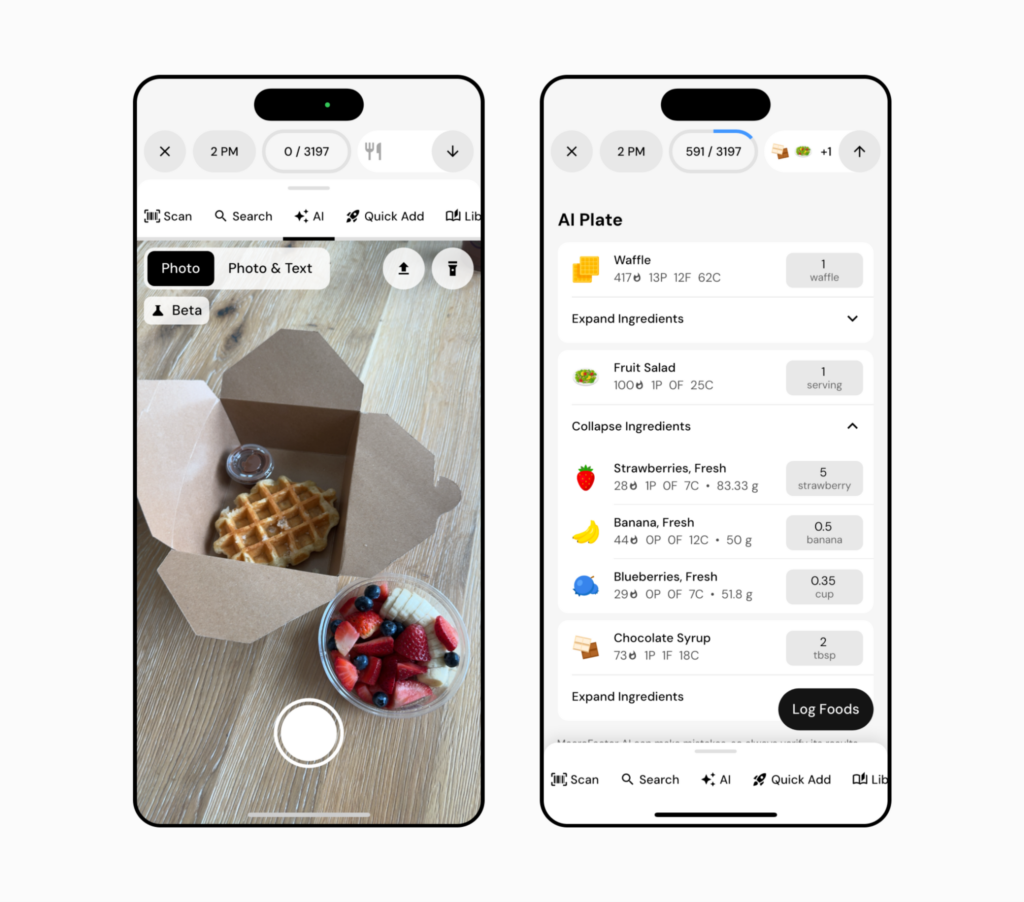
The inspected AI composite mf-v12 shows an older Photo/Photo & Text interface beside an AI Plate whose recipe ingredients can expand.[5][47]
That image supports the editable-output pattern, not today's precise tab labels.[5][47]
A May 25, 2026 update describes a newer Snap/Describe organization, multiple images and richer text instructions.[5][47]
Any competitor comparison that says MacroFactor only supports a single food photograph would be stale.[5][47]
Legacy Describe instructions explicitly use the keyboard microphone for dictation.[6][47] They also describe a common-food natural-language search with limitations around branded products and compound descriptions.[6][47] Because the newer AI feature changes the entry model, those legacy constraints should not be promoted into universal claims about current AI capability.[6][47] Voice logging is documented; a separate hands-free conversational assistant is not established.[6][47]
The strongest reusable pattern is reviewable inference: proposed foods and quantities remain editable before logging.[5] What is still unknown is how conspicuous uncertainty is, how failed analysis recovers, whether instructions survive a retry, and whether users can repair one incorrect ingredient without repeating the whole request.[5] None of those performance or durability properties was tested.[5]
8. Correcting the diary is not editing the library
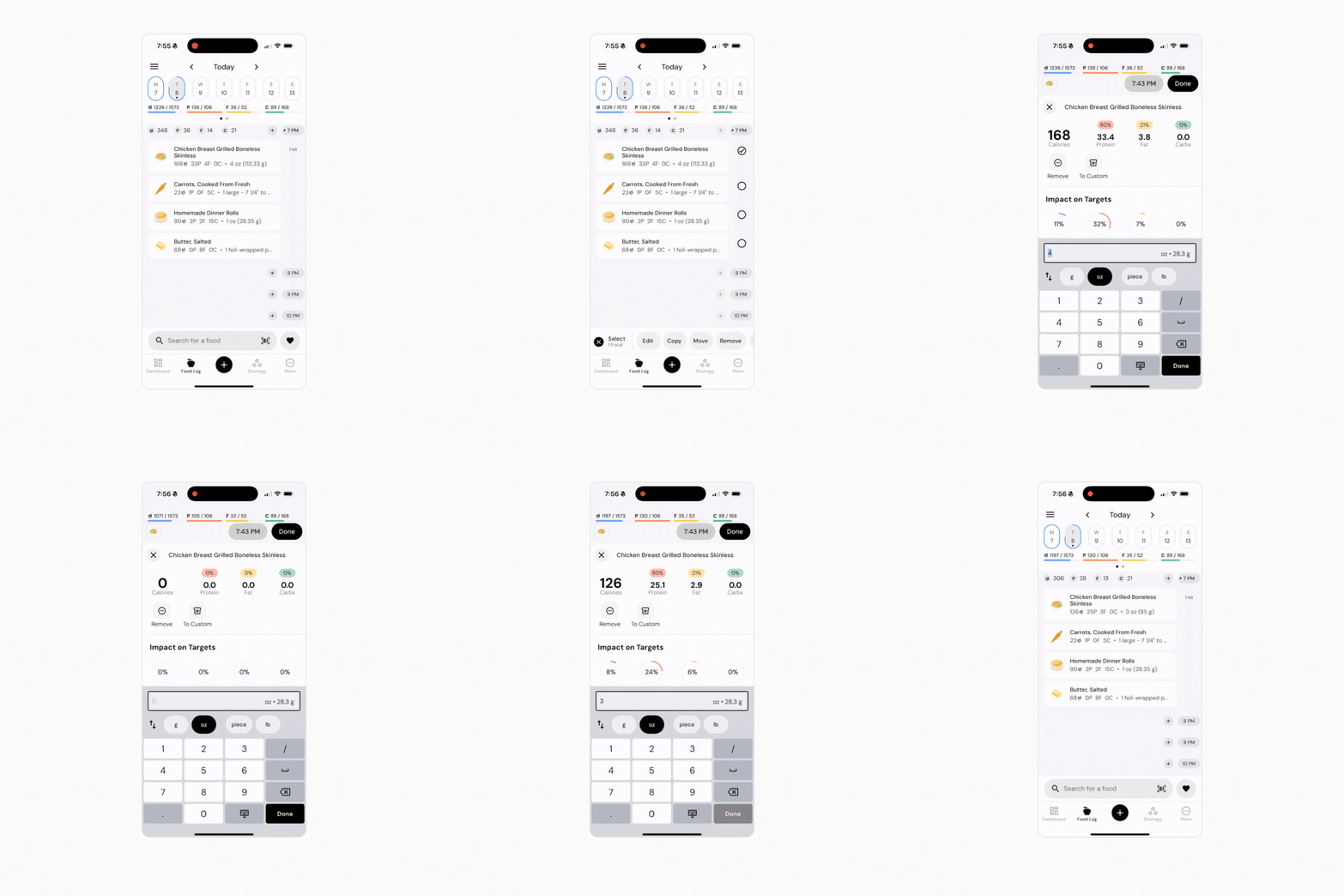
For a logged item, documented correction begins by selecting it in Food Log and choosing Edit.[8]
Users can also expose a direct edit affordance through timeline configuration.[8]
The inspected correction frame mf-v02 keeps nutrition/target information above a quantity field, serving-unit chips and numeric keypad.[8]
The retained GIF is the original tutorial media; the annotated still is just one frame.[8]
The larger data-integrity decision is historical snapshotting.[13] Editing a custom food or recipe changes future use, not previously logged copies.[13] To replace a historical entry with a corrected definition, the documented remedy is delete then relog.[13] This protects months of history from accidental retroactive mutation but makes systematic correction more work.[13] A competitor claiming “edits everywhere” would be making a different tradeoff, not automatically offering a superior model.[13]
Hands-on verification should separate these cases: changing today's amount, changing a saved recipe's ingredients, correcting yesterday's copy, and checking whether the same entry survives restart/sync. A successful edit animation proves none of that durability. This dossier records the documented persistence contract, not an observed one.
9. Reuse at several levels
Favorites are portion-aware shortcuts, not merely starred names.[37] Multiple saved quantities of the same food can coexist; favorites have rename/reorder/delete operations.[37] This supports routines without requiring a search plus serving adjustment on every visit.[37] It also means the favorite's identity and the underlying food definition are conceptually distinct, which deserves testing when a base food is edited.[37]
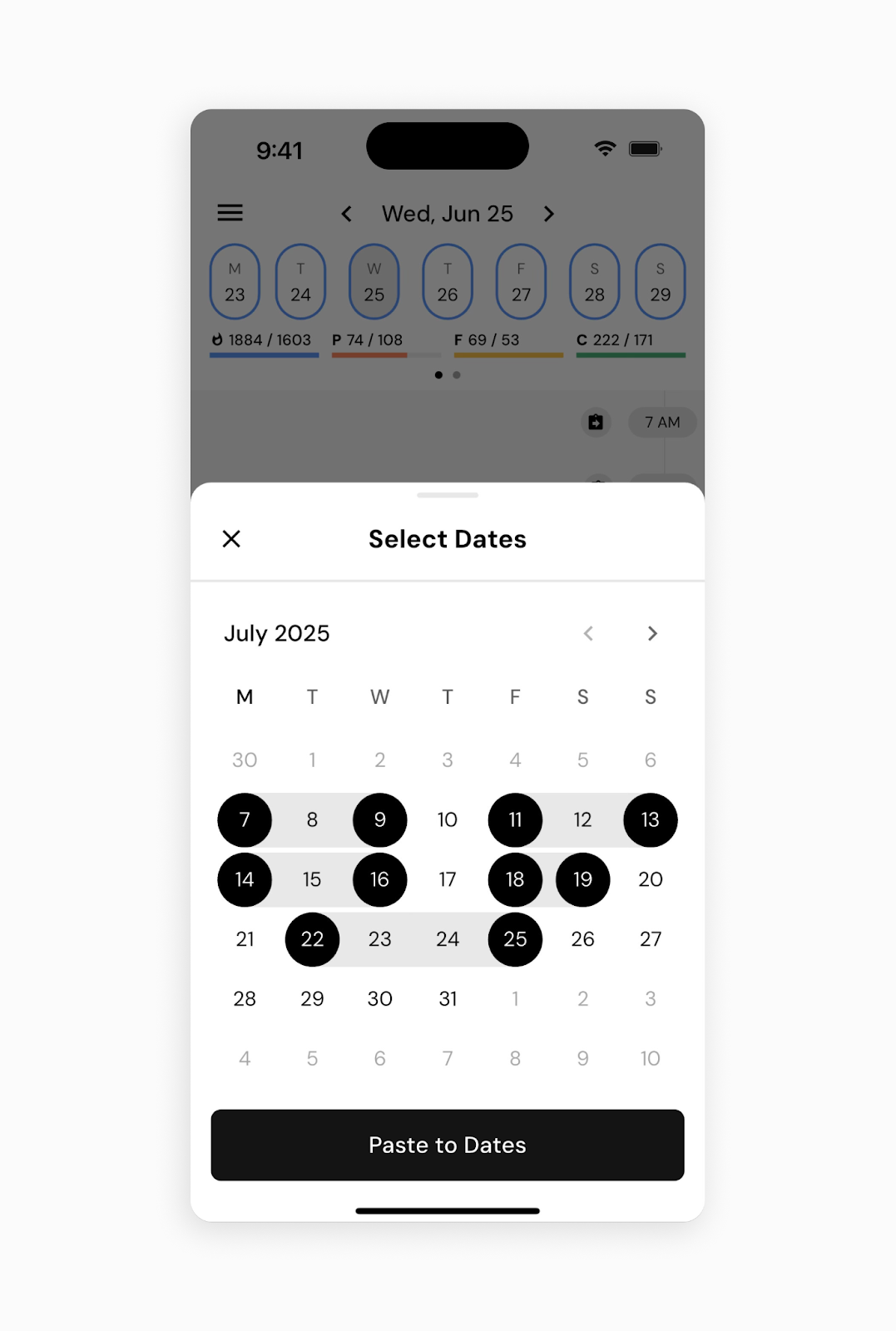
Copying works at food, hour and day scale, with temporal destinations such as today, tomorrow, explicit date/time and multiple selected dates.[9]
The inspected date sheet mf-v03 makes non-contiguous batch selection visible.[9]
This is meaningful prelogging support, but not evidence of automated meal generation, grocery planning or scheduled recurring entries.[9]
Batch operations should be evaluated together with their correction and undo story.[9]
10. Meals, recipes and cooked yield
Saved meals reuse the recipe abstraction: selected diary foods can become a named bundle.[14][41] A repeat breakfast can then be expanded or exploded into ingredients for a one-off variation without rewriting its base recipe.[14][41] Speed and context modes expose somewhat different routes to the same operation.[14][41] This is a useful interaction distinction to preserve rather than flattening every workflow into one universal tap sequence.[14][41]
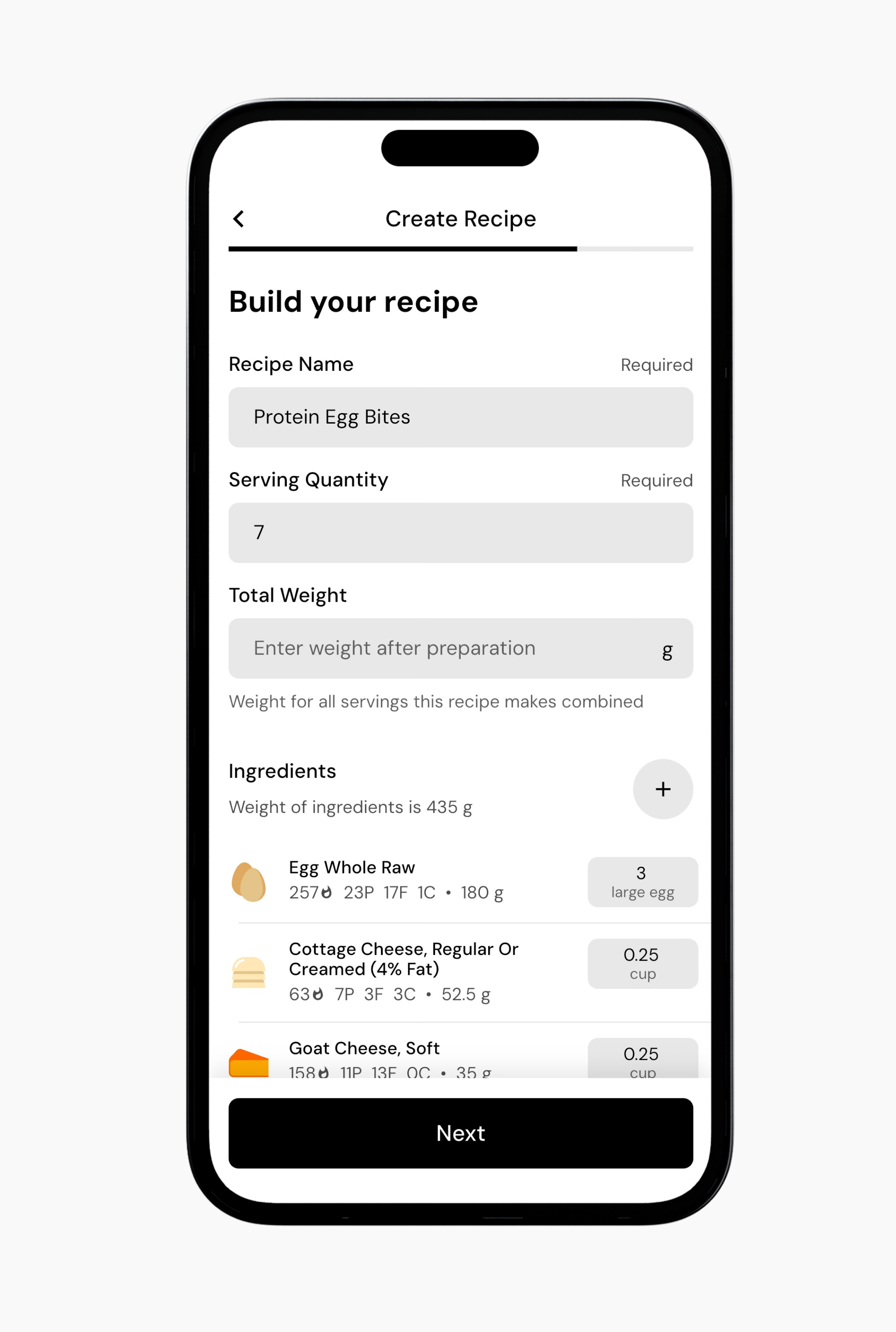
Recipe creation supports named servings, ingredients, preparation notes and total cooked weight.[10] The raw ingredient sum is not necessarily the cooked dish yield; documentation recommends weighing the finished dish when mass-based portions matter.[10] That is a domain-specific data-model requirement with visible UI consequences, not an optional flourish in a recipe editor.[10]
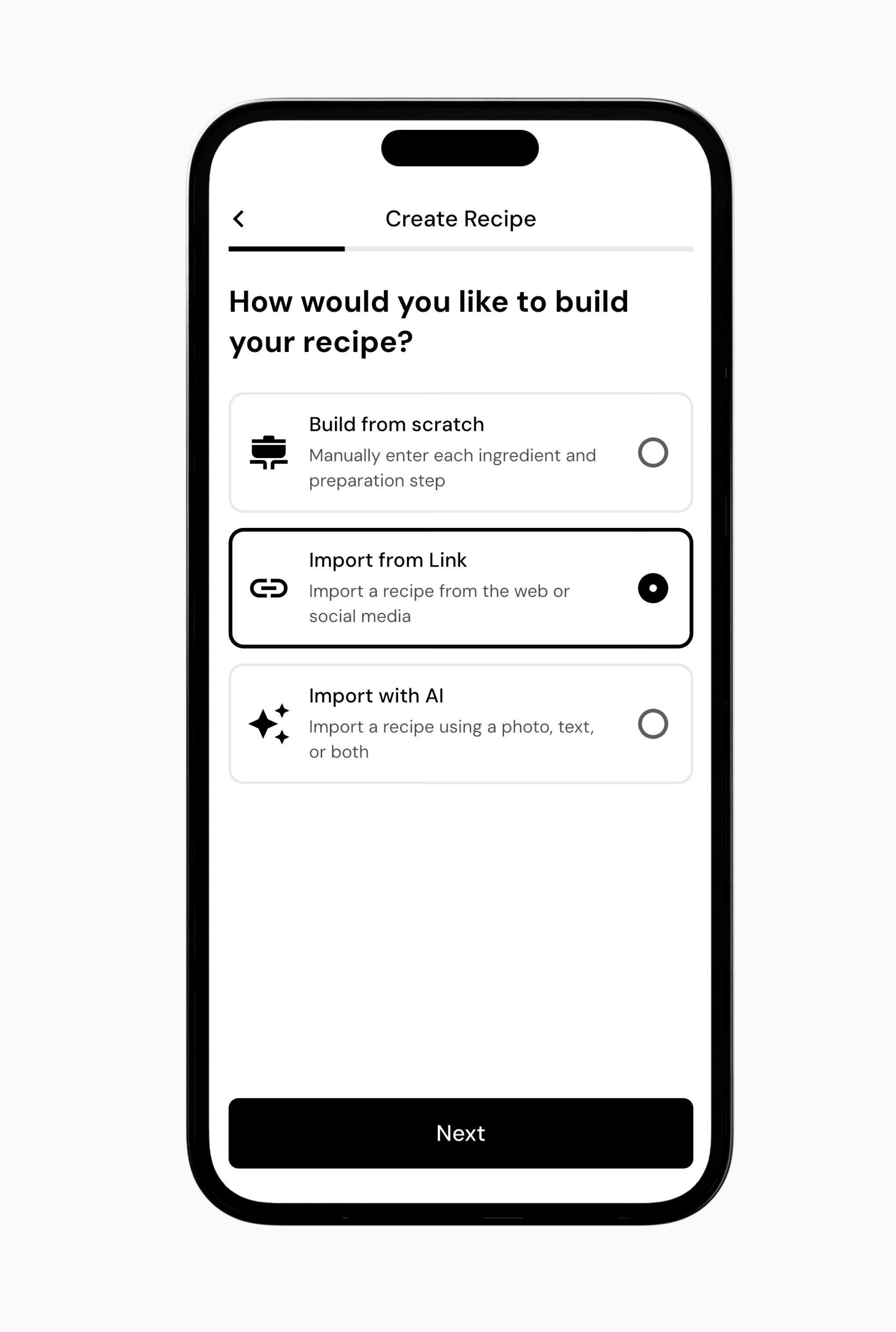
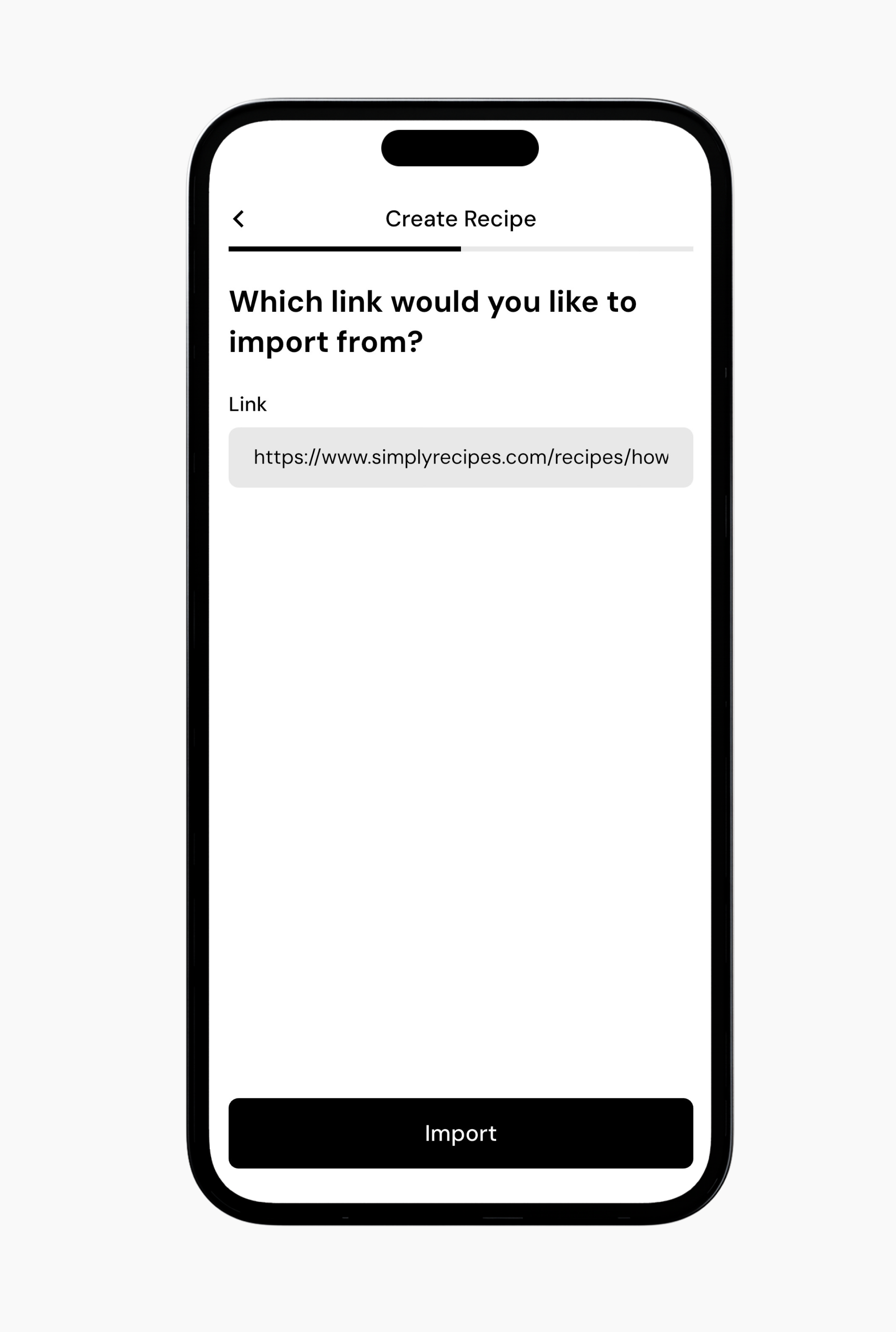
For the canonical import sequence, see mf-f-recipe and annotated visuals mf-v04–mf-v06.[11]
Keep save-scope comprehension in the evaluation; the canonical flow retains both outcomes.[11]
This sequence is real vendor help imagery, but it does not depict import latency, unsupported pages or an error state.[11]
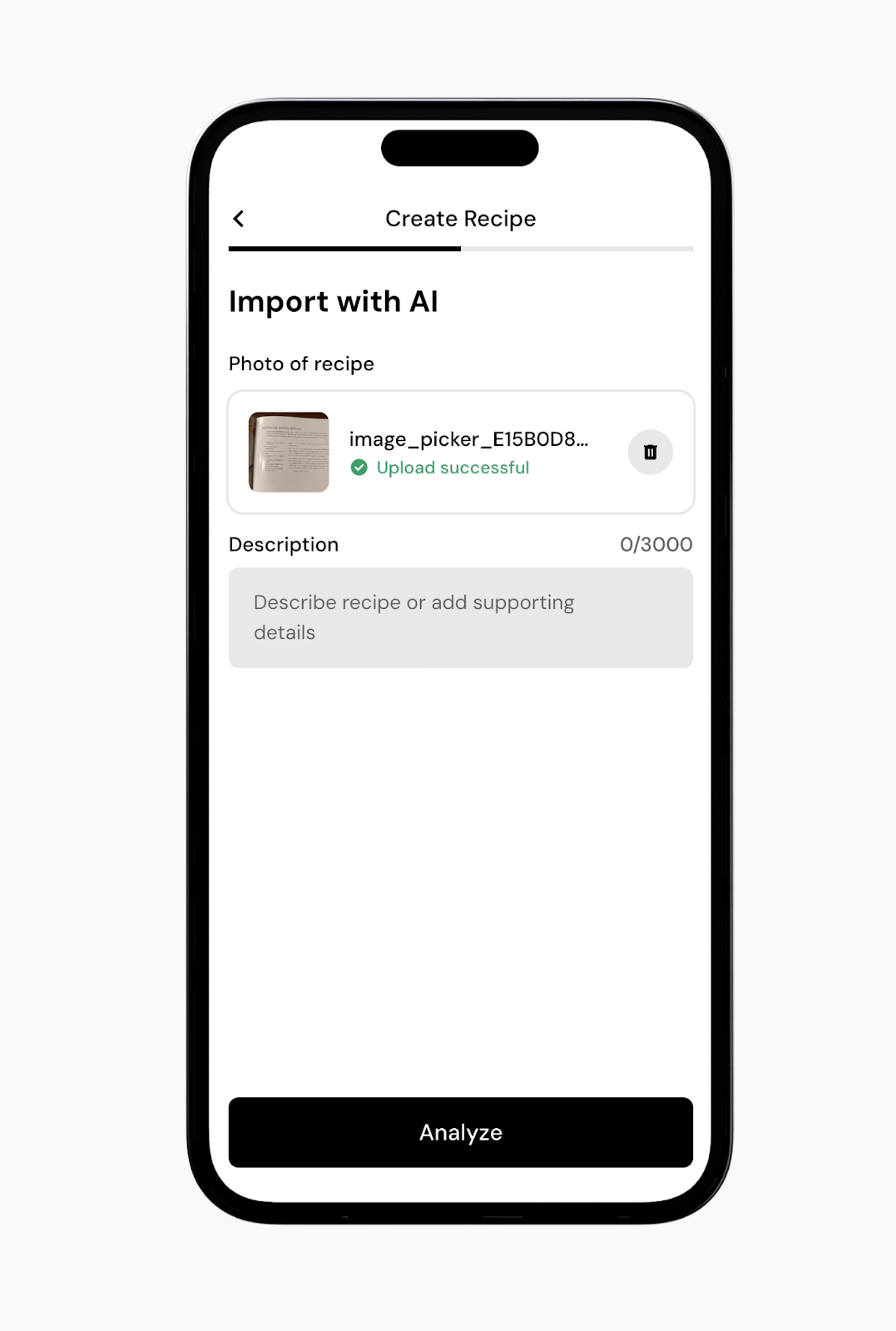
AI recipe import is distinct from meal-photo estimation.[12]
It accepts recipe images and/or text, analyzes them, then presents editable recipe details.[12]
The document even describes ingredient substitutions through text. mf-v07 shows image-plus-description input and an Analyze action.[12]
Those are useful capture affordances; actual extraction accuracy from handwriting, multi-page recipes or ambiguous measures remains unmeasured.[12]
11. Weekly review as data repair plus consent
Weekly check-ins are available to Coached and Collaborative programs.[18] Strategy signals availability; modules can be skipped, individually disabled or bypassed with Fast Check-In.[18] The product therefore offers a graduated path from explanation to a low-friction update, rather than imposing the same coaching ceremony every week.[18]
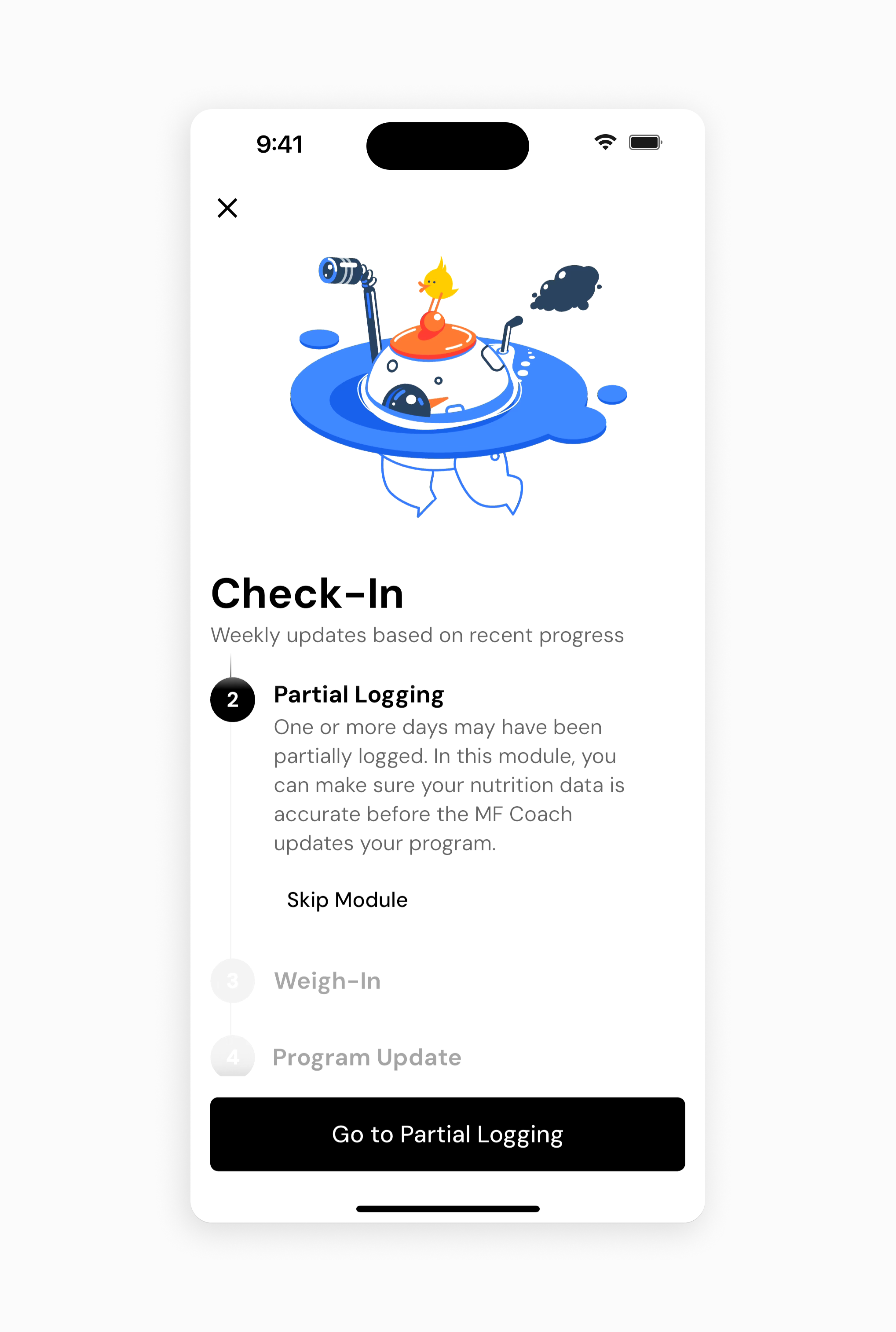
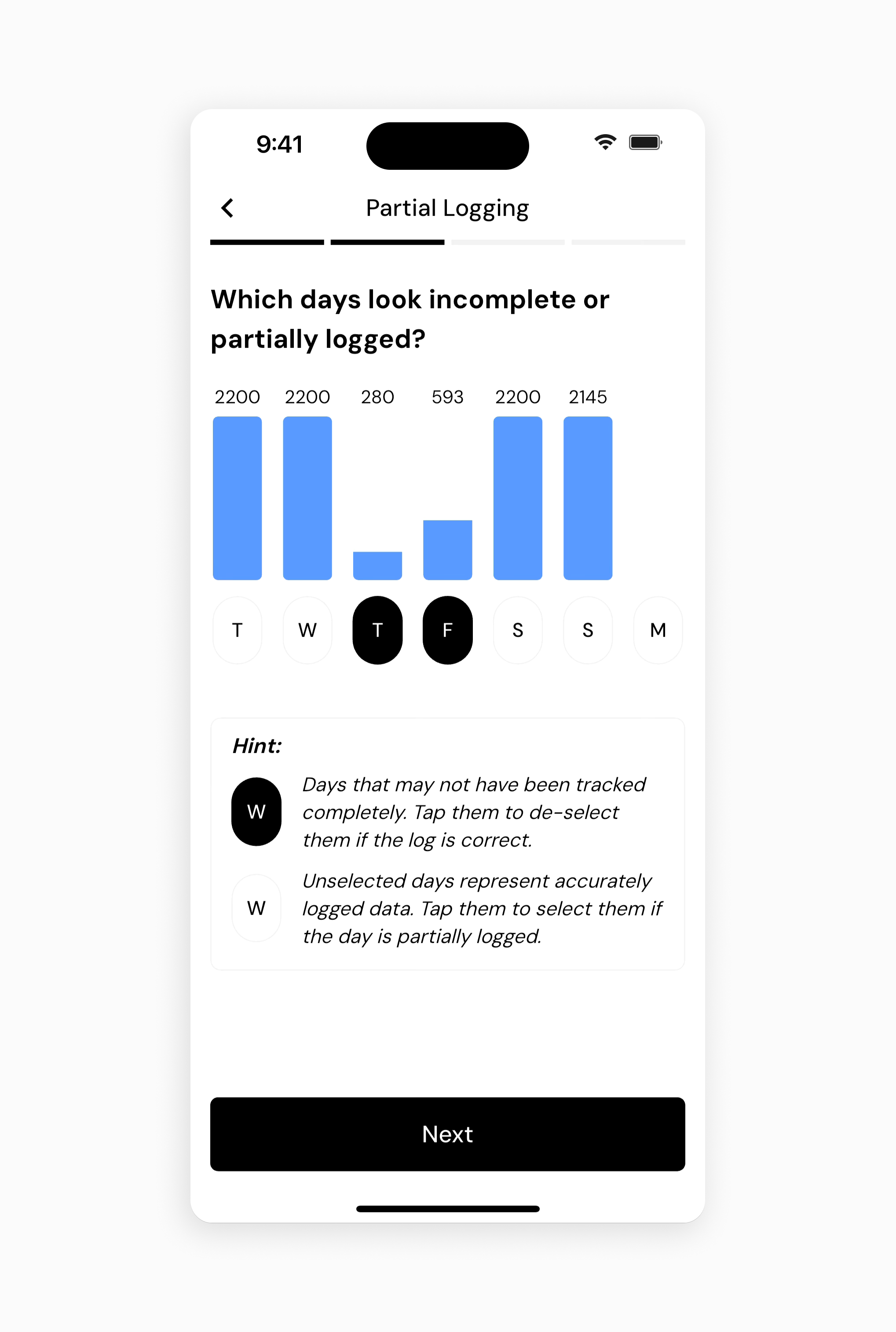
The partial-logging sequence mf-v08/mf-v09 shows an agenda followed by daily intake bars and selectable days.[19]
A low value is a candidate for incomplete data, not proof.[19]
The explanatory legend lets users reverse the suggested classification.[19]
Design implication: correctable anomaly detection is especially important where behavior can be unusual but legitimate.[19]
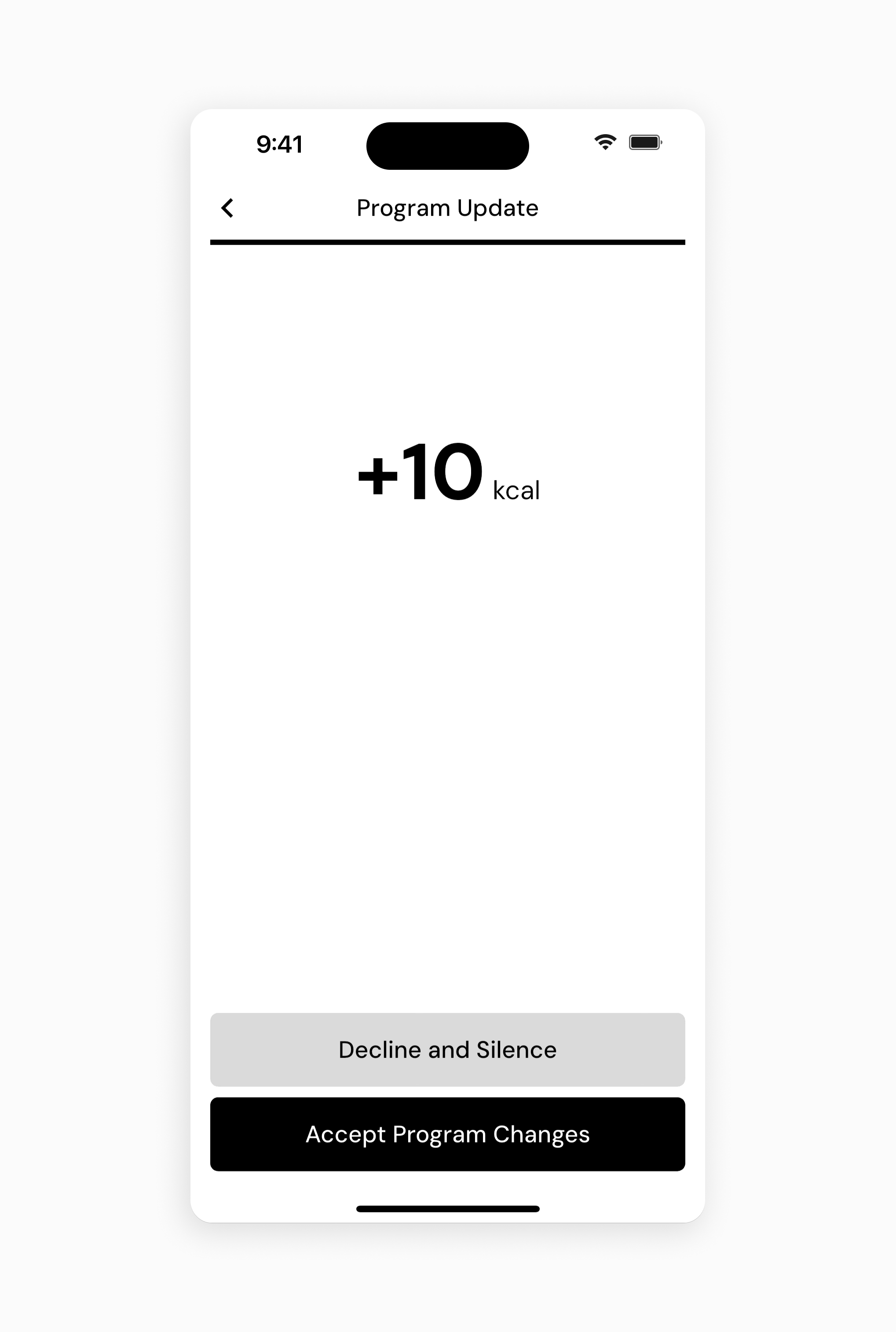
The update screen mf-v10 prominently presents a calorie delta and separate decline/accept actions.[20][18]
The module guide places Program Update last.[20][18]
Its text uses “weekend” where the broader check-in explanation describes weekly targets; this dossier does not infer a weekend-only adjustment rule from that wording.[20][18]
Actual recommendation changes, acceptance persistence and decline behavior should be checked in a live program.[20][18]
12. Weight, expenditure and activity boundaries
Weight Trend deliberately differs from raw Scale Weight.[3] Documentation describes smoothing and gap handling so a daily fluctuation does not become an equally abrupt coaching change.[3] The key product implication is to make both measurements inspectable: users need to understand why today's displayed trend is not the number on their scale.[3]
Older explanations that describe expenditure as driven only by nutrition and weight need a current qualification.[50] Expenditure Modifiers now include optional step-informed updates and predictive goal adjustment.[50] Steps can accelerate the system's response when trends provide useful evidence; this is not a direct calories-per-step credit.[50] The modifier help contains vendor accuracy claims that were not independently evaluated.[50]
This does not reverse the explicit decision not to use wearable calorie-burn estimates to calculate expenditure or modify targets.[28][50] The important boundary is the kind of signal: step trends can inform adaptation while watch-generated energy expenditure is excluded.[28][50] A simple “wearables supported: yes/no” cell would erase that difference.[28][50]
13. Nutrition depth and interpretation risk
Nutrient Explorer provides historical charts, goal ranges and food-contributor context.[31][33]
Users can pan/zoom and inspect past entries rather than seeing only today's nutrient bars.[31][33]
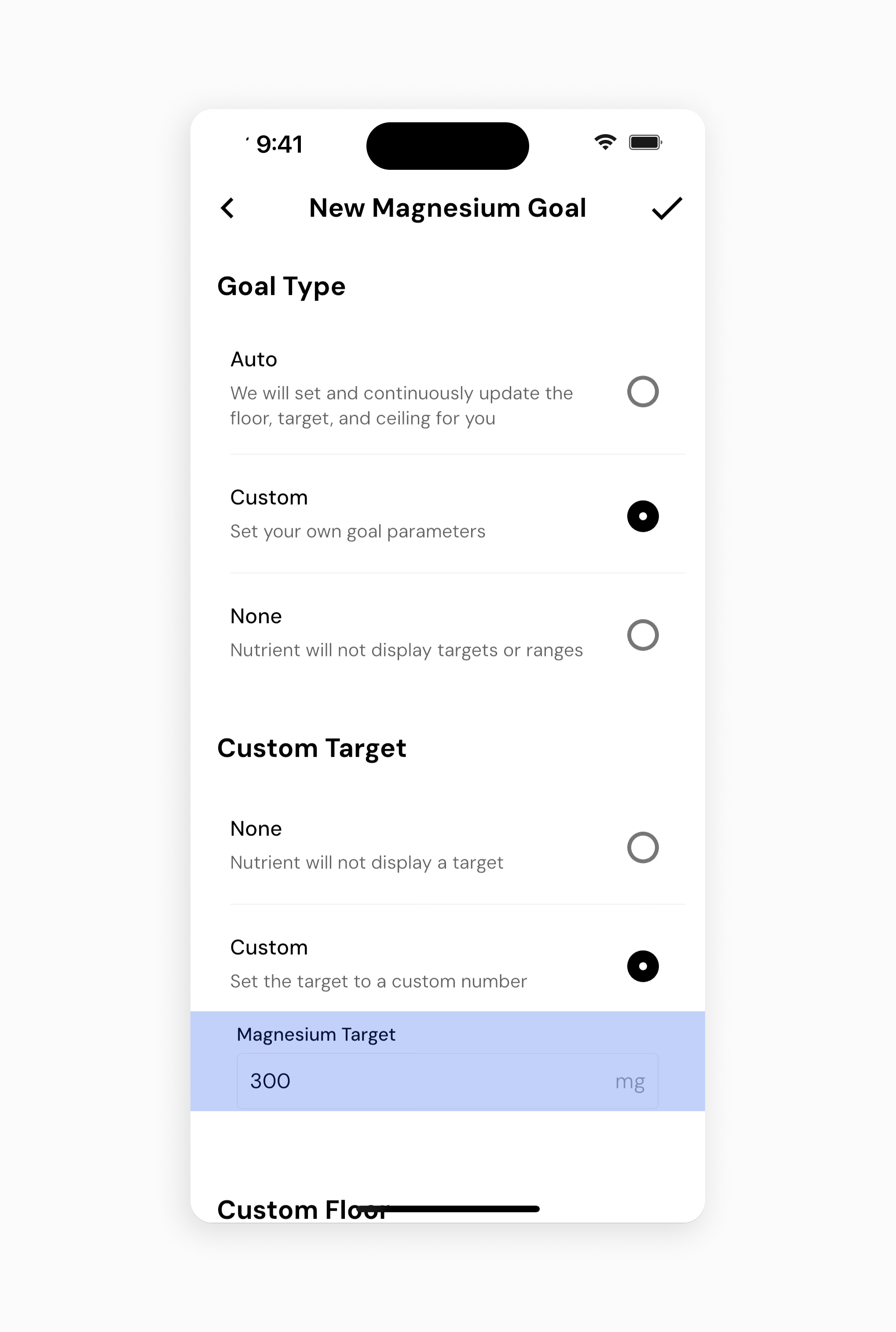
Custom goals are configured separately, with Auto, Custom and None plus optional floor, target and ceiling parameters. mf-v11 visually supports that explicit goal-mode model.[31][33]
Nutrient Completeness is a separate indicator of whether logged foods supplied information for a nutrient.[32] Low reported intake may therefore be missing data, not a dietary shortfall.[32] This is a valuable trust pattern: the product shows a limitation of its measurements near the measurements themselves, rather than asking a low bar to carry an unsupported health interpretation.[32]
Water is included as nutrient data, but the water article warns that many branded records omit it.[38][39] That does not establish a dedicated hydration counter, drink reminder or reliable total fluid intake.[38][39] Future-day diary entries similarly establish preplanning, not a full meal-planning service.[38][39]
14. Zero intake, missing days and body records
A fasting-day flag expresses a full day's zero intake distinctly from a blank diary.[34] The fasting help provides current-day and historical-day routes and describes check-in classification of unlogged days.[34] This is not evidence of a fasting timer.[34] The data-model lesson is broader: zero, missing and partially observed are different states and should not collapse into the same empty screen.[34]
Body measurements and progress photos are separate dated records.[29][30] Measurement entry lives under Body Metrics; photo entry supports front/side/back, capture or upload, and crop/rotation before saving.[29][30] Their exact controls were not visually inspected in this set.[29][30] They should be evaluated as sensitive records, not casually treated as interchangeable attachments to meals.[29][30]
15. Integrations and conflicting data
Current integration help specifies Apple Health for iOS and Health Connect for Android, and explicitly says direct Fitbit support was removed.[21] Manual entries take priority over Food Log, which takes priority over imported sources; the priorities are not editable.[21] An apparently missing import can therefore be expected precedence behavior rather than an integration failure.[21]
Connection is documented under More → Integrations, with OS prompts where needed and an initial historical pull of up to 30 days.[22] Smart scales can connect through the health hub.[22] The exact per-field read/write permissions, duplicate handling and revoke/reconnect effects require a device test; a generic “synced” label alone would not answer those questions.[22]
16. Offline, widgets and returning-user access
There is no full offline database mode.[27] Help nevertheless allows navigation, cached/history food lookup and adding/editing/deleting data during a temporary outage.[27] Those are materially different guarantees: cached logging is not full offline search, and neither is proof of reliable multi-device reconciliation after reconnecting.[27]
Widget behavior is platform-specific. iPhone documentation covers home and lock-screen widgets with an edit-widget route; Android documentation covers home-screen resizing and says customization requires removing/re-adding the widget.[35][36] This difference belongs in implementation-aware design research rather than being hidden behind a single widget checkmark.[35][36]
17. Export, cancellation and deletion
Data Export separates a quick progress spreadsheet from granular, selected datasets.[23] The quick path includes expenditure, trend/scale weight, energy/macros and primary targets with a chosen timeframe.[23] Food-row granularity, attachment export and file formats were not downloaded or validated.[23]
Subscriptions show plan/renewal information in-app, but cancellation and payment details are managed through the phone's app store.[25][24] Account deletion is available with both active and inactive subscriptions, through different navigation routes, and explicitly does not cancel billing.[25][24] This is a critical offboarding distinction: leaving safely is more than pressing a destructive account button.[25][24]
18. Separate adjacent product: MacroFactor Workouts
Workouts is not a Nutrition screen or an unlocked exercise tab.[49] Its official page describes a separate workout planner/logger, including progression, set/rep tracking and training analytics.[49] It also describes shared body metrics, scale weight, progress photos, selected habits and period data.[49] The products can share an account and a bundle without having one combined coaching algorithm.[49]
The Workouts page frames the lack of cross-product automatic program adjustment as its launch state.[49][48] This should not be generalized into a permanent product promise.[49][48] Equally, a newly shipped training feature, rest timer, exercise demo or workout lock-screen activity must not leak into Nutrition's feature matrix.[49][48] The annual report treats the two development tracks separately, which reinforces that boundary.[49][48]
Additional returning-user affordances include pinning selected nutrients through dashboard settings, manual or integrated step history, and links to external Facebook/Reddit communities.[42][43][44] These are distinct features: a configurable dashboard is not an alert system, and external communities are not evidence of an in-app social feed.[42][43][44]
19. Design assessment and next tests
The strongest patterns are editable staging, historical snapshots, portion-aware favorites, batch date reuse, recipe import followed by review, data-quality qualification and reviewable coaching. These observations are grounded in the flows above; the advantage attributed to them is researcher interpretation, not a measured usability outcome.
The corresponding risks are discoverability and state comprehension: Add versus Log, goal versus program, recipe versus logged copy, zero versus missing, and manual versus imported data. Rich configuration may help practiced users while making the default experience harder to explain. The right comparison study should measure correction through durable storage, not simply first-entry speed.
Priority hands-on checks are current AI parity; correction after restart and sync; bulk-paste undo; incomplete-day classification reversibility; exact export contents; expired-subscription access; and shared-account deletion scope. Additional checks should cover large text/screen-reader access, current watch capabilities and configurable nutrition reminders. app.json gives an actionable question checklist. Unknown transitions are kept explicit rather than supplied with invented screenshots or timings.
Sources
[1] https://help.macrofactorapp.com/en/articles/22-get-to-know-your-dashboard — Get to Know Your Dashboard | MacroFactor [2] https://help.macrofactorapp.com/en/articles/20-expenditure — Expenditure | MacroFactor [3] https://help.macrofactorapp.com/en/articles/21-weight-trend — Weight Trend | MacroFactor [4] https://help.macrofactorapp.com/en/articles/215-how-to-log-food-in-macrofactor — How to Log Food in MacroFactor | MacroFactor [5] https://help.macrofactorapp.com/en/articles/258-ai-food-logging — AI Food Logging | MacroFactor [6] https://help.macrofactorapp.com/en/articles/216-log-foods-with-describe — Log Foods with Describe | MacroFactor [7] https://help.macrofactorapp.com/en/articles/213-label-scanner — Label Scanner | MacroFactor [8] https://help.macrofactorapp.com/en/articles/98-edit-quantities-of-foods-you-ve-already-logged-and-view-nutritional-values-for-foods-on-your-timeline — Edit Quantities of Foods You've Already Logged, and View Nutritional Values for Foods on Your Timeline | MacroFactor [9] https://help.macrofactorapp.com/en/articles/95-copy-and-paste — Copy and Paste | MacroFactor [10] https://help.macrofactorapp.com/en/articles/6-create-and-add-a-custom-recipe — Create and Add a Custom Recipe | MacroFactor [11] https://help.macrofactorapp.com/en/articles/259-import-recipes-from-link — Import Recipes from Link | MacroFactor [12] https://help.macrofactorapp.com/en/articles/398-import-recipes-with-ai — Import Recipes with AI | MacroFactor [13] https://help.macrofactorapp.com/en/articles/240-does-editing-a-recipe-or-custom-food-item-affect-my-food-log-history — Does Editing a Recipe or Custom Food Item Affect My Food Log History? | MacroFactor [14] https://help.macrofactorapp.com/en/articles/239-save-a-meal-for-later-use — Save a Meal For Later Use | MacroFactor [15] https://help.macrofactorapp.com/en/articles/90-set-a-new-goal — Set a New Goal | MacroFactor [16] https://help.macrofactorapp.com/en/articles/91-program-styles — Program Styles | MacroFactor [17] https://help.macrofactorapp.com/en/articles/242-create-a-new-macro-program — Create a New Macro Program | MacroFactor [18] https://help.macrofactorapp.com/en/articles/247-introduction-to-check-ins-and-coaching-modules — Introduction to Check-Ins and Coaching Modules | MacroFactor [19] https://help.macrofactorapp.com/en/articles/248-coaching-module-partial-logging — Coaching Module: Partial Logging | MacroFactor [20] https://help.macrofactorapp.com/en/articles/252-coaching-module-program-update — Coaching Module: Program Update | MacroFactor [21] https://help.macrofactorapp.com/en/articles/102-integrations — Integrations | MacroFactor [22] https://help.macrofactorapp.com/en/articles/65-connect-health-connect-or-apple-health — Connect Health Connect or Apple Health | MacroFactor [23] https://help.macrofactorapp.com/en/articles/68-export-your-data — Export Your Data | MacroFactor [24] https://help.macrofactorapp.com/en/articles/66-how-to-permanently-delete-your-account-and-data — How to Permanently Delete Your Account and Data | MacroFactor [25] https://help.macrofactorapp.com/en/articles/71-manage-your-subscription — Manage Your Subscription | MacroFactor [26] https://help.macrofactorapp.com/en/articles/393-how-macrofactor-subscriptions-and-bundles-work — How MacroFactor Subscriptions and Bundles Work | MacroFactor [27] https://help.macrofactorapp.com/en/articles/28-does-macrofactor-have-an-offline-mode — Does MacroFactor have an Offline Mode? | MacroFactor [28] https://help.macrofactorapp.com/en/articles/33-does-macrofactor-use-energy-expenditure-data-from-my-wearable-activity-tracker — Does MacroFactor use Energy Expenditure Data from my Wearable Activity Tracker? | MacroFactor [29] https://help.macrofactorapp.com/en/articles/120-how-to-log-body-measurements — How to Log Body Measurements | MacroFactor [30] https://help.macrofactorapp.com/en/articles/121-how-to-add-progress-photos — How to Add Progress Photos | MacroFactor [31] https://help.macrofactorapp.com/en/articles/131-how-to-view-micronutrient-intake-over-time — How to View Micronutrient Intake Over Time | MacroFactor [32] https://help.macrofactorapp.com/en/articles/135-what-is-the-nutrient-completeness-score — What is the Nutrient Completeness Score? | MacroFactor [33] https://help.macrofactorapp.com/en/articles/136-set-custom-nutrient-goals — Set Custom Nutrient Goals | MacroFactor [34] https://help.macrofactorapp.com/en/articles/16-track-a-fasting-day — Track a Fasting Day | MacroFactor [35] https://help.macrofactorapp.com/en/articles/211-iphone-widgets — iPhone Widgets | MacroFactor [36] https://help.macrofactorapp.com/en/articles/212-android-widgets — Android Widgets | MacroFactor [37] https://help.macrofactorapp.com/en/articles/257-favorite-foods — Favorite Foods | MacroFactor [38] https://help.macrofactorapp.com/en/articles/195-water — Water | MacroFactor [39] https://help.macrofactorapp.com/en/articles/51-log-food-to-future-days — Log Food to Future Days | MacroFactor [40] https://help.macrofactorapp.com/en/articles/5-create-and-add-a-custom-food — Create and Add a Custom Food | MacroFactor [41] https://help.macrofactorapp.com/en/articles/3-explode-recipes — Explode Recipes | MacroFactor [42] https://help.macrofactorapp.com/en/articles/129-pin-nutrients-to-the-dashboard — Pin Nutrients to the Dashboard | MacroFactor [43] https://help.macrofactorapp.com/en/articles/255-how-to-import-your-step-count — How to Import your Step Count | MacroFactor [44] https://help.macrofactorapp.com/en/articles/107-join-our-communities — Join our Communities | MacroFactor [45] https://macrofactor.com/welcome — Welcome To MacroFactor - MacroFactor [46] https://macrofactor.com/macrofactor — MacroFactor app – Smart Macro Tracker & Diet Coach [47] https://macrofactor.com/mm-may-2026 — Food Logging Upgrade, Live Activity, and How to Use Warm-Ups in Your Lifting Programs - MacroFactor [48] https://macrofactor.com/annual-report-2026 — The 2026 MacroFactor Annual Report - MacroFactor [49] https://macrofactor.com/workouts — MacroFactor Workouts - MacroFactor [50] https://help.macrofactorapp.com/en/articles/274-expenditure-modifiers — Expenditure Modifiers | MacroFactor