Lose It! — product and interaction dossier
Research date: October 7, 2026. Product identity is Lose It!, not Luze. This is public-source desk research, not native-app testing. Sources use numbered citations corresponding to sources/ledger.json; li-01 in app.json is source [1].
1. Executive interpretation and evidence boundaries
Lose It! organizes weight management around a personalized calorie budget, a dated food-and-exercise log, and progress toward a weight goal. Its store description positions voice/photo entry and broader tracking as paid extensions of the basic calorie/weight workflow.[51] This is best understood as a daily accounting product with flexible capture and review—not evidence of an algorithm that learns individual energy expenditure from observed intake and weight.
The research includes 35 screen destinations or dialogs, 21 workflow records and all 40 requested feature categories. These are inventories of supported evidence, not claims that every destination has been opened. Nine useful official iOS store composites were downloaded and visually inspected; a tenth downloaded brand-only image was excluded from the useful screenshot set. visuals.html provides the numbered annotation gallery, while originals remain intact. No account was created, no payment was made, and no private data was accessed.
Current help articles were fetched through the official Zendesk JSON API, retaining full bodies and update metadata. This avoided dependence on search snippets. A guessed tutorial route returned HTTP 403 and was not used as evidence. Initial onboarding remains less completely evidenced than returning-user and correction workflows. Store assets show iPhone framing, but their production dates and app builds are unknown; listing metadata must not be mistaken for the screenshot version.
2. Mental model and information architecture
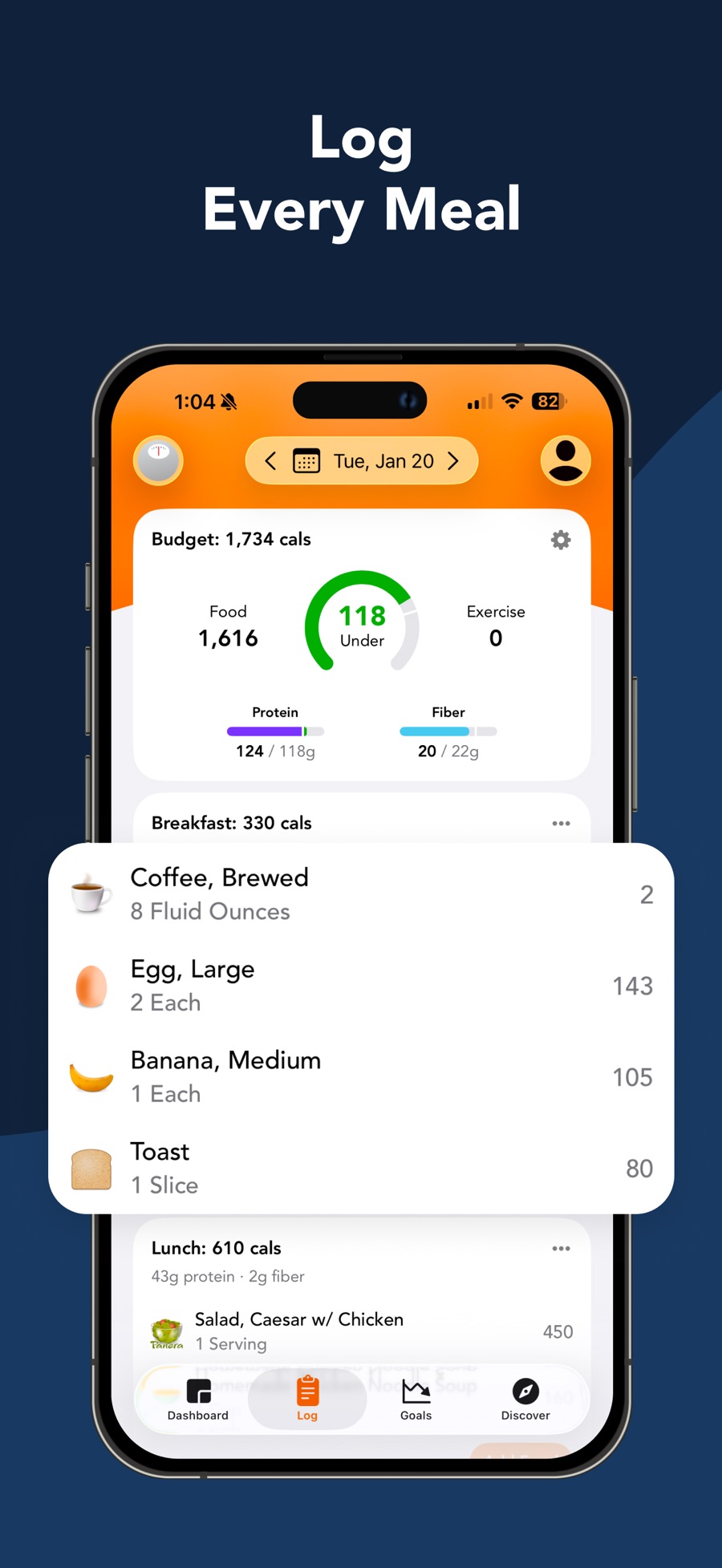
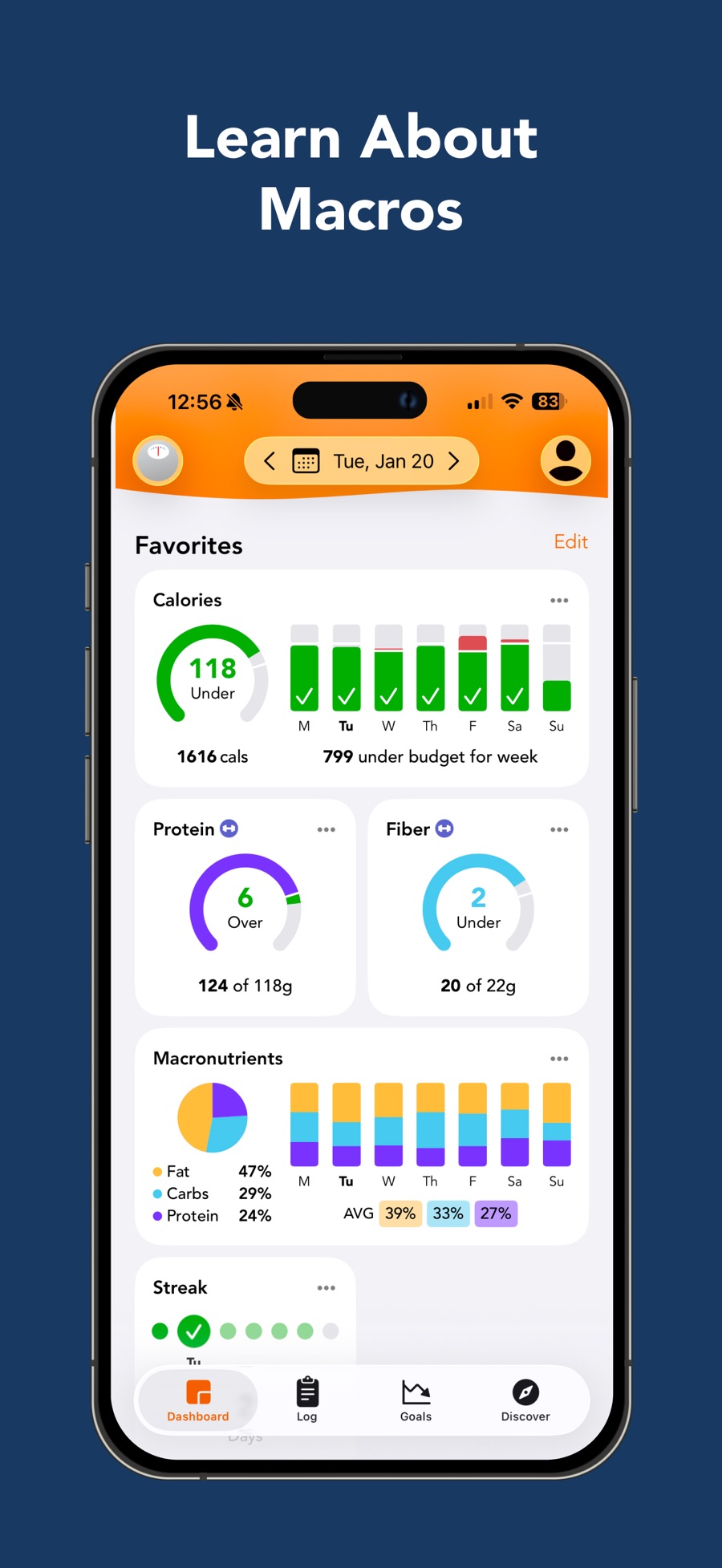
The observed mobile navigation separates Dashboard, Log, Goals, and Discover. The Log image makes the selected date and remaining calorie budget prominent, with meal sections below; Dashboard instead emphasizes a collection of nutrient and adherence cards.[55][60] The division suggests distinct questions: “What did I eat?”, “How am I doing?”, and “What am I trying to achieve?” This is design interpretation, not measured user comprehension.
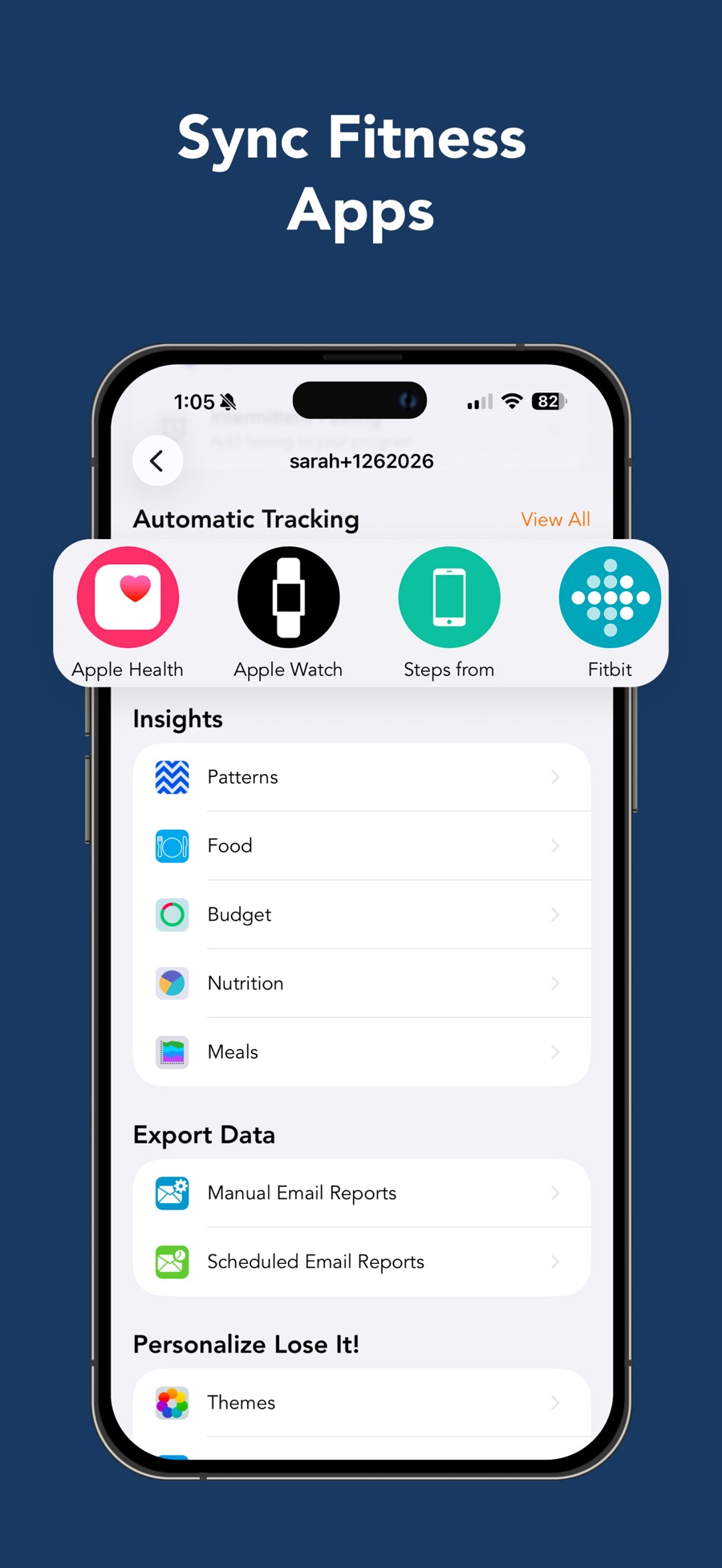
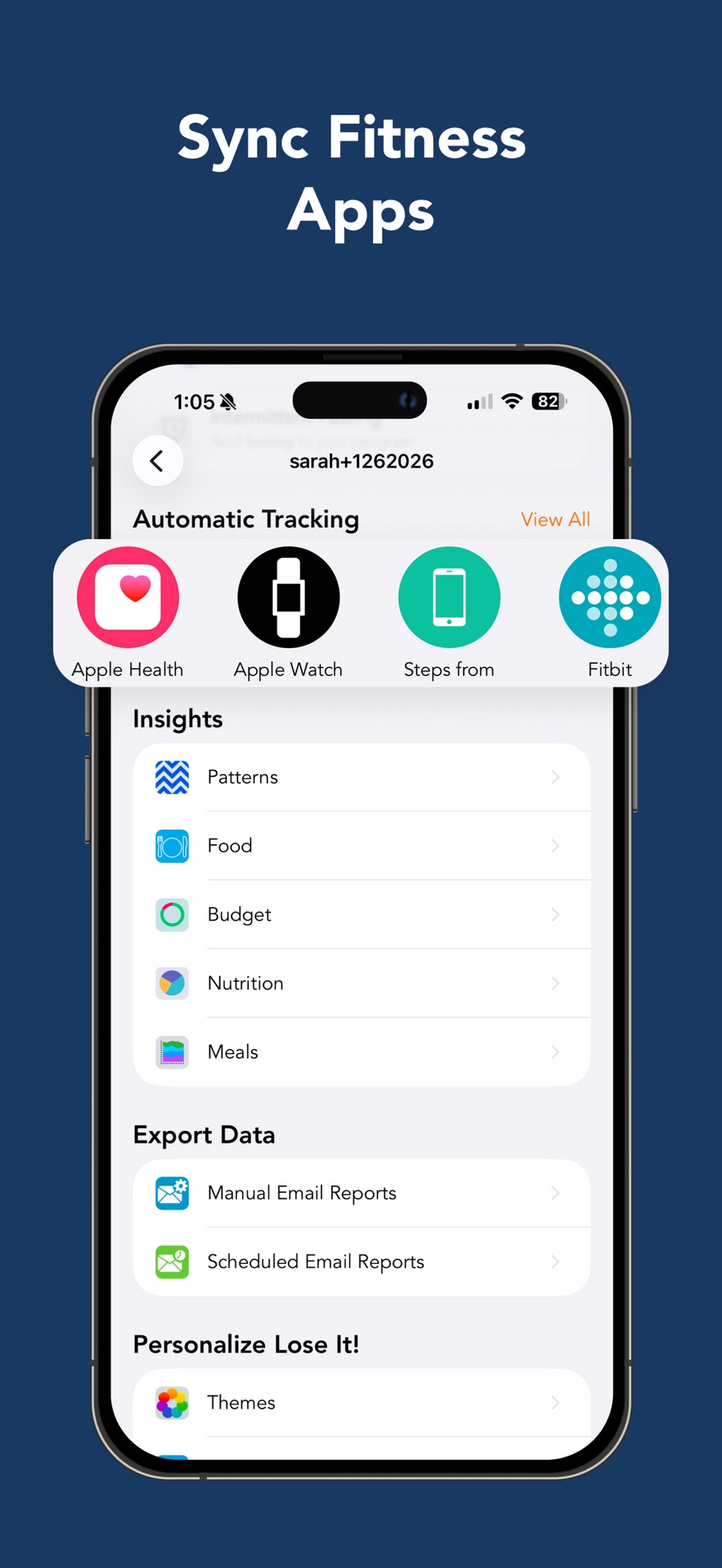
Profile is a second navigation system. Its inspected image groups Automatic Tracking, Insights, Export Data and personalization settings into sections.[61] Documentation places weight-plan settings and food libraries there as well.[12][6] Consequently, the same domain can have a review surface and a management surface: Goals for nutrient charts, Profile for the weight program, and Log for entry. A competitor should test discoverability across these locations rather than merely count settings.
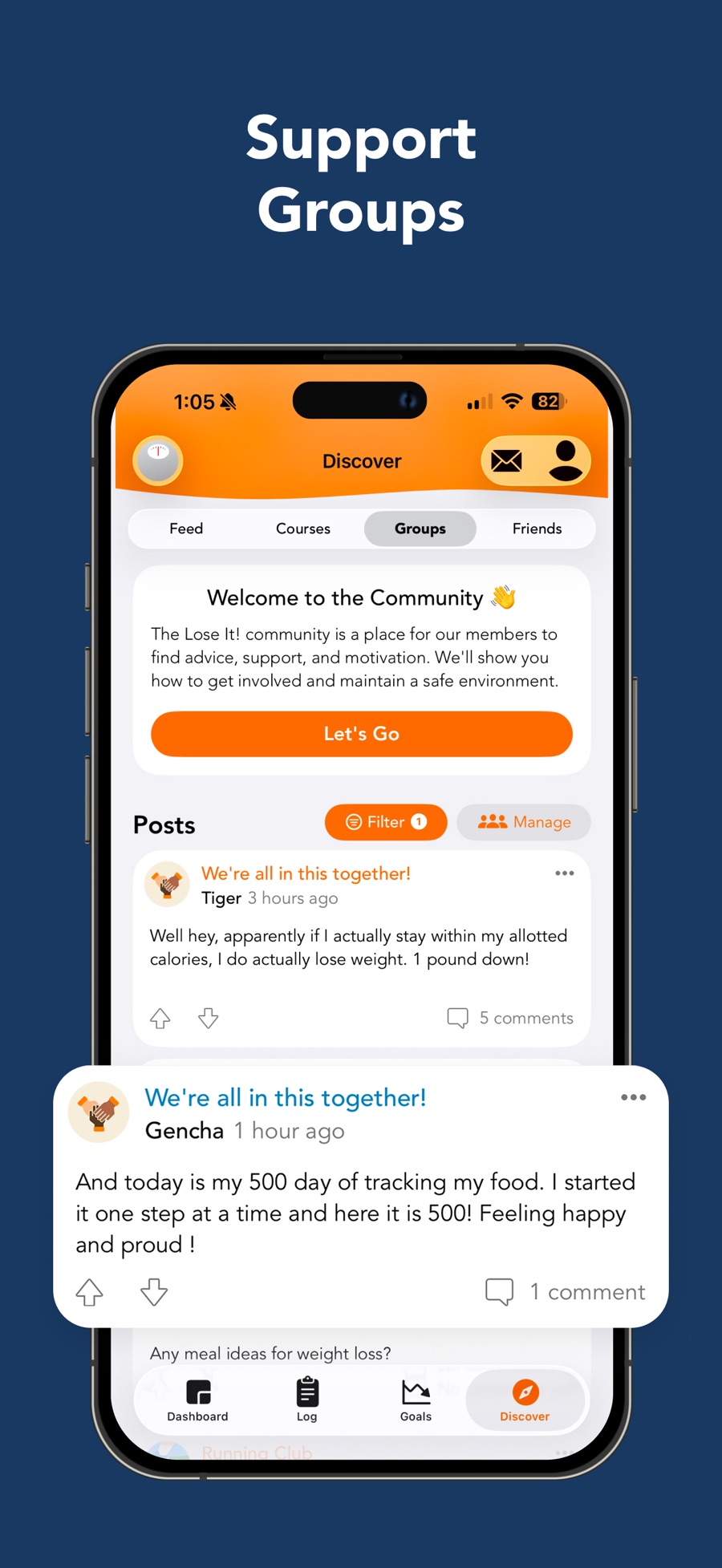
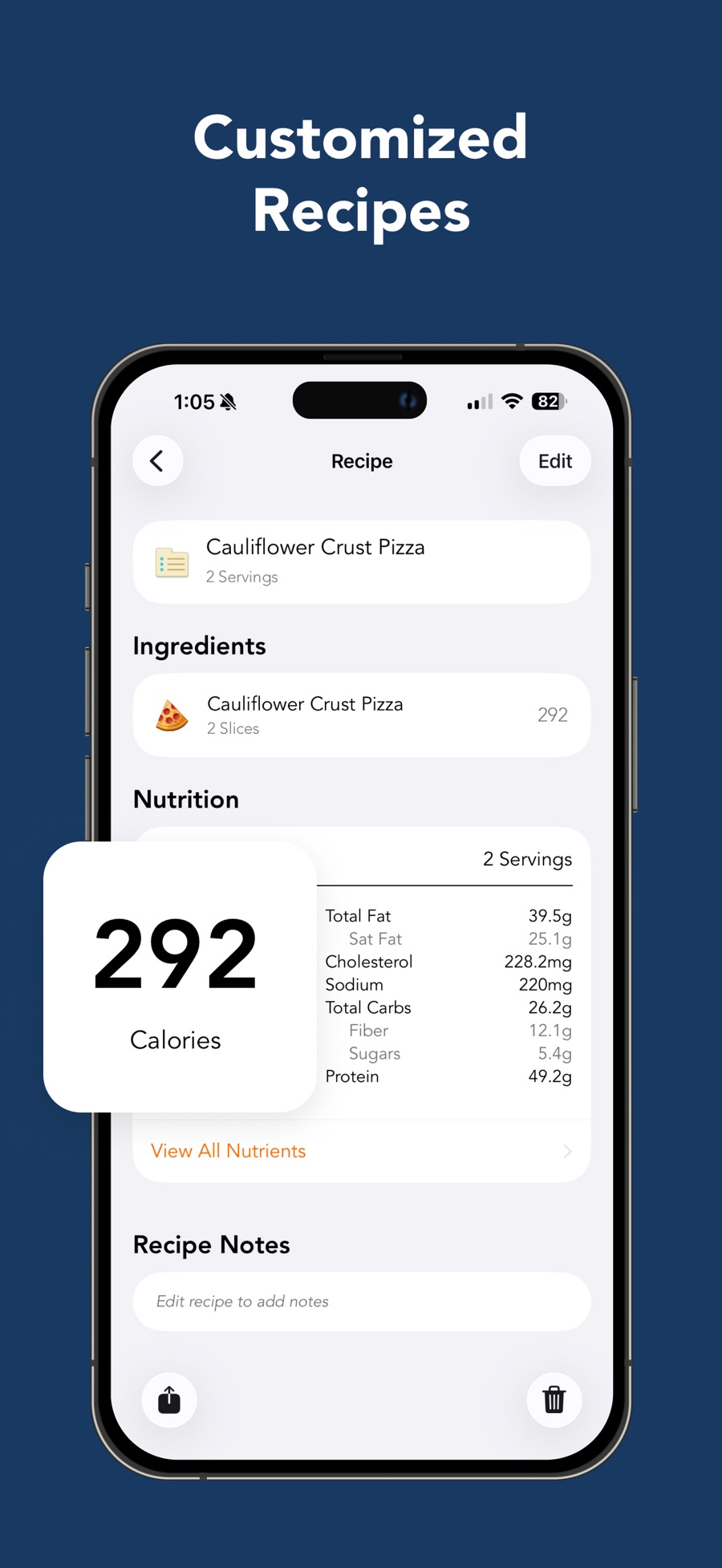
The recipe detail visual separates ingredients, nutrition and notes, with editing above and share/delete affordances below.[63] Discover shows local Feed/Courses/Groups/Friends tabs inside the persistent bottom navigation.[62] These are visually supported destinations, not proof of the detailed actions behind each control.
3. Membership, commercial boundaries and platform differences
The current membership article quotes Basic at no charge, annual Premium at $79.99 USD, and Lifetime at $299.99 USD for Basic accounts or $229.99 USD for active Premium members. These are the support article’s standard US-dollar terms, not a universal checkout quote. It also says Lifetime does not automatically cancel Apple/Google renewals.[1]
Separate Premium documentation emphasizes promotional variation and says store-origin entitlements automatically cover their corresponding mobile platform plus web; buying via loseit.com automatically covers both iOS and Android, with support available for cross-platform issues.[31] That distinction deserves verification before promising seamless paid-platform switching. Lifetime is an additional purchase, not a refund of unused annual time.[32]
The web product is substantial but not feature-identical. Custom foods can be created and managed there.[6] Weight-plan edits become restricted on web when a calorie schedule is active.[12] Manual email reports are iOS-only, whereas scheduled reports are Premium and documented on both mobile platforms.[39] The matrix deliberately keeps these differences visible instead of using a blanket “available everywhere.”
4. Starting, restarting and returning
The store describes completing a profile to obtain a budget and schedule; it does not establish every fresh-install prompt or paywall.[51] The stronger documented path is restarting: Profile → Goal → Start Fresh & Reset Plan → Start a New Plan, followed by current weight, goal weight and plan selection. “Keep Data” versus “Clear Data” is described as showing versus hiding past weight entries; it should not be casually characterized as account deletion.[54]
A particularly important returning-user problem appears in a dedicated article: after roughly three to four weeks without logging, a reactivation questionnaire appears. The documented bypass is to force-close and reopen because there is no in-app skip button.[46] This is an unusually actionable design finding. Reorientation may be helpful, but escape should not require knowing an operating-system workaround. Its current frequency and exact screens still need a consenting-device test.
Personal health details are maintained through Profile → Budget → gear, with platform differences in Done/Save versus OK actions.[33] Those details are inputs to the plan, not merely profile decoration; accidental edits can affect targets.
5. Calorie budget, adaptation and guardrails
The documented budget derives from basal metabolic rate, an activity multiplier and the selected weekly loss rate.[15] This describes an estimate-based system. Weight changes cause recalculation, and reaching the goal automatically changes the plan to maintenance. An accidentally low recorded weight can also trigger maintenance until the user changes the plan again.[16] That is a consequential correction branch, not just a chart blemish.
Budget controls include activity level, weekly rate and a minimum-average-budget threshold with multiple settings.[14] This dossier reports those controls without recommending any calorie target or endorsing removal of a safety threshold. A hands-on study should inspect warnings and recovery from mistaken measurements.
Premium Calorie Schedules redistribute a weekly allocation across high and low days. Users select the high days and additional calories, then save the schedule; custom budgets can participate in the same weekly-average scheme.[17] This is materially different from custom macro cycling, which nutrient-goal documentation explicitly says is unavailable.[13] The design lesson is to distinguish distribution of a known weekly budget from recalculation of a metabolic estimate.
6. Nutrient strategy and coverage
Nutrition Strategies are mobile Premium target configurations, including balanced, high-protein, low-carb, plant-based and other approaches.[19] Changing the associated nutrient targets can move the account into a Custom Strategy; once a strategy is enabled, documentation recommends switching to Custom rather than removing it.[18] A strategy is therefore a settings bundle, not a guarantee of prescribed menus.
The distinction is explicit: strategy-based meal plans and recipes are not currently provided.[40] A competitive analysis must not confuse future food logging with generated meal planning.
Core nutrient goals support grams or percentage ranges where appropriate. The broader nutrient article distinguishes eight targetable core nutrients from 18 additional nutrients that can be viewed but lack dedicated individual goals.[13][53] This is more useful than simply labeling Lose It! “macro-only” or “full micronutrient tracking.” Coverage also depends on the selected food record. Detailed values can be missing even when a top-level calorie count exists.[53]
Editing a goal has an important data boundary: deleting the goal destroys its history, and changing its start date removes records before that date.[48] Target experimentation is therefore not entirely reversible. A safer competitor should separate changing the target from discarding observations.
7. Search, portions and database trust
Food entry begins from a meal and exposes Search, My Foods, Meals and Recipes. After choosing food, the user sets a serving unit and quantity before Add/Save and Done.[2] The flow is a composition of identity, portion and destination, rather than a search box alone.
The database combines generic source data, community uploads, barcode-linked entries and a curated verified subset. Green checks and a verified-only filter help identify the curated records, but the help explicitly permits correction even for those entries.[7] Thus, “verified” should not be treated as invulnerability to label changes or errors.
My Foods is generated through use: logging or creating a custom food adds it automatically. Removing an item there does not remove it for other members, and logging it again restores it to the personal list.[9] This favors low-effort familiarity over a deliberately curated favorites model. It may also preserve accidental or obsolete choices until cleaned up.
Custom food creation has an explicit community-sharing option.[6] The distinction between private reusable food and shared database contribution should be part of any privacy/discoverability test; it is not equivalent to sharing a user’s entire diary.
8. Barcode, label and AI capture are different jobs
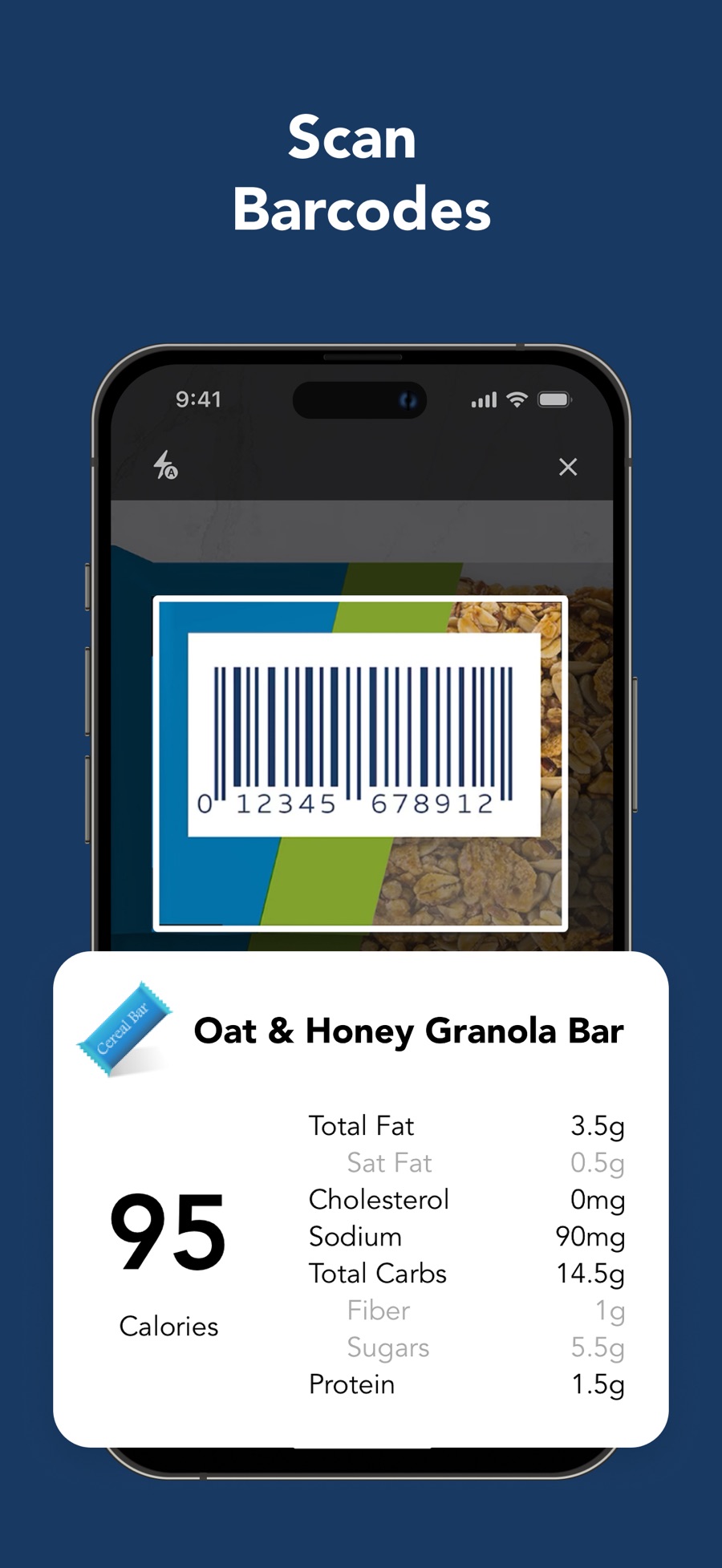
Scan It resolves a barcode, then still requires portion selection and confirmation. The help specifies English device language and different Add versus Save labels on iOS and Android.[4] Its official image depicts a barcode framing window with an enlarged nutrition overlay; the overlay is promotional composition, not proof that this exact result card appears over the live camera.[59]
Label scanning is a different operation. From version 16.6.601, Premium Autofill is embedded in custom-food creation and Edit Nutrition rather than documented solely as a separate top-level scanner.[3] This supports a repair-oriented capture model: read the package when an existing database result is wrong. A discoverability study should ask whether users know to enter editing before seeking the camera.
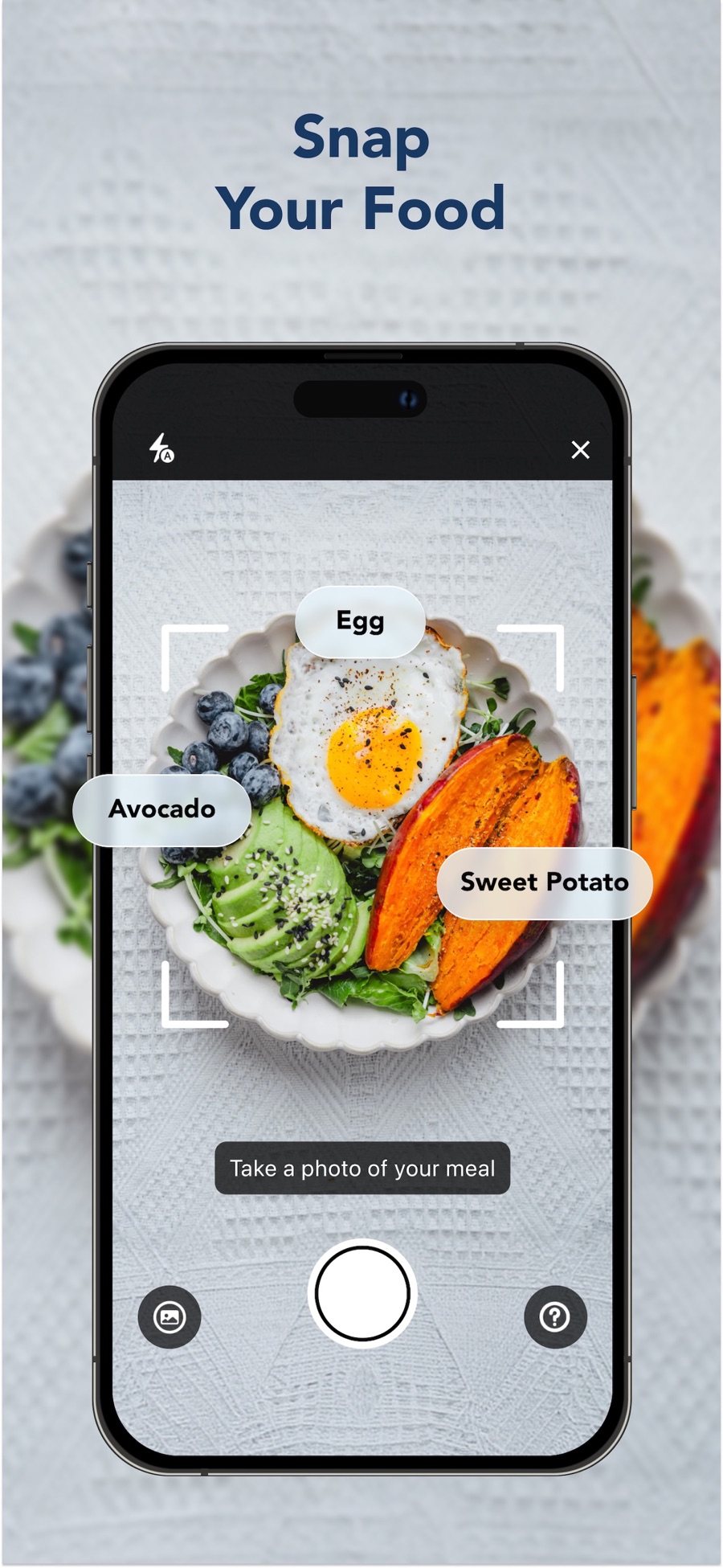
Snap It accepts a new photo or an existing image. Results include identified foods and estimated portions, with conditional Swap options and explicit serving editing before final Save.[5] The camera image visually supports a shutter, gallery shortcut and framing corners, but its floating ingredient labels are marketing elements.[56] None of this is a measured recognition-accuracy result.
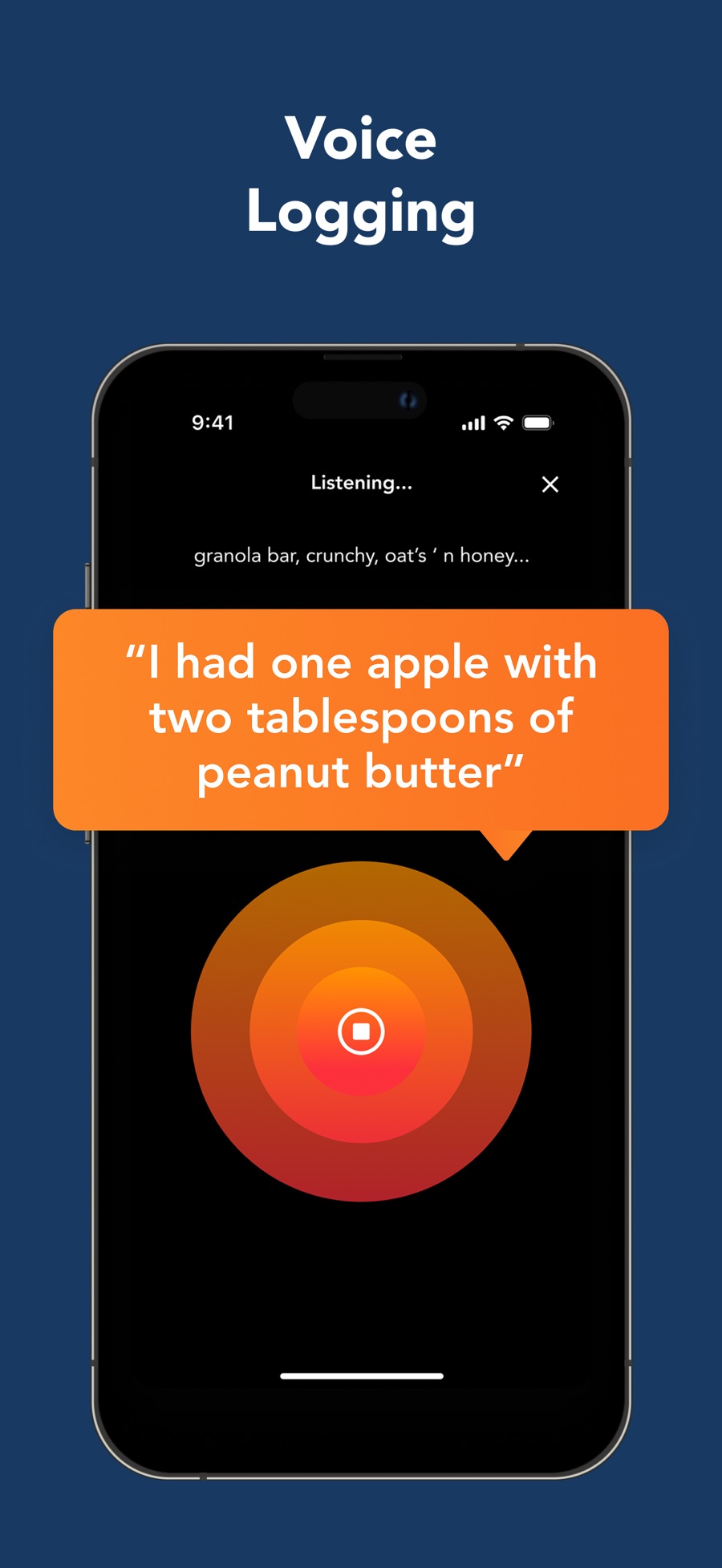
Say It is documented as voice input, and its store image shows a listening state, partial transcript, stop control and close affordance.[2][58] The resulting review/edit/save sequence is not sufficiently covered here. The structured voice flow deliberately ends at an unknown transition rather than inventing a polished conversational correction system.
9. Correction after commitment and durability
Deleting a wrong entry is documented as swipe-left on iOS and long-press on Android. A meal’s overflow menu can clear all entries with confirmation.[41] The structured correction flow documents deletion, not a verified single-command replacement interaction. Undo behavior and direct post-save portion editing require testing.
Nutrition corrections are available through Edit Nutrition, including manual values or camera-assisted capture.[7] Whether a correction propagates to historical logs, later search results, synced exports or other devices is not established by the read documentation. This is a high-priority test because a successful edit screen does not prove durable correction.
Food timestamps are mobile-only and manually set. The first timestamp in a logging session can apply to subsequent foods in that session, but direct Meals-tab logging does not offer the same timestamp path.[49] This creates a subtle tradeoff between fast meal reuse and accurate chronology. Returning to a logged item allows a documented Log Time edit, but automatic timestamping is explicitly unsupported.[49]
10. Reuse, recipes and importing
Previous Meals re-logs a recent meal. The filter can restrict candidates by meal period, with lunch and dinner grouped together; disabling it exposes all periods.[52] This is more specific than “copy meals,” and the matrix does not imply arbitrary bulk copying of whole days. The help retains a bottom-plus entry path, so its exact navigation should be reconciled against a current build.
Manual recipes are available to all users. Their model distinguishes total batch yield from the serving portion; mobile users can also convert an already logged meal into a recipe.[10] That makes recipes useful both for home cooking and recurring combinations. The inspected recipe detail confirms ingredient and nutrition sections, but not editing propagation to old logs.[63]
Recipe importer troubleshooting explicitly documents inaccessible/unsupported web pages and a Text Importer fallback using copied ingredient lists.[47] This proves a typed ingredient-matching capability, not general freeform AI meal chat. The import tier, ambiguous-unit handling, ingredient review and final save state remain open questions.
11. Planned food, water and fasting
Premium future entries appear in planned mode with gray styling and a clock. Tapping the clock activates them when eaten. Same-day planned entry is mobile-only, and remaining planned entries affect the Done Logging completion path.[11] The distinction between intended and consumed food is valuable; its exact effect on summary accounting must still be checked rather than inferred from color.
Water is a custom Premium goal with an optional Log tracker. Serving increments are constrained, and Apple Health water is read into Lose It! rather than written back; other named fitness integrations do not receive its water entries.[22] This is a concrete example of why “sync supported” is too vague without direction and data type.
Fasting setup chooses duration, days, start time and notification options.[37] Its troubleshooting guide says timers require manual start/stop, fasting does not alter the calorie budget, all scheduled days use the same hours, and history is inspected by date rather than in a consolidated fasting dashboard.[38] These are product boundaries, not recommendations to fast.
12. Review, progress and motivation
The current Log header can expose up to three nutrients, with more detailed daily/weekly calorie accounting behind the calorie ring.[20] Dashboard visually combines daily rings, week bars, macro distribution and streak indicators.[60] This concentrates quick feedback while keeping deeper analysis elsewhere.
Highlights require Premium and at least seven days of consistent food logging; they appear below Dashboard favorites.[21] Their dependency on recorded data should be prominent in empty states. They are vendor-generated observations, not verified causal evidence that a specific food caused weight change.
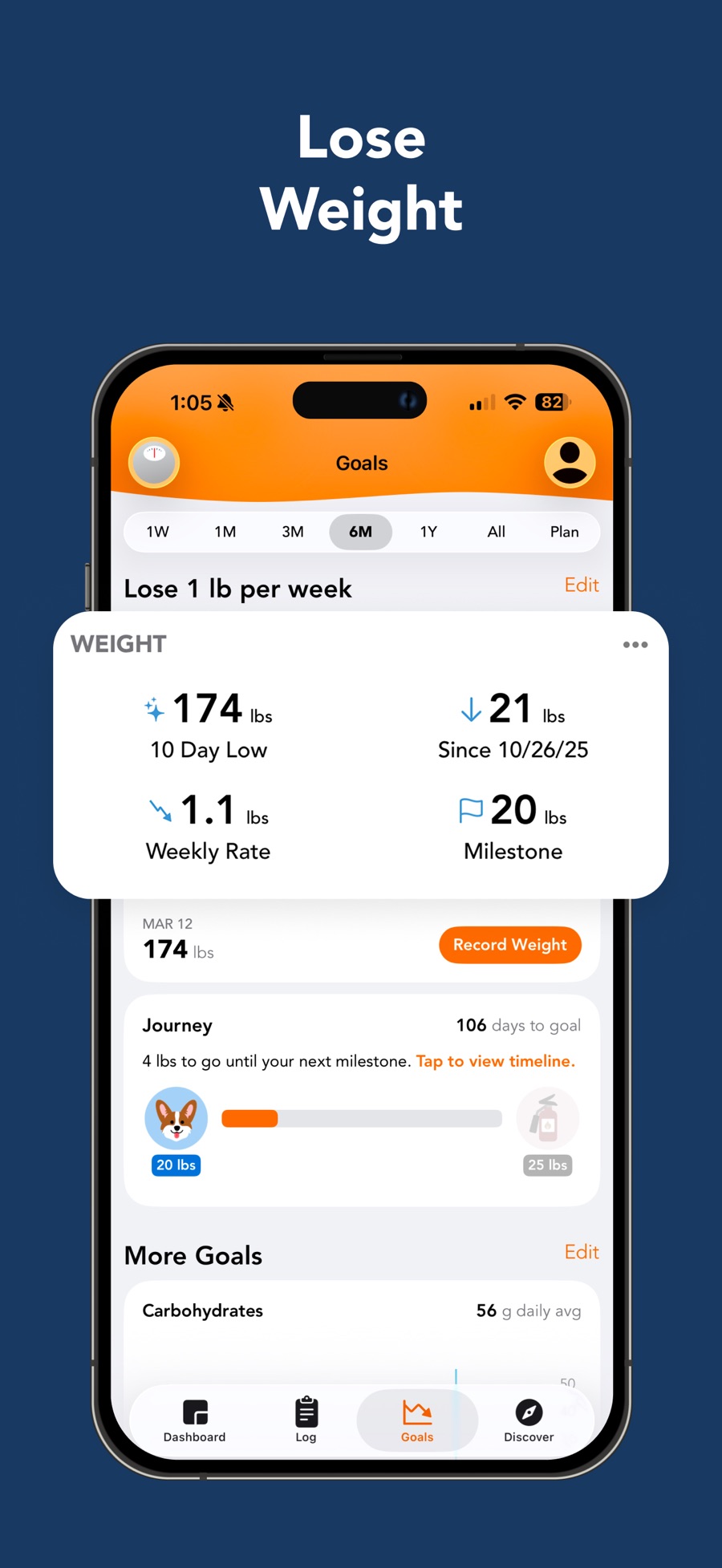
Goals imagery combines a range selector, weight metrics, recording action and milestone journey.[57] That provides several motivational frames, but projections are not guarantees. Separately, email reports can be manual or scheduled, with platform and tier limits already noted.[39]
Widgets exist on both mobile platforms, while customization is limited to specified iOS widget families.[35][36] Widget support alone does not demonstrate editable logging widgets or Android parity.
13. Exercise, wearable and health-data boundaries
Manual workouts can be logged without adding burned calories to the food budget; the relevant control differs between mobile platforms and web.[27] Connected total-burn trackers use a separate bonus model. Synced workout calories may appear crossed out to prevent double-counting, and extra credit arrives after reported burn exceeds the target estimate.[26] This explains how a populated exercise list can coexist with zero budget credit without necessarily indicating a sync defect.
Garmin connection is Premium and includes authorization plus custom-goal prerequisites for some metrics.[25] Apple Health base synchronization is available to all iOS users, while additional custom metrics require corresponding goals. It cannot backfill historical records, and workout reading requires the relevant phone/watch integration.[23]
Health Connect on Android is a repository, not the source that records movement: another device/app must write data there. Its help enumerates incoming steps/workouts/weight and outgoing nutrition, weight and activity categories, controlled through permissions.[24] Integrations should therefore be benchmarked as directional pipelines with duplicate-source tests, not a row of logos.
The Android blood-pressure/glucose timestamp issue has a documented fix in 18.4.600; the article separates displayed time from measurement values.[45] This is a historical support issue, not proof that the currently installed app remains defective.
14. Community and guidance
Friends can be invited using email, with mobile and web acceptance paths.[43] Community standards document reporting and possible account action for inappropriate behavior.[42] The Groups promotional screen shows posts and engagement affordances but cannot establish moderation speed, community quality or current participation.[62]
Courses are separately purchased, text-based lessons, English-only and mobile-only; existing memberships do not include them.[44] Do not classify this as live human coaching. The useful product distinction is between target configuration, educational content and interpersonal support—three different jobs with different access conditions.
15. Export, privacy, cancellation and deletion
Full-history export is documented on the authenticated website, alongside per-goal exports. Goal exports cover all recorded dates, and importing data back is unsupported.[28] A downloaded archive is therefore not a demonstrated restorable backup. File formats and complete field coverage were not inspected.
Cancellation must follow actual billing origin: Apple, Google Play or the web Purchases area. The cancellation help notes that many new US subscriptions in 2026 use Stripe, including some initiated inside the app.[30] Device-based assumptions are inadequate; a user can reasonably look in Apple subscriptions and find nothing.
Account deletion is irreversible and also closes accounts for other FitNow apps. iOS uses password confirmation, Android an email link, and web its own confirmation path.[29] There is a wording discrepancy: the deletion article says direct-web subscriptions automatically cancel, while cancellation guidance broadly warns against treating account deletion as cancellation.[29][30] The conservative workflow is explicit provider cancellation and verification before deletion; no destructive action was performed for this study.
16. Design opportunities and hands-on acceptance checklist
These are research hypotheses rather than measured competitive advantages:
- Make the acquisition → review → correction → saved-result chain visible, especially for voice. Measure repaired, durable logs rather than initial recognition latency.
- Explain budget adjustments at the moment they happen: a weight correction, maintenance transition and exercise bonus are different causes.
- Preserve observation history when users change targets. Export-before-delete is an inadequate substitute for clear separation of data and configuration.
- Offer a visible returning-user escape route rather than an OS-level restart workaround.
- Expose billing origin, health-sync direction and food-sharing scope directly where users act.
The structured questions list supplies verification jobs. Minimum hands-on coverage should include fresh onboarding on each platform; ambiguous multi-food photo/voice input; incorrect barcode and missing nutrient repair; recipe yield change after logging; meal reuse with timestamps; planned-to-consumed accounting; weight correction after accidental maintenance; overlapping trackers; airplane-mode persistence; exported schema; and cancellation/deletion confirmation without using real personal data. None was simulated or represented as completed.
17. Artifact map
app.json: normalized feature matrix, screen/flow inventory, source objects, visual observations, design patterns and verification questions.visuals.html: local gallery with nine annotated official image derivatives.assets/store-*.jpg: original downloaded store media; brand-only image 01 retained but excluded from useful visuals.assets/annotated-*.jpg: clearly labeled annotations, not invented native screens.sources/: article bodies, official responses, source metadata, discovery results and isolated citation ledger.audit/verification.json: computed schema/reference/image checks and documented gaps.
The evidence supports a deep operational model and identifies sharp unknowns. It does not support an exhaustive coverage claim, native performance measurement, nutritional efficacy conclusion or current universal checkout price.
Sources
[1] https://loseit.zendesk.com/api/v2/help_center/en-us/articles/51906523474708.json — Lose It! Membership Tiers & Pricing [2] https://loseit.zendesk.com/api/v2/help_center/en-us/articles/49210381551380.json — How to Log Food in Lose It! [3] https://loseit.zendesk.com/api/v2/help_center/en-us/articles/52164255037588.json — How to Use the Nutrition Label Scanner [4] https://loseit.zendesk.com/api/v2/help_center/en-us/articles/49209634235924.json — How to Use the Barcode Scanner [5] https://loseit.zendesk.com/api/v2/help_center/en-us/articles/47771695186580.json — How to Use Snap It [6] https://loseit.zendesk.com/api/v2/help_center/en-us/articles/49209748140052.json — Custom Foods [7] https://loseit.zendesk.com/api/v2/help_center/en-us/articles/49210480663316.json — Incorrect Food Data [9] https://loseit.zendesk.com/api/v2/help_center/en-us/articles/49210308470164.json — My Foods [10] https://loseit.zendesk.com/api/v2/help_center/en-us/articles/47345201948052.json — Using Recipes in Lose It! [11] https://loseit.zendesk.com/api/v2/help_center/en-us/articles/47273187626260.json — How to Plan Food in Lose It! [12] https://loseit.zendesk.com/api/v2/help_center/en-us/articles/47649738246548.json — How to Edit Your Weight Loss Plan [13] https://loseit.zendesk.com/api/v2/help_center/en-us/articles/47649705562004.json — How to Create Nutrient Goals [14] https://loseit.zendesk.com/api/v2/help_center/en-us/articles/47648748161172.json — How to Edit Your Calorie Budget [15] https://loseit.zendesk.com/api/v2/help_center/en-us/articles/47497714327060.json — How the Calorie Budget is Calculated [16] https://loseit.zendesk.com/api/v2/help_center/en-us/articles/47773659281940.json — Reasons Your Budget Might Change [17] https://loseit.zendesk.com/api/v2/help_center/en-us/articles/51659585741972.json — How to Set Up Calorie Cycling [18] https://loseit.zendesk.com/api/v2/help_center/en-us/articles/51699401666964.json — How to Change Your Nutrition Strategy [19] https://loseit.zendesk.com/api/v2/help_center/en-us/articles/47773469433364.json — Nutrition Strategies [20] https://loseit.zendesk.com/api/v2/help_center/en-us/articles/47649133343380.json — Using the Log Header in Lose It! [21] https://loseit.zendesk.com/api/v2/help_center/en-us/articles/47773480314772.json — About Highlights [22] https://loseit.zendesk.com/api/v2/help_center/en-us/articles/47772444078996.json — Water Tracking in Lose It! [23] https://loseit.zendesk.com/api/v2/help_center/en-us/articles/47773580085140.json — Using Apple Health With Lose It! [24] https://loseit.zendesk.com/api/v2/help_center/en-us/articles/47650100219028.json — Using Health Connect With Lose It! [25] https://loseit.zendesk.com/api/v2/help_center/en-us/articles/47649863625364.json — How to Connect Your Garmin [26] https://loseit.zendesk.com/api/v2/help_center/en-us/articles/47492627092372.json — The Calorie Bonus [27] https://loseit.zendesk.com/api/v2/help_center/en-us/articles/47648836406420.json — How to Log Exercise Without Adding Calorie Burn to Your Budget [28] https://loseit.zendesk.com/api/v2/help_center/en-us/articles/47497914864916.json — How to Download Your Data [29] https://loseit.zendesk.com/api/v2/help_center/en-us/articles/47574713915412.json — How to Close or Delete Your Account [30] https://loseit.zendesk.com/api/v2/help_center/en-us/articles/47274554961812.json — How to Cancel a Lose It! Premium Subscription or Trial [31] https://loseit.zendesk.com/api/v2/help_center/en-us/articles/47345136549652.json — What is Lose It! Premium? [32] https://loseit.zendesk.com/api/v2/help_center/en-us/articles/47492421271956.json — What is Lose It! Lifetime? [33] https://loseit.zendesk.com/api/v2/help_center/en-us/articles/49210059701012.json — Updating Your Personal Health Details [35] https://loseit.zendesk.com/api/v2/help_center/en-us/articles/51045533782548.json — How to Set Up Widgets [36] https://loseit.zendesk.com/api/v2/help_center/en-us/articles/51045542782996.json — Widget Customization Options [37] https://loseit.zendesk.com/api/v2/help_center/en-us/articles/51856350428052.json — How to Set Up Intermittent Fasting [38] https://loseit.zendesk.com/api/v2/help_center/en-us/articles/51856472427284.json — Intermittent Fasting FAQs and Troubleshooting Guide [39] https://loseit.zendesk.com/api/v2/help_center/en-us/articles/47773831414932.json — How to Send Email Reports [40] https://loseit.zendesk.com/api/v2/help_center/en-us/articles/47773953397524.json — Are There Meal Plans or Recipes for My Nutrition Strategy? [41] https://loseit.zendesk.com/api/v2/help_center/en-us/articles/53007221459348.json — How to Delete a Food Log [42] https://loseit.zendesk.com/api/v2/help_center/en-us/articles/49209755238548.json — Community Standards [43] https://loseit.zendesk.com/api/v2/help_center/en-us/articles/47771907495700.json — How to Add and Accept Friends [44] https://loseit.zendesk.com/api/v2/help_center/en-us/articles/50062272471060.json — Lose It! Courses [45] https://loseit.zendesk.com/api/v2/help_center/en-us/articles/52676657131668.json — Inaccurate Timestamps: Blood Pressure and Glucose [46] https://loseit.zendesk.com/api/v2/help_center/en-us/articles/53670144511252.json — How to Skip Survey Questions After Returning to Lose It! [47] https://loseit.zendesk.com/api/v2/help_center/en-us/articles/51197596722836.json — Troubleshooting Recipe Importer Error Messages [48] https://loseit.zendesk.com/api/v2/help_center/en-us/articles/51322382978964.json — How to Edit a Nutrient Goal [49] https://loseit.zendesk.com/api/v2/help_center/en-us/articles/51699529280532.json — Understanding Food Timestamps [51] https://itunes.apple.com/lookup?id=297368629&country=us — Apple US listing metadata and description [52] https://loseit.zendesk.com/api/v2/help_center/en-us/articles/49209714942996.json — Previous Meals [53] https://loseit.zendesk.com/api/v2/help_center/en-us/articles/47273196503572.json — Tracking Nutrients [54] https://loseit.zendesk.com/api/v2/help_center/en-us/articles/47649627723540.json — How to Start a New Weight Loss Plan [55] https://is1-ssl.mzstatic.com/image/thumb/PurpleSource221/v4/5b/46/f9/5b46f98d-5464-4441-0e1c-087debabe39b/SC-2.jpg/900x0w.jpg — Official store image: Log Every Meal [56] https://is1-ssl.mzstatic.com/image/thumb/PurpleSource211/v4/73/54/b5/7354b5e8-ff0f-58fc-2fbe-6347980854dd/SC-3.jpg/900x0w.jpg — Official store image: Snap Your Food [57] https://is1-ssl.mzstatic.com/image/thumb/PurpleSource211/v4/59/b5/ac/59b5ac74-d510-9833-85a1-e73b0587ee5a/SC-4.jpg/900x0w.jpg — Official store image: Lose Weight [58] https://is1-ssl.mzstatic.com/image/thumb/PurpleSource221/v4/5d/6a/18/5d6a1864-7bbb-7c14-0b88-bad8cabeb994/SC-5.jpg/900x0w.jpg — Official store image: Voice Logging [59] https://is1-ssl.mzstatic.com/image/thumb/PurpleSource221/v4/12/7b/6a/127b6a1c-c772-fc07-046c-b444dde77ca0/SC-6.jpg/900x0w.jpg — Official store image: Scan Barcodes [60] https://is1-ssl.mzstatic.com/image/thumb/PurpleSource221/v4/10/f3/28/10f32834-5ac2-d585-95e5-9466b641af4b/SC-7.jpg/900x0w.jpg — Official store image: Learn About Macros [61] https://is1-ssl.mzstatic.com/image/thumb/PurpleSource211/v4/23/0a/03/230a03aa-568e-a2c2-eef7-e01d71d7c271/SC-8.jpg/900x0w.jpg — Official store image: Sync Fitness Apps [62] https://is1-ssl.mzstatic.com/image/thumb/PurpleSource221/v4/d0/47/70/d04770c7-415d-9bdb-791f-d4e271c56e05/SC-9.jpg/900x0w.jpg — Official store image: Support Groups [63] https://is1-ssl.mzstatic.com/image/thumb/PurpleSource221/v4/ca/7e/5d/ca7e5d86-78d0-f3aa-73fd-47890c65c5f3/SC-10.jpg/900x0w.jpg — Official store image: Customized Recipes