In Plain Sight / Nutrition atlas

Inspect / 2026-10-07

Cronometer

Desk research · Tested-native: 0 · 38 screen records · 19 flow records

Product model & research scope

Positioning

Nutrition-data depth with reusable logging, optional AI capture, detailed targets and a separate professional workspace.

Mental model

Date-indexed diary of foods, exercise, biometrics and notes; reusable Foods library; target configuration; Discover reports; external data streams.

Scope, platform boundaries & limitations

Scope

Public official-help desk research. iOS, Android and web; Basic, Gold and separate Pro. No account creation, purchase, live app testing or shared browser use.

Platforms

  • iOS
  • Android
  • Web

Limitations

  • Official screenshots are demonstration records, not our tested sessions.
  • Article updated_at is not a screenshot version date.
  • Pro web quick-start contradicts dedicated Pro-mobile guide; mobile-specific guide is more directly applicable.
  • Baseline activity advice differs between overview and newer platform-specific instructions.
  • No price universalized; no checkout or subscription performed.
  • Offline, learned expenditure and automated weekly check-ins not established.
  • All 40 feature keys from the research contract are retained; not-found means unknown, not absent.

Screen inventory

Evidence-supported inventory, not a claim to all app screens.

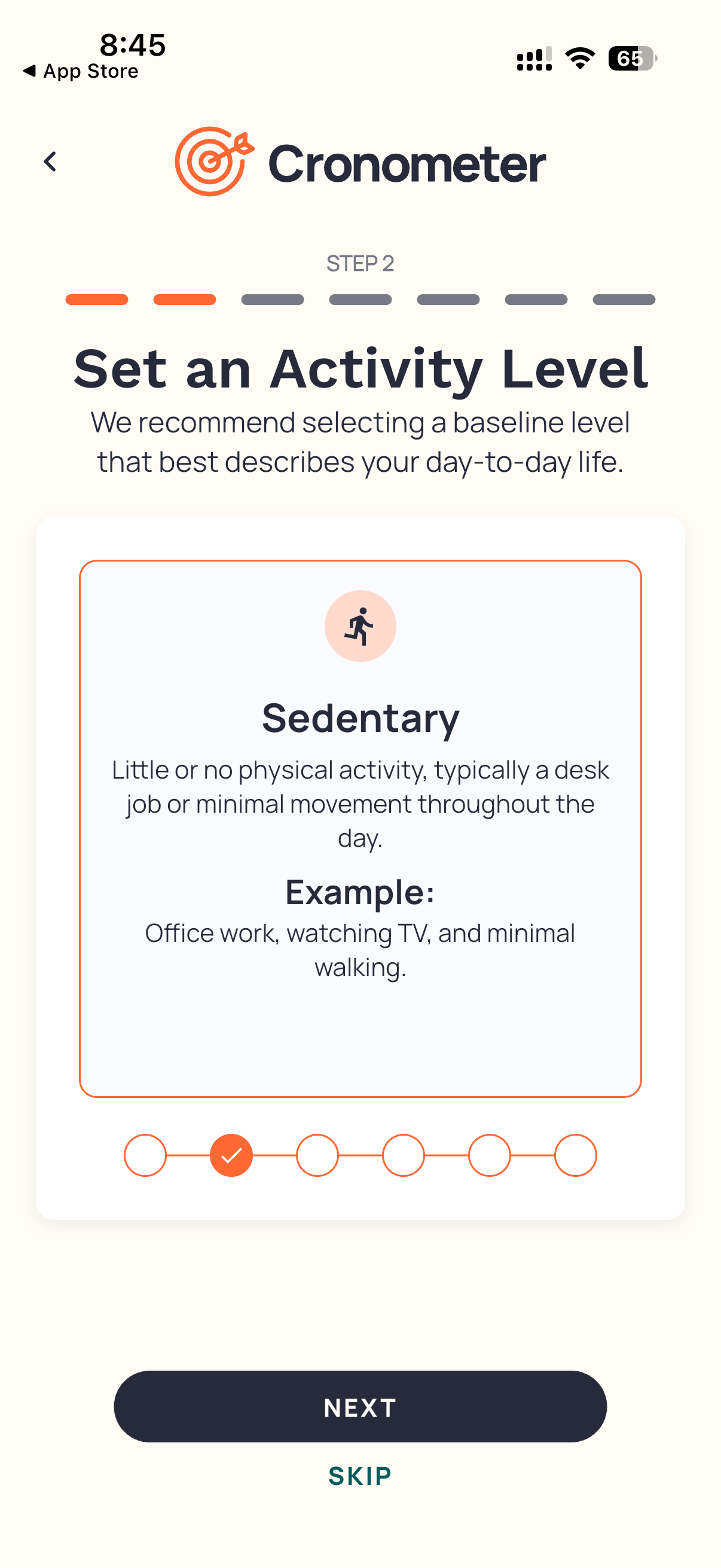
Activity onboardingOnboarding · iOS visual; mobile documentation · BasicVisual

Entry

Signup profile sequence

Primary actions

  • Select baseline
  • Next
  • Skip

States

  • Sedentary selected
cr-02
DiaryLogging · iOS; Android · BasicVisual

Entry

Diary tab

Primary actions

  • Change date
  • Add
  • Open summary

States

  • Today
  • Completed/incomplete
cr-09 · cr-10
Food searchLogging · Mobile · BasicDocumented

Entry

+ > Add Food

Primary actions

  • Search
  • Filter
  • Multi-add

States

  • Results
  • Favorites
  • Custom
cr-04
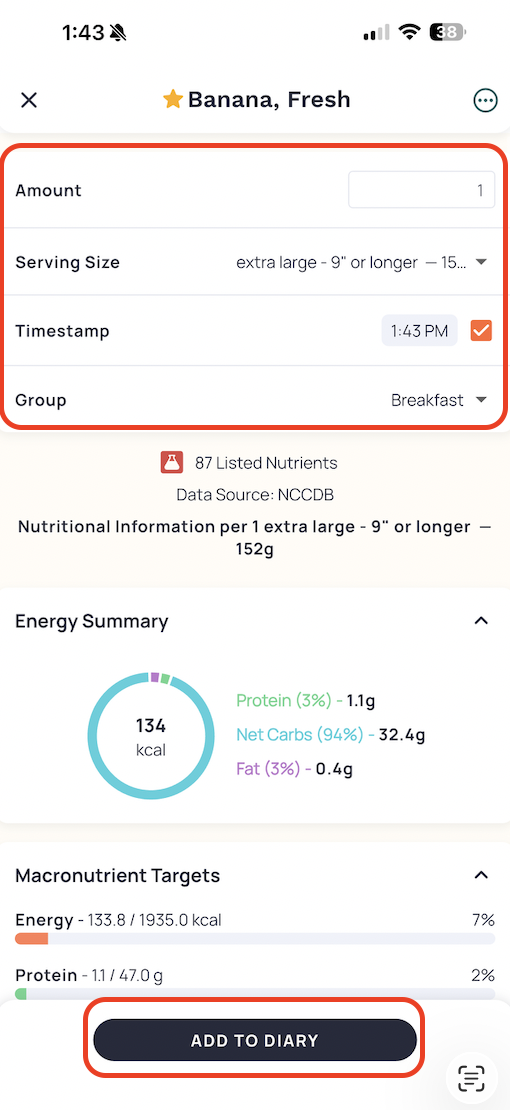
Food detailLogging · iOS visual; mobile docs · Basic; Gold timestampVisual

Entry

Select search result

Primary actions

  • Change amount/unit
  • Choose group
  • Add to Diary

States

  • Favorite selected
  • Source shown
cr-04
Barcode cameraLogging · Mobile · No gate statedDocumented

Entry

+ > Scan Food

Primary actions

  • Scan
  • Type Barcode

States

  • Matched
  • Not found
cr-05
Custom-food editorFoods · Mobile · BasicDocumented

Entry

Foods > Create Food

Primary actions

  • Name
  • Set serving
  • Enter nutrients
  • Save

States

  • Review
  • Delete/Retire
cr-46
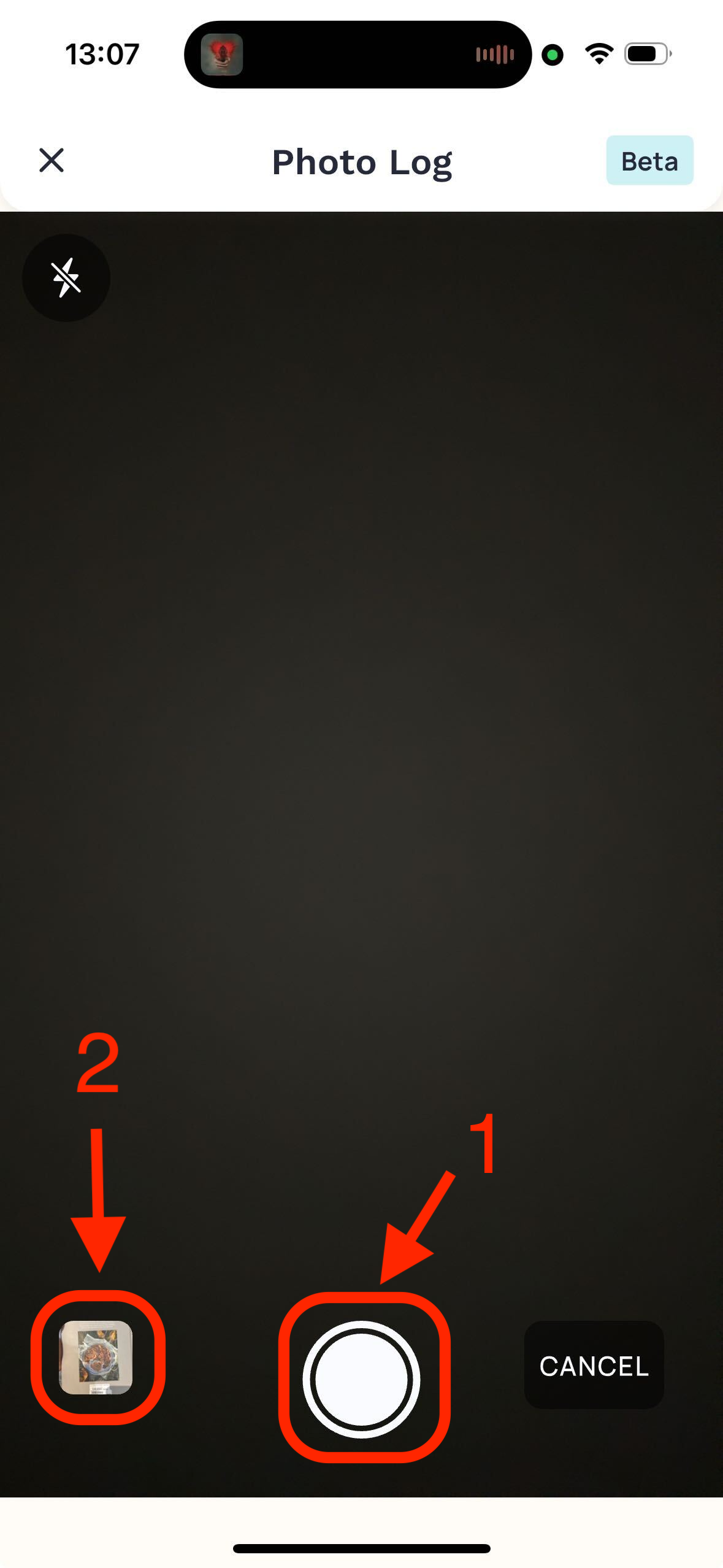
Photo cameraAI logging · iOS visual; mobile docs · GoldVisual

Entry

+ > Photo Log

Primary actions

  • Capture
  • Choose library

States

  • Camera; Beta badge in asset
cr-06
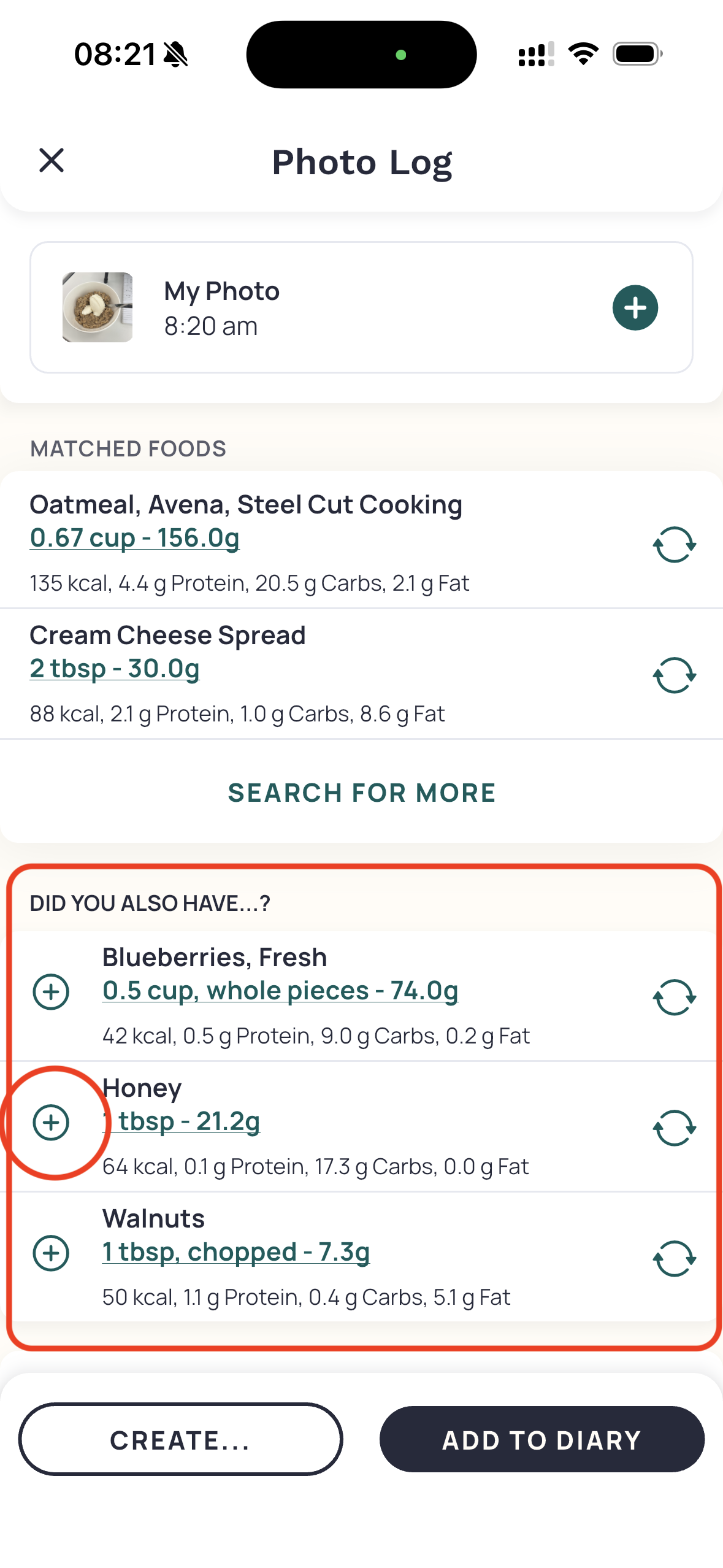
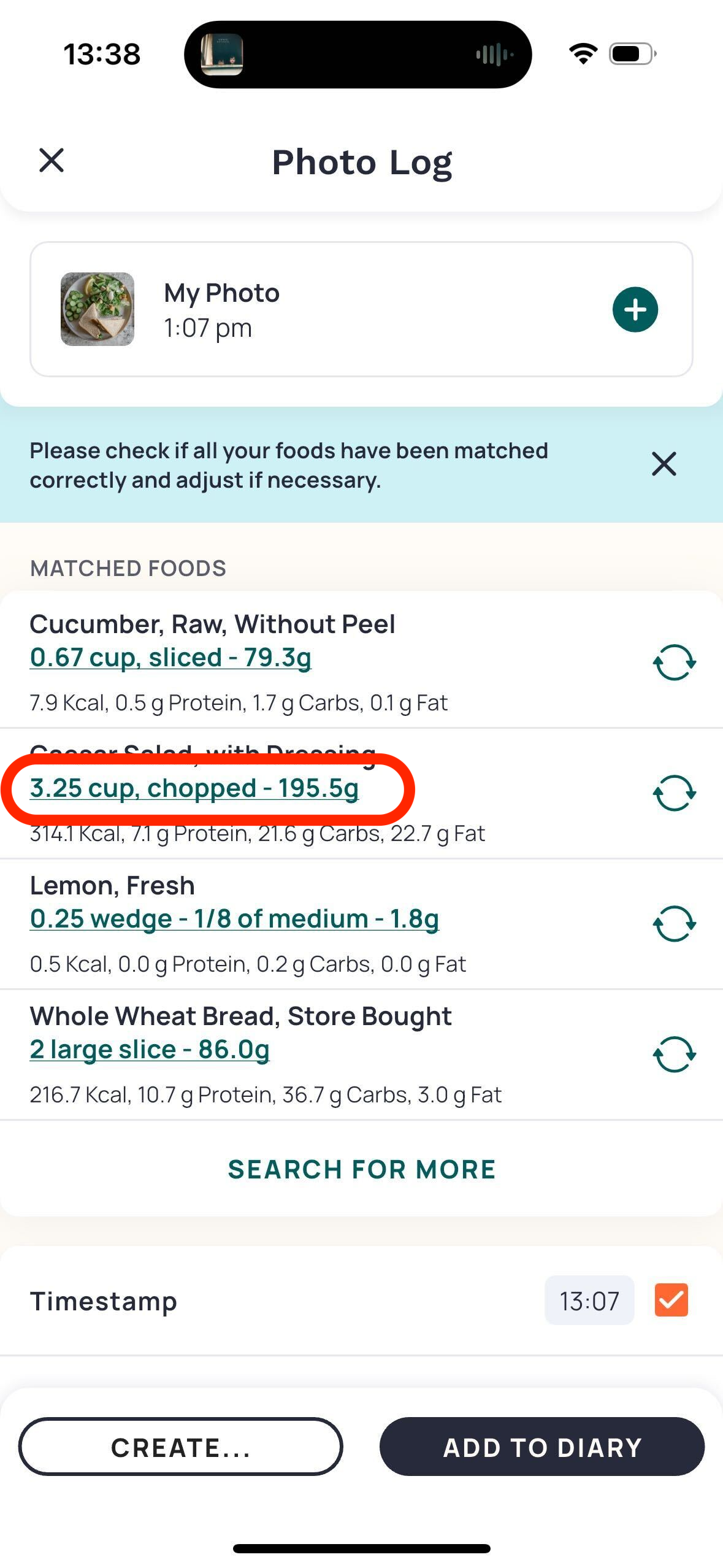
Photo matched-food reviewAI logging · iOS visual; mobile docs · GoldVisual

Entry

After photo recognition

Primary actions

  • Swap
  • Search
  • Create
  • Add to Diary

States

  • Matches
  • Suggested ingredients
  • Editable serving links
cr-06
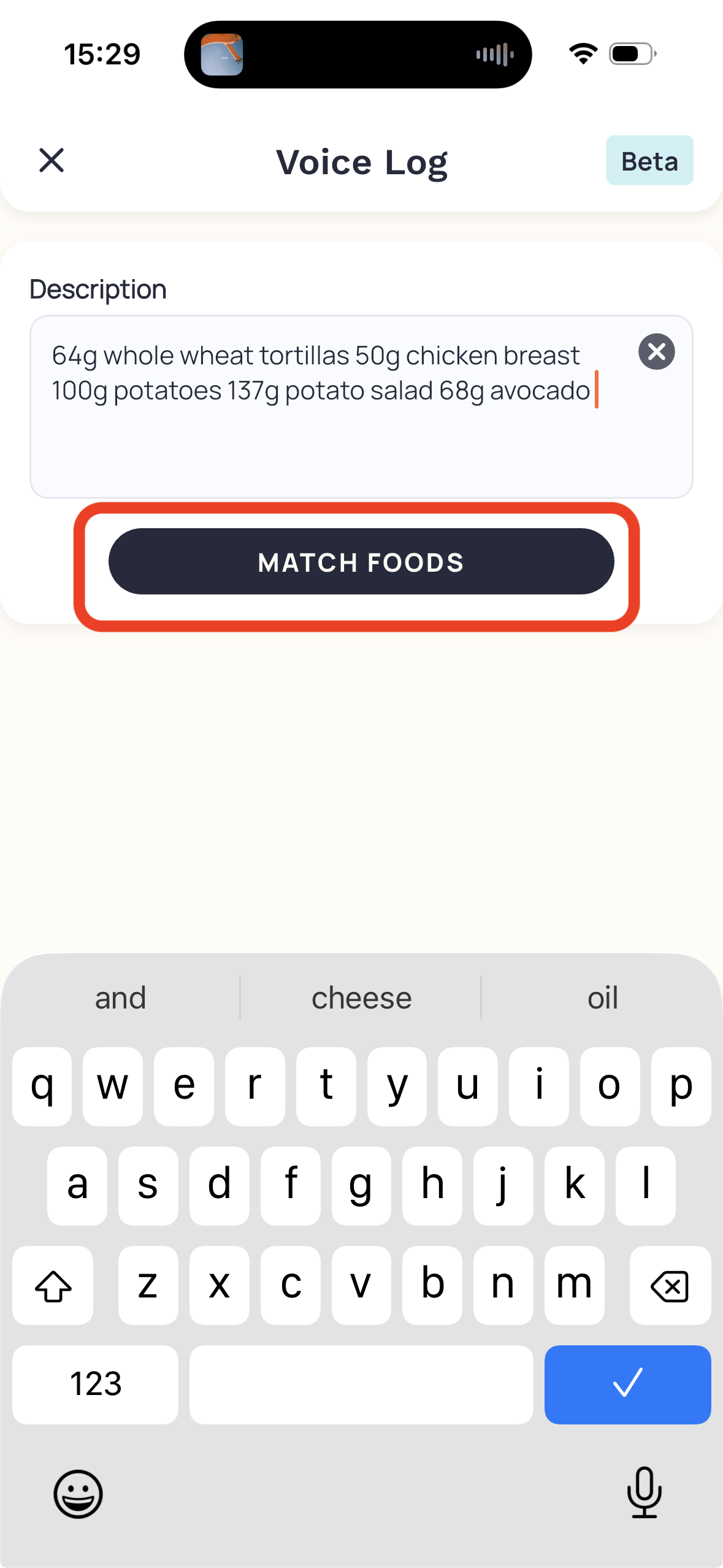
Voice descriptionAI logging · iOS visual; mobile docs · GoldVisual

Entry

+ > Voice Log

Primary actions

  • Speak/type
  • Match Foods

States

  • Keyboard active; Beta in asset
cr-07
Voice matched-food reviewAI logging · Mobile · GoldDocumented

Entry

Match Foods

Primary actions

  • Edit description
  • Swap/delete
  • Add

States

  • Matches awaiting review
cr-07
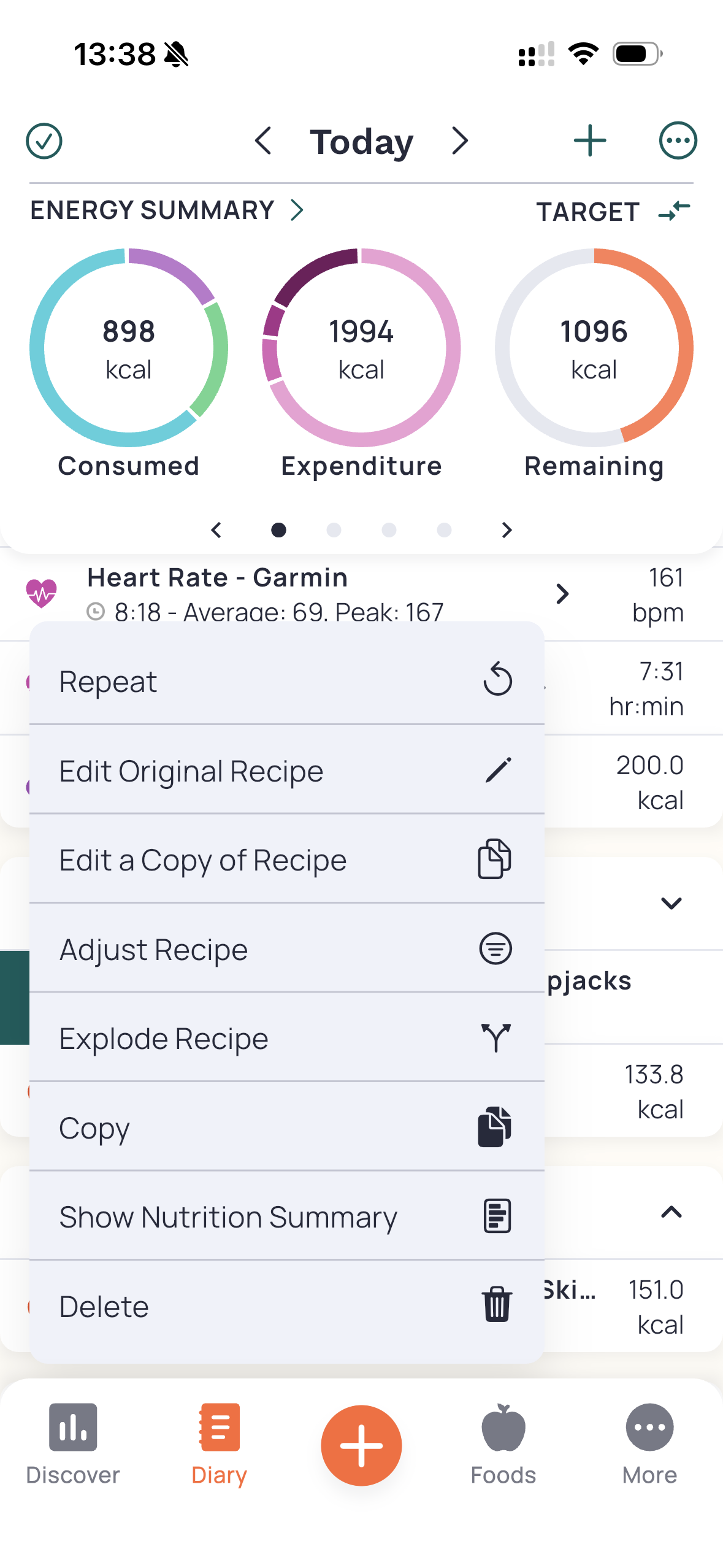
Diary entry actionsCorrection · iOS visual; mobile docs · Core; some Gold actionsVisual

Entry

Swipe right > menu

Primary actions

  • Edit original/copy
  • Adjust
  • Explode
  • Delete

States

  • Recipe action menu open
cr-10
Diary multi-selectReuse · Mobile · No gate statedDocumented

Entry

Diary overflow > Multi-Select

Primary actions

  • Select
  • Copy
  • Create meal/recipe

States

  • Selection active
cr-10 · cr-11 · cr-12
Custom-meal editorFoods · Mobile · No gate statedDocumented

Entry

Foods > Create Meal

Primary actions

  • Add items
  • Review
  • Save

States

  • Saved
  • Retire/delete choice
cr-12
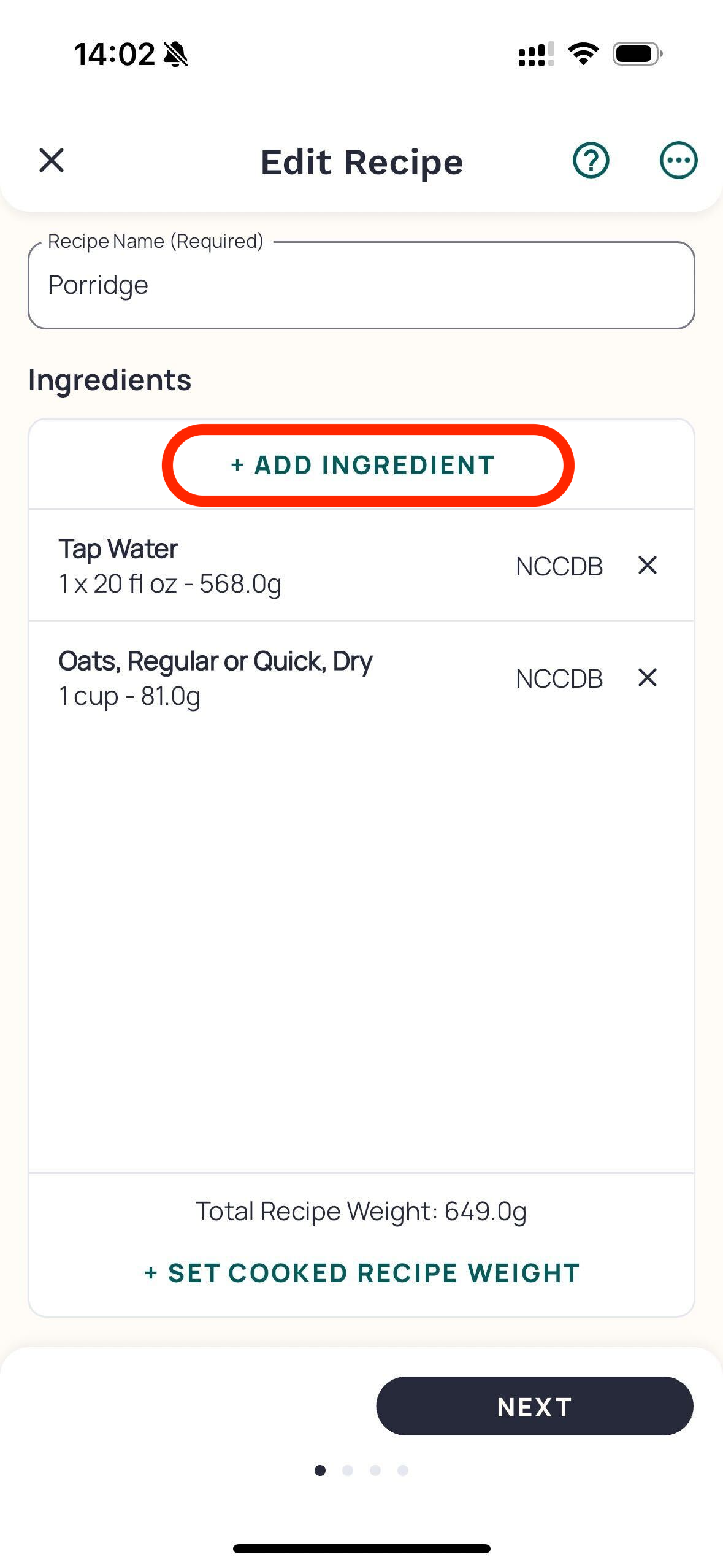
Recipe ingredient editorFoods · iOS visual; mobile docs · BasicVisual

Entry

Foods > Create Recipe

Primary actions

  • Add ingredient
  • Cooked weight
  • Next

States

  • Ingredient list
cr-13 · cr-15
Recipe serving setupFoods · Mobile · BasicDocumented

Entry

Recipe editor > Next

Primary actions

  • Weight or servings basis
  • Set size

States

  • Basis becomes fixed after save
cr-13
Recipe importerFoods · Mobile · GoldDocumented

Entry

Foods > Import Recipe

Primary actions

  • Paste URL/list
  • Repair matches
  • Save

States

  • Unresolved ingredient blocks save
cr-14
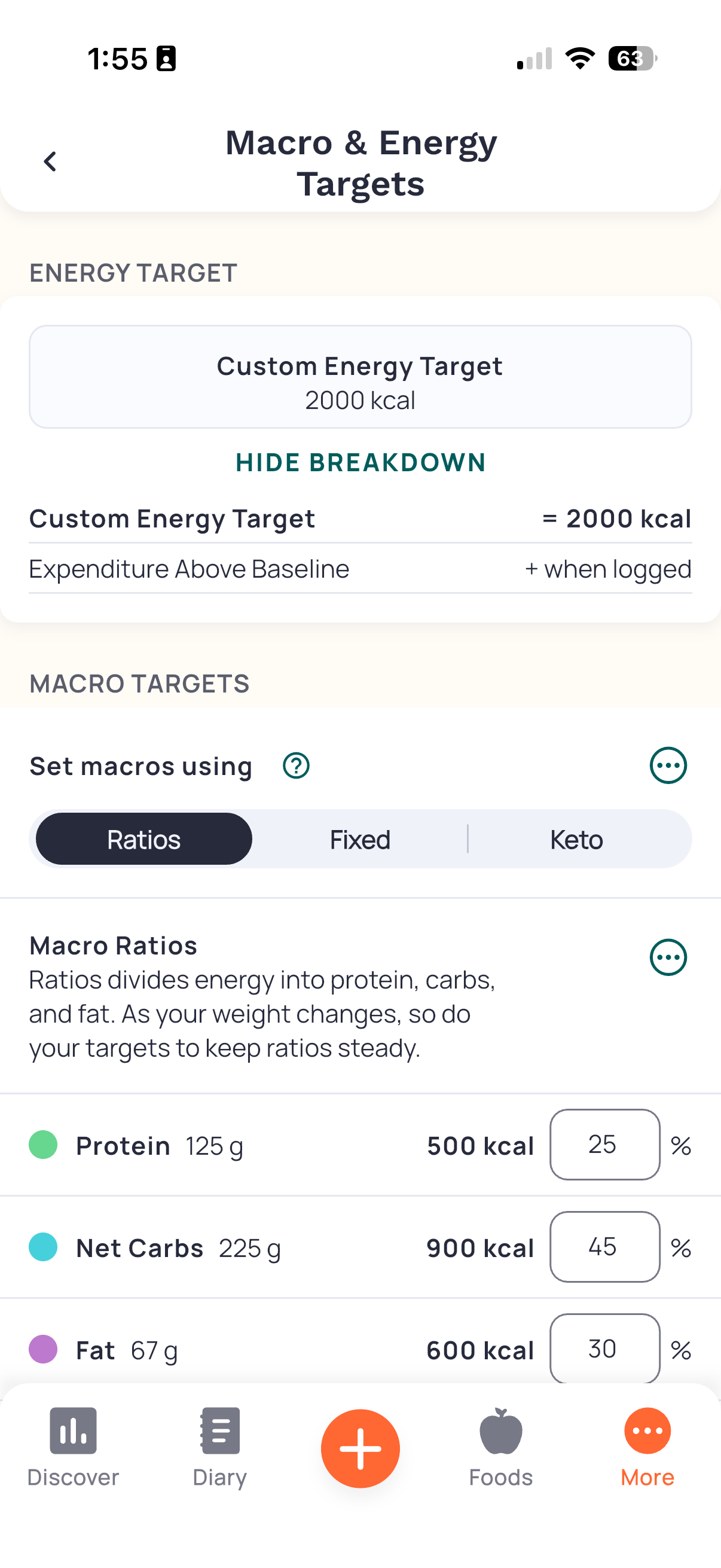
Macro and energy targetsTargets · iOS visual; mobile docs · BasicVisual

Entry

More > Targets

Primary actions

  • Set macro mode
  • Custom energy
  • Breakdown

States

  • Ratios selected
  • Custom energy
cr-16
Weight goalTargets · Mobile · BasicDocumented

Entry

More > Targets > Weight Goal

Primary actions

  • Set goal/rate
  • Review forecast
  • Save

States

  • Maintain
  • Low-energy warning
cr-17
Energy expenditureTargets · Mobile · BasicDocumented

Entry

More > Targets

Primary actions

  • Set BMR
  • Baseline
  • TEF

States

  • Estimated/custom BMR
cr-18
Nutrient-target editorTargets · Mobile · BasicDocumented

Entry

More > Targets or report bar

Primary actions

  • Minimum
  • Maximum
  • Visibility

States

  • Default/custom
cr-19
Macro schedulerTargets · Mobile · GoldDocumented

Entry

More > Targets > Macro Scheduler

Primary actions

  • Create/copy template
  • Schedule
  • Edit Today

States

  • Recurring
  • Single-day override
cr-40
Discover dashboardReview · Mobile · Basic; Gold CoachDocumented

Entry

Discover > Dashboard

Primary actions

  • Choose cards
  • Open Coach

States

  • Configurable cards
cr-23 · cr-38
Daily ReportReview · Mobile · Basic; Gold advanced sectionsDocumented

Entry

Diary overflow or summary

Primary actions

  • Inspect contributors
  • Edit nutrient target

States

  • Target met/exceeded/not set
cr-48 · cr-01
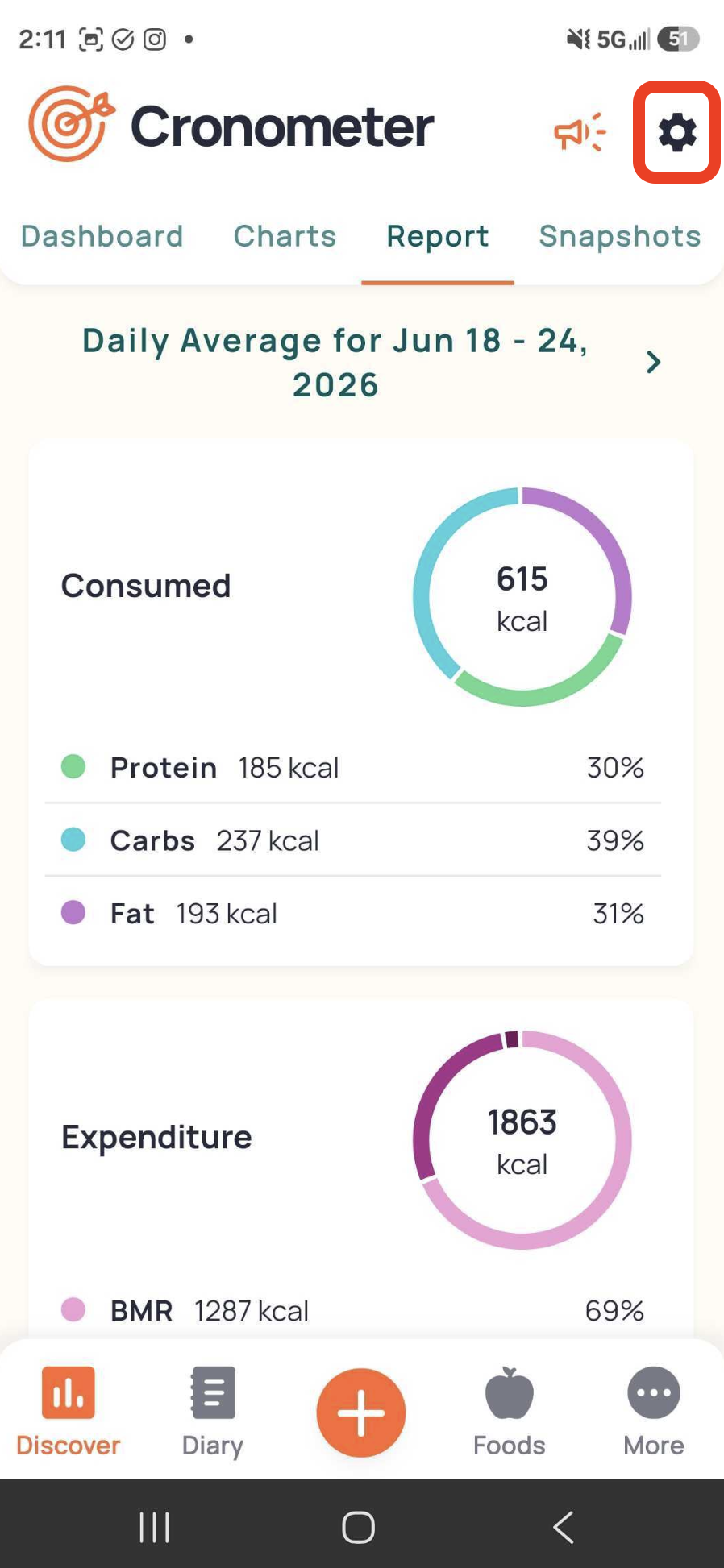
Nutrition ReportReview · Android visual; mobile docs · Basic week; Gold rangeVisual

Entry

Discover > Report

Primary actions

  • Change range
  • Open settings

States

  • Daily-average summary
cr-21
Report settingsReview · Mobile · Basic; Gold custom rangeDocumented

Entry

Report gear

Primary actions

  • Include today/supplements
  • Choose day type

States

  • All/nonempty/complete days
cr-21
ChartsReview · Mobile · Basic; Gold advancedDocumented

Entry

Discover > Charts

Primary actions

  • Expand
  • Filter
  • Manage charts

States

  • Weight
  • Energy
  • Gold/custom
cr-22
Connect Apps & DevicesIntegrations · iOS Apple Health; Android Health Connect · BasicDocumented

Entry

More > Connect Apps & Devices

Primary actions

  • Connect
  • Set permissions
  • Backfill

States

  • Connected/disconnected
cr-25 · cr-26
Exercise entryActivity · Mobile · BasicDocumented

Entry

+ > Add Exercise

Primary actions

  • Search
  • Effort
  • Duration
  • Add

States

  • Database/custom
cr-42
Biometric entryActivity · Mobile · Basic; Gold customDocumented

Entry

+ > Add Biometric

Primary actions

  • Select metric
  • Value/unit
  • Add

States

  • Standard/custom
cr-43 · cr-01
Fasting settings/historyFasting · Mobile · GoldDocumented

Entry

More > Fasting

Primary actions

  • Enable
  • New fast
  • Edit history

States

  • Scheduled/active/completed
cr-30
Water widget/settingsHydration · Mobile · Basic; Gold containerDocumented

Entry

Diary water widget

Primary actions

  • Add/remove
  • Custom amount
  • Goal

States

  • Drinking/total-water measures
cr-41
Account and deletionAccount · Mobile; Web · All accountsDocumented

Entry

More > Account

Primary actions

  • Privacy
  • Bulk delete
  • Delete account

States

  • Irreversible deletion
cr-27 · cr-28
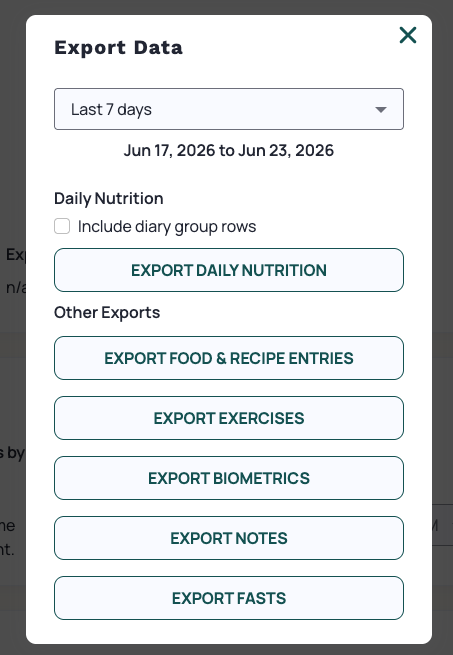
Export Data dialogAccount · Web · BasicVisual

Entry

Web account data export

Primary actions

  • Choose range
  • Choose data export

States

  • Include diary-group rows unchecked
cr-28 · cr-01
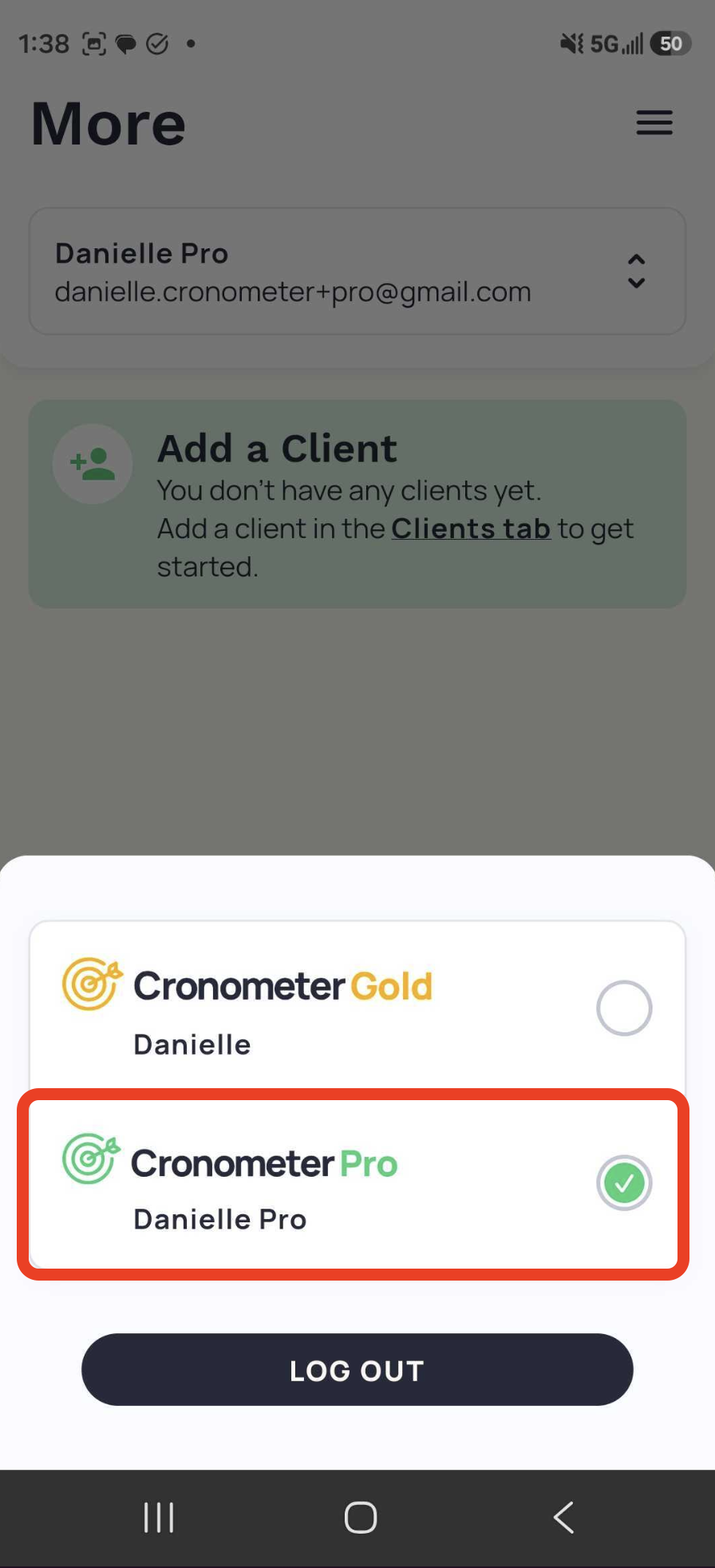
Gold/Pro profile switcherProfessional · Android visual; mobile docs · ProVisual

Entry

More > arrows next to name

Primary actions

  • Choose personal Gold
  • Choose Pro

States

  • Pro selected; empty clients
cr-36
Crono Coach setupCoaching · Mobile · GoldDocumented

Entry

Dashboard > Get Started

Primary actions

  • Goals/restrictions
  • Notes
  • Accept disclaimer

States

  • Initial setup
  • Adjust settings
  • Hide Coach
cr-38
Repeating itemsFoods · Mobile · GoldDocumented

Entry

Foods > Repeat Items

Primary actions

  • Configure recurrence
  • Disable
  • Delete

States

  • Scheduled
  • Paused
cr-39
Signup and email validationOnboarding · Mobile · BasicDocumented

Entry

After plan review

Primary actions

  • Enter credentials
  • Accept terms
  • Validate email

States

  • Pending email confirmation
cr-02
Siri external loggingExternal capture · iOS external system surface · GoldDocumented

Entry

Enabled Siri shortcut

Primary actions

  • Describe food
  • Review confirmation

States

  • Logged banner
cr-08

Visual evidence

Source imagery with numbered commentary, not recreated app screens.

Flow explorer

Read the documented sequence and its uncertainty. These are research narratives, not interactive app simulations.

Onboard and set goalEstablish initial targetsDocumented

Preconditions

  • New account
  1. Enter profile/activity

    Needs estimated

  2. Set goal/rate

    Forecast shown

  3. Register and validate email

    Account ready

Branches & unknown transitions

  • Skip activity visible; downstream effect untested.

Persistence — documented result, not tested durability

Account stores profile; durability untested.

Friction & limits

Email handoff; warning interpretation.

cr-02 · cr-17
Search and logRecord a known foodDocumented

Preconditions

  • Account
  1. Search/filter

    Candidate list

  2. Set amount/unit/group

    Nutrition preview

  3. Add to Diary

    Entry logged

Branches & unknown transitions

  • Multi-add uses Review Items.

Persistence — documented result, not tested durability

Diary entry; untested.

Friction & limits

Similar labels can differ in nutrient coverage.

cr-04 · cr-20
Barcode and missing-product repairLog packaged foodDocumented

Preconditions

  • Camera access
  1. Scan or type code

    Match or missing-item prompt

  2. Create New; capture label/front

    Custom-food fields

  3. Review and save

    Food submitted for curation

Branches & unknown transitions

  • US labels autofill; other formats require manual details.

Persistence — documented result, not tested durability

Custom food saved; publication follows review.

Friction & limits

Capture quality and serving data.

cr-05
Photo match and repairConvert meal image into entriesDocumented

Preconditions

  • Gold
  1. Capture/upload

    Matched foods

  2. Edit amounts; swap/add/delete

    Reviewed candidates

  3. Add to Diary

    Committed entries

Branches & unknown transitions

  • New photo replaces matches; Create makes meal/recipe.

Persistence — documented result, not tested durability

Documented diary result; not tested.

Friction & limits

Hidden ingredients remain user responsibility.

cr-06
Voice or typed matchUse natural-language food entryDocumented

Preconditions

  • Gold
  1. Speak/type; Match Foods

    Candidates

  2. Repair portions/matches

    Reviewed items

  3. Add to Diary

    Entries logged

Branches & unknown transitions

  • Re-matching replaces prior matches.

Persistence — documented result, not tested durability

Diary save documented.

Friction & limits

Correction survival after re-match must be tested.

cr-07
Siri log then reviewHands-free external captureDocumented

Preconditions

  • Gold iOS; Shortcuts/Siri enabled
  1. Invoke Siri and describe food

    Confirmation banner

  2. Reopen Cronometer

    Siri reminder and marked items

  3. Review logged item

    Corrections available

Branches & unknown transitions

  • Shortcut setup occurs outside app; exact failure UI unknown.

Persistence — documented result, not tested durability

Siri inserts entries before in-app review.

Friction & limits

Different trust boundary from in-app AI.

cr-08 · cr-10
Correct a logged mealRepair entry without unintended history changesDocumented

Preconditions

  • Existing diary entry
  1. Tap entry

    Amount/unit fields

  2. Choose original/copy/adjust/explode

    Chosen editing path

  3. Review resulting diary

    Nutrition changes

Branches & unknown transitions

  • Completed day must be reopened; exact original-edit propagation requires test.

Persistence — documented result, not tested durability

Entry edit documented; historical scope not fully established.

Friction & limits

Similar editing actions demand scope comprehension.

cr-10
Copy prior intakeReuse yesterday or selected entriesDocumented

Preconditions

  • Prior diary data
  1. Select entries; Copy

    Clipboard selection

  2. Navigate target date/group

    Destination

  3. Paste

    Copied entries

Branches & unknown transitions

  • Copy to Today shortcut; whole-day imported activity excluded.

Persistence — documented result, not tested durability

Target-date entries documented.

Friction & limits

Wrong date/group; clipboard lifetime untested.

cr-11 · cr-10
Save reusable mealBundle foods eaten togetherDocumented

Preconditions

  • Foods or diary selection
  1. Name; add portioned items

    Meal draft

  2. Review; Save Meal

    Library meal

  3. Find custom meal

    Ready to log

Branches & unknown transitions

  • Explode once/always; retire preserves history, delete removes it.

Persistence — documented result, not tested durability

Custom library and historical policy documented.

Friction & limits

Meal versus recipe distinction.

cr-12
Build portionable recipeReuse a cooked dishDocumented

Preconditions

  • Ingredient information
  1. Name/add ingredients

    Full recipe

  2. Choose serving basis

    Portion model

  3. Set cooked weight if needed; review/save

    Searchable recipe

Branches & unknown transitions

  • Serving/weight basis cannot switch after save.

Persistence — documented result, not tested durability

Library recipe; retirement preserves history.

Friction & limits

Weighing and unit consistency.

cr-13 · cr-15
Import and resolve recipeReduce ingredient transcriptionDocumented

Preconditions

  • Gold; URL or ingredient list
  1. Import URL/list

    Matched ingredients

  2. Resolve flags; compare originals

    Valid ingredient list

  3. Confirm servings; review/save

    Recipe saved

Branches & unknown transitions

  • Manual list fallback when URL fails.

Persistence — documented result, not tested durability

Saved recipe documented.

Friction & limits

Unmatched items block save.

cr-14
Review a meaningful weekInterpret nutrient averagesDocumented

Preconditions

  • Logged days
  1. Mark completed days in diary

    Completeness metadata

  2. Open Report

    Period averages

  3. Filter days/today/supplements

    Adjusted comparison

Branches & unknown transitions

  • Basic recent week; Gold custom periods.

Persistence — documented result, not tested durability

Report configuration, not tested longitudinally.

Friction & limits

Exclusion rules change denominator.

cr-21 · cr-10
Adjust target without erasing historyChange future or one-day prescriptionDocumented

Preconditions

  • Gold for scheduling
  1. Choose macro/energy mode

    Baseline settings

  2. Copy template; schedule

    Future-day targets

  3. Edit Today when needed

    Single-day override

Branches & unknown transitions

  • Editing original can change past days; deleting template reverts all uses.

Persistence — documented result, not tested durability

Scope is explicitly documented.

Friction & limits

Energy target and fixed macro totals may diverge.

cr-40 · cr-44
Connect health data and recover gapsBring activity into energy accountingDocumented

Preconditions

  • Mobile app and provider permissions
  1. Choose Apple Health/Health Connect

    OS permission flow

  2. Choose streams; allow

    Connected

  3. Review baseline; Apple backfill if needed

    Expenditure updated

Branches & unknown transitions

  • Android Stop Sync separate from deleting Health Connect data.

Persistence — documented result, not tested durability

Import/export documented, not live tested.

Friction & limits

Conflicting baseline advice across docs.

cr-25 · cr-26 · cr-18 · cr-24
Export before removing dataRetrieve or delete recordsDocumented

Preconditions

  • Authenticated account; web for export
  1. Choose period/type; export

    CSV requested

  2. Select range/types for bulk delete

    Deletion selection

  3. Confirm intended deletion

    Irreversible removal

Branches & unknown transitions

  • Full account deletion separate; exact confirmation dialogue untested.

Persistence — documented result, not tested durability

Documented irreversible deletion; actual file not generated.

Friction & limits

Web handoff and irreversible scope.

cr-28 · cr-27
Cancel Gold renewalStop future billingDocumented

Preconditions

  • Know purchase channel
  1. Identify subscription source

    Web/Apple/Google branch

  2. Use web Do Not Auto-Renew or store cancellation

    Renewal cancelled per docs

Branches & unknown transitions

  • Store screens are external and not inspected; deletion is not assumed cancellation.

Persistence — documented result, not tested durability

End-of-term nonrenewal documented for web.

Friction & limits

Channel-dependent navigation.

cr-29 · cr-28
Repeat habitual foodsReduce daily entry laborDocumented

Preconditions

  • Gold
  1. Foods > Repeat Items; configure days/portion

    Recurrence

  2. Tap Log Items prompt

    Items logged

  3. Disable recurrence when needed

    Paused

Branches & unknown transitions

  • Disable reversible; Delete removes recurrence.

Persistence — documented result, not tested durability

Schedule plus user-confirmed daily logging.

Friction & limits

Not silent auto-logging.

cr-39
Use Pro without confusing client and selfManage a client contextDocumented

Preconditions

  • Pro account and accepted client
  1. Switch Gold to Pro

    Professional workspace

  2. Choose client in Clients

    Client context

  3. View client diary

    Client records displayed

Branches & unknown transitions

  • Personal diary requires switching back; context label persists.

Persistence — documented result, not tested durability

Selected client context documented.

Friction & limits

Older web guide contradicts mobile availability.

cr-36 · cr-37
Set up informational coachingInterpret logged nutritionDocumented

Preconditions

  • Gold
  1. Get Started; goals/restrictions/notes

    Personalization

  2. Accept disclaimer

    Coach enabled

  3. Adjust settings or hide via Display

    Configuration changed

Branches & unknown transitions

  • Hiding card is documented opt-out; underlying processing deletion not established.

Persistence — documented result, not tested durability

Settings documented; advice quality untested.

Friction & limits

Guidance must not be confused with clinical care.

cr-38

Design patterns & trade-offs

Review before commit

Observed or documented pattern

AI results expose repair before diary insertion.

Design interpretation

Measure correction effort, not recognition alone.

Trade-off

Siri instead inserts before review.

cr-06 · cr-07 · cr-08
Provenance beside portion

Observed or documented pattern

Food detail puts source near quantity.

Design interpretation

Data confidence can inform selection.

Trade-off

Users must distinguish coverage from accuracy.

cr-04 · cr-20
Same visual grammar across horizons

Observed or documented pattern

Rings appear in diary and period reports.

Design interpretation

Daily and longitudinal views are recognizable.

Trade-off

Averages and daily values may look alike.

cr-09 · cr-21
Explicit editing scopes

Observed or documented pattern

Recipe menu distinguishes original/copy/adjust/explode.

Design interpretation

Power users can choose scope.

Trade-off

Choice increases accidental-history-change risk.

cr-10
Recipe physical model

Observed or documented pattern

Ingredients and cooked weight coexist.

Design interpretation

Portioning respects final dish mass.

Trade-off

Requires measurements; serving basis locks.

cr-13 · cr-15
Transparent target arithmetic

Observed or documented pattern

Expanded target breakdown precedes macro controls.

Design interpretation

Explain why calorie allowance changes.

Trade-off

Several independently configurable quantities.

cr-16 · cr-44
Export separated by data semantics

Observed or documented pattern

Dialog separates summaries from entries.

Design interpretation

Analysts can choose appropriate granularity.

Trade-off

Web handoff interrupts mobile-only workflow.

cr-28 · cr-21
Professional context isolation

Observed or documented pattern

Gold and Pro are explicit profile choices.

Design interpretation

Reduces self/client ambiguity.

Trade-off

Persistent client labels still need usability validation.

cr-36
Optional rather than presumed ingredients

Observed or documented pattern

See cr-s08 and cr-v04 for the canonical observation.

Design interpretation

Encourages checking unseen ingredients.

Trade-off

Suggestion exposure can introduce false additions.

cr-06

Feature detail

Profile-led onboardingDocumented

Profile, activity and goal inform targets; email validation completes account creation.

Tier

Basic

Platforms

iOS; Android; Web

cr-02 · cr-03
Weight goal and forecastDocumented

Goal rate changes energy target; lower-energy warning requires acknowledgment.

Tier

Basic

Platforms

iOS; Android; Web

cr-17 · cr-03
Energy target and balanceDocumented

Weight-goal or custom target; expenditure-above-baseline is independently configurable.

Tier

Basic

Platforms

iOS; Android; Web

cr-16 · cr-48
Ratios, fixed and ketoDocumented

Fixed grams need not equal energy target; Gold templates support day-specific targets.

Tier

Basic; Gold scheduling

Platforms

iOS; Android; Web

cr-44 · cr-40 · cr-01
Editable micronutrient targetsDocumented

Minimum, maximum and visibility settings; unreported nutrients are not proof of zero intake.

Tier

Basic; Gold advanced analysis

Platforms

iOS; Android; Web

cr-19 · cr-01
Curated source provenanceDocumented

Vendor describes lab-analyzed sources and review of community submissions, not equal completeness for every food.

Tier

Basic

Platforms

iOS; Android; Web

cr-20
Barcode lookupDocumented

Camera lookup has manual-number fallback; web accepts barcode numbers in search.

Tier

Basic

Platforms

iOS; Android; Web manual number lookup

cr-05 · cr-20
Missing-barcode label captureLimited

US-label autofill is documented within custom-food submission; not universal label OCR.

Tier

Not explicitly gated in scanner help

Platforms

iOS; Android

cr-05
AI photo matchingDocumented

See canonical workflow cr-f04.

Tier

Gold

Platforms

iOS; Android documentation; iOS screenshots

cr-06
Voice and Siri loggingDocumented

In-app review before adding; Siri logs first and asks for later review.

Tier

Gold

Platforms

iOS; Android in-app; Siri iOS only

cr-07 · cr-08
Typed natural-language matchingDocumented

Voice Log also accepts typed descriptions.

Tier

Gold

Platforms

iOS; Android

cr-07
Group quick-add shortcutsLimited

Documented shortcut configuration; calories-only quick-entry mode not established.

Tier

Basic diary groups; action gates vary

Platforms

iOS; Android

cr-45
Amount and serving editDocumented

Tap logged entry to edit quantity/unit; timestamps require Gold.

Tier

Basic

Platforms

iOS; Android; Web

cr-10 · cr-01
Recipe and meal repairDocumented

Menu distinguishes original, copy, adjustment, explosion and deletion.

Tier

Basic core; Gold repeating

Platforms

iOS; Android

cr-10
Favorites and reusable libraryDocumented

Favorite star and custom library support return visits; Recents removal is documented.

Tier

Basic

Platforms

iOS; Android; Web

cr-04 · cr-10
Copy items, groups and daysDocumented

Copy to Today shortcut; whole-day copies exclude imported activity/biometrics.

Tier

Not gated in cited help

Platforms

iOS; Android; Web

cr-11 · cr-10
Custom mealsDocumented

Reusable collections differ from portioned recipes; retire preserves historical entries.

Tier

Not gated in cited help

Platforms

iOS; Android; Web

cr-12
Recipe constructionDocumented

Ingredient workflow, serving/weight basis and cooked-weight correction.

Tier

Basic

Platforms

iOS; Android; Web

cr-13 · cr-15 · cr-01
URL and ingredient-list importDocumented

Unmatched items must be corrected or removed before saving.

Tier

Gold

Platforms

iOS; Android; Web

cr-14
Planning componentsLimited

Reuse and scheduling exist; complete calendar meal-plan generator or grocery workflow not established.

Tier

Basic manual diary; Gold repeats/scheduler/suggestions

Platforms

iOS; Android; Web

cr-39 · cr-40 · cr-47
Drinking and total waterDocumented

Drinking-water widget differs from total water including foods.

Tier

Basic; Gold custom container size

Platforms

iOS; Android; Web

cr-41
Weight chartDocumented

Single-metric chart defaults to weight; not evidence of an adaptive smoothed-weight algorithm.

Tier

Basic chart; Gold advanced charts

Platforms

iOS; Android; Web

cr-22
BiometricsDocumented

Search metric, enter value/unit and group; custom metrics reusable.

Tier

Basic standard; Gold custom/timestamps

Platforms

iOS; Android; Web

cr-43 · cr-01
SnapshotsDocumented

Upload JPG/PNG with title, note, vitals; consumer-mobile operation not verified.

Tier

Tier not established in snapshots article

Platforms

Web; mobile Pro documented; mobile consumer tab visually present

cr-34 · cr-36 · cr-21
Energy-oriented exercise logDocumented

Type, effort and duration estimate energy; no set/rep training-program claim.

Tier

Basic

Platforms

iOS; Android; Web

cr-42
Device integrationsDocumented

Per-stream permissions and provider-specific limits; WHOOP strength training not imported in cited overview.

Tier

Basic selected integrations

Platforms

Web account links; iOS; Android

cr-24 · cr-01
Apple Health and Health ConnectDocumented

Android imports exercise/biometrics and water; exports food/water and supported biometrics.

Tier

Basic

Platforms

iOS Apple Health; Android Health Connect

cr-25 · cr-26
Dynamic but not established learned targetsLimited

Profile/activity/goal-dependent recalculation documented; intake-and-weight learned expenditure algorithm not established.

Tier

Basic; Gold scheduling

Platforms

iOS; Android; Web

cr-16 · cr-18
Range-based nutrition reviewLimited

Nutrition averages and completeness filters documented; dedicated weekly check-in not established.

Tier

Basic recent week; Gold custom range

Platforms

iOS; Android; Web

cr-21
Fasting scheduling and historyDocumented

Open-ended or timed fasts, recurrence, history and food-entry warning.

Tier

Gold

Platforms

iOS; Android; Web

cr-30
Conditional logging remindersDocumented

Reminds if food/group remains unlogged; weight reminder follows seven days without entry.

Tier

Basic food/weight; Gold fasting

Platforms

iOS; Android; Web email options

cr-31 · cr-28
Home-screen widgetsDocumented

iOS docs list water/streaks in addition to energy/fasting; Android article lists energy/fasting only.

Tier

Core widgets; Gold fasting

Platforms

iOS; Android

cr-32 · cr-33
Offline behaviorUnknown

No offline durability/network-requirement claim established in retrieved official corpus.

Tier

Unknown

Platforms

Unknown

cr-02 · cr-09
Raw CSV exportDocumented

Date-ranged exports include daily nutrition, food/recipe entries and other data types.

Tier

Basic raw export; Gold print reports

Platforms

Web

cr-28 · cr-01
Bulk or account deletionDocumented

Irreversible delete by data type/date or entire account; separate Health Connect data deletion.

Tier

Account control

Platforms

iOS; Android; Web

cr-27 · cr-28 · cr-26
Cancel renewal at purchase channelDocumented

Web Do Not Auto-Renew; app-store purchases managed at their original store.

Tier

Gold

Platforms

Web; Apple subscriptions; Google Play

cr-29
Browser applicationDocumented

Diary, Foods, Trends and account/device settings; useful export companion.

Tier

Basic; Gold; Pro

Platforms

Web

cr-03 · cr-28
Sharing with friends/professionalsLimited

Friends exchange foods/recipes, not diary access; professional access can be stopped.

Tier

Gold friends; Pro relationship

Platforms

iOS; Android; Web

cr-35
AI support and professional workspaceDocumented

Coach offers informational guidance; Pro is client management, not automatic human-coach service.

Tier

Gold Crono Coach; separate Pro subscription

Platforms

iOS; Android; Web Pro

cr-38 · cr-36 · cr-37

Full research dossier

Read the complete narrative

Cronometer — product-design research dossier

Research date: October 7, 2026. Scope: public documentation and official demonstration screenshots, not hands-on app testing. Basic, Gold and Pro are separate product contexts. Mobile documentation generally covers both phone platforms; screenshot platform is identified separately. Numerical citations map to the isolated citation ledger; [6] corresponds to cr-06 in app.json.

1. Product thesis and evidence boundaries

Cronometer's central object is a date-indexed diary rather than a prescribed meal plan.[9] Food, exercise, biometric and note records contribute to a daily picture, with summaries above the diary and additional actions behind gestures and menus.[9] The product-design implication is that accurate capture, correction and interpretation matter together: a fast entry that distorts later reporting is not a successful end-to-end experience.

Its distinction is not simply a larger food catalog. The vendor differentiates research/laboratory-derived food composition from branded nutrition labels and privately created records.[20] Community submissions undergo curation before publication, but a curated branded entry can still contain fewer nutrients than a generic research entry.[20] This is a provenance-and-coverage model, not evidence that all displayed values have identical certainty.

The Foods library separates custom foods, meals and recipes, alongside repeat items and nutrient-oriented discovery tools.[47] This creates a reusable knowledge layer above individual diary events. Design evaluation should ask whether users understand when they are changing one occurrence, a reusable definition or an entire historical series.

This dossier reads 48 official help articles, retains their complete extracted text, and visually inspects 12 official screenshots. No signup, purchase, authenticated record, native build or external synchronization was exercised. Screens are evidence of depicted controls, not proof of working persistence. Source updated_at values are retained but must not be mistaken for screenshot capture dates or app-release versions. The gallery preserves original files and provides separately labeled research annotations.

2. Tiers, platforms and information architecture

Basic is an ongoing free account, not merely a trial: the subscription guide includes source nutrition data, custom foods/recipes, selected integrations, diary groups and raw-data export.[1] Gold adds automation, advanced analysis, sharing and other convenience features.[1] Pro is a professional client-management subscription that also supplies personal/client Gold access; it is not a synonym for the consumer premium tier.[1] Mobile's depicted bottom navigation is Discover, Diary, the central add action, Foods and More.[10] Diary is documented as the opening destination, while Discover's dashboard can be configured separately.[9][23] The screenshots show both detail-first screens and tabbed review areas.[4][21] This combines a daily operational surface with secondary interpretation surfaces rather than forcing every task into one home feed.

Web onboarding routes target configuration through More → Targets + Profile, device connections through More → Devices, and analysis through Trends.[3] It also supports Diary and Foods workflows.[3] Do not mechanically copy phone navigation labels into desktop flow diagrams. The web account surface is especially important for export, payment management and deletion.[28] There is an important documentation contradiction: the general Pro getting-started article says the professional interface is web-only, while a dedicated Pro Mobile guide explicitly explains iOS/Android client management.[37][36] The specific mobile guide, plus its actual Android profile-switcher image, supports mobile availability more directly.[36] The older assertion is recorded as conflicting evidence rather than silently discarded.

No universal subscription price is asserted. Checkout currency, geography, store purchase channel and promotional entitlements were not tested. Likewise, a feature page that omits a paid gate is not equivalent to an independently verified Basic entitlement; ambiguous entries are labeled accordingly in the structured matrix.

3. First-run setup and target comprehension

Mobile setup requests personal details, activity level, weight goal and desired rate, presents a plan/forecast, then finishes account credentials, terms and email validation.[2] The inspected activity screen shows an explicit step indicator, a discrete selection control with descriptive context, a dominant Next action and a secondary Skip.[2] That is evidence of progressive disclosure, not a measured abandonment or conversion effect.

Returning users adjust weight goals through More → Targets → Weight Goal.[17] Changing the intended rate changes the energy target and forecast; a lower-energy range can trigger a review acknowledgment.[17] The overview can also appear on the dashboard.[17] The responsible critique is discoverability and comprehension of this safeguard, not a claim that the recommended target is clinically suitable for an individual.

Macro configuration supports ratios, fixed targets and a keto calculation.[16] Energy can follow the weight goal or a custom target; selecting custom energy deactivates the weight-goal setting.[16] An independent advanced option determines whether expenditure above baseline increases the target.[16] The inspected screen makes the arithmetic expandable, an important transparency affordance when an allowance changes during the day.[16]

Fixed macros can be expressed in grams or calories.[44] Their aggregate energy need not match a separately configured weight-goal energy target; the help explicitly describes aligning them through a custom energy value if desired.[44] A parity comparison should distinguish editable macro grams from a coherent, automatically reconciled calorie prescription.

Expenditure is estimated from BMR, baseline activity, tracker activity, exercise and optional thermic effect of food.[18] The documented default BMR uses profile information, and incoming activity adjusts baseline components.[18] This is dynamic energy accounting. It does not establish an algorithm that learns expenditure from longitudinal intake and weight change. Calling it equivalent to an adaptive coaching algorithm would overstate the evidence.

Individual nutrient settings expose a daily target, maximum threshold and visibility.[19] Some nutrients are hidden because source coverage is sparse; reported intake may underestimate actual intake.[19] Designers should treat missing data and unmet targets as different states. A visually precise progress bar cannot remove the uncertainty created by incomplete source composition.

4. Core capture: select, inspect, commit

Food search supports category and database filters, favorites and a multi-add review stage.[4] Food detail combines serving controls with nutrient information and source provenance.[4] The inspected banana example shows amount, serving unit, timestamp and group above the data source, then nutrition and a fixed bottom commit button.[4] This makes portion selection part of verification rather than an afterthought.

Barcode lookup is a phone-camera workflow with a manual-number fallback.[5] A missing code branches into custom-food creation and label/package photography.[5] The documented automatic nutrition/serving fill applies to American labels; public publication follows curation review.[5] The handoff is therefore not “camera always produces trustworthy nutrition.” It is a lookup path plus a structured exception-resolution path.

Custom-food authoring lets users define the serving reference, alternate weight-based measures, label format and nutrient fields.[46] Its historical semantics matter: retiring removes the library item while preserving prior diary entries; deleting can remove those entries.[46] This is a high-priority destructive-action test because users may intend to clean up search without rewriting history.

For the canonical photo capture, review and correction sequence, see workflow cr-f04 and annotated visuals cr-v03–cr-v05.[6] Include replacement-photo behavior in the evaluation; the canonical workflow retains its documented scope.[6] The inspected sequence covers camera, suggestions and portion-repair affordances, but the examples are different meals, not one continuous tested capture session. Source red arrows and circles are publisher annotations, not native controls.[6]

Gold Voice Log accepts speech or typed descriptions, matches them to foods and permits repair before addition.[7] Editing the description and matching again replaces the earlier results.[7] The keyboard screenshot proves that typed natural-language input belongs in the feature matrix; it should not be misclassified as ordinary keyword search simply because it shares a voice-branded entry point.[7]

Siri is a different trust model: Gold iOS users enable a shortcut, describe foods externally and receive a logging confirmation.[8] The next app visit reminds them to review Siri-marked entries.[8] Unlike in-app match review, this is a post-commit inspection path. An evaluation must include incorrect external commands, later discoverability and reversal, not just successful dictation.

5. Correction, reuse and historical integrity

Tapping a diary item edits amount/unit/group; swiping exposes additional actions.[10] For the canonical recipe-edit choices, see cr-f07 and cr-v07.[10] A completed day freezes editing until reopened.[10] These names suggest intentional scope separation, but the precise propagation of each recipe change was not live-tested. That uncertainty is more important than counting the number of available menu items.

Copying can target one entry, selected entries, a group or a day, with destination-date/group paste and a Copy to Today shortcut.[11] Returning-user efficiency is not limited to favorites. Test wrong-day recovery, clipboard behavior across navigation and accidental repeated pastes; none of those durability details can be established from static instructions alone.

Custom meals bundle routinely co-eaten items.[12] They can be created from Foods or a diary selection and later exploded into constituents; the app offers a once-versus-always preference for explosion.[12] This is a collection abstraction rather than merely a recipe alias. It supports editing breakfast components independently while retaining a reusable meal definition.

Custom recipes model ingredient quantities and a serving basis, followed by notes and nutrition review.[13] The documentation warns that weight-based versus serving-based mode cannot be changed after saving.[13] The ingredient screenshot surfaces each ingredient's source alongside its quantity, with cooked weight and Next visible.[13] The lock-in makes early explanation and recoverable duplication particularly important.

Cooked recipe weight accounts for cooking-related weight changes; the documented adjustment affects water while preserving other nutrients before portion scaling.[15] Users can edit or revert it.[15] This is unusually relevant to real kitchen behavior: a cooked dish's final mass differs from a sum of raw ingredients. The dossier describes the product mechanism, not laboratory validation of every cooking assumption.

Gold recipe import accepts a URL or manually pasted ingredient lines.[14] It presents original versus matched descriptions and blocks saving while unresolved matches remain; users can replace, resize or remove problematic items.[14] This is a stronger correction contract than a silent best guess. An importer benchmark should include unit ambiguity and substituted ingredients, not merely a valid recipe URL.

Gold repeat items are configured with portion, group, days and optional timing, but users still tap the daily Log Items prompt.[39] Recurrence can be disabled or deleted.[39] Do not describe this as unconditional automatic consumption logging. That distinction is important for skipped breakfasts, travel and supplements taken inconsistently.

Diary groups support custom labels, group-specific shortcuts and group reuse.[45] Creating a meal/recipe from a group saves a reusable definition without replacing the original diary items.[45] The help's phrase “Quick Add” refers to shortcut configuration here; a standalone calories-only quick-add mode was not established by this research.

Daily Report includes energy, macro and nutrient sections, with individual nutrient bars opening contributor/target details.[48] It distinguishes remaining-to-target from consumed-versus-burned balance, and renders targets met, exceeded or not set differently.[48] The design implication is to preserve those semantic differences in any simplified summary; one generic red/green score would hide why a value matters.

Period Nutrition Report averages daily data.[21] Basic access covers the recent week; Gold enables custom ranges.[21] Include-today, supplement and complete/nonempty/all-day choices change what enters the calculation.[21] The Android screenshot places report beside Dashboard, Charts and Snapshots.[21] Filtering incomplete days is valuable, but the comparison denominator needs to remain understandable to avoid apparent improvement caused by exclusion alone.

Default charts include energy consumed and a single metric, initially weight.[22] Gold expands chart types and permits custom charts; chart settings include date/day filters, contextual options and dashboard placement.[22] A plotted weight history is documented; a separately smoothed weight-trend algorithm is not. The chart article itself is uneven about custom-range availability, so exact Basic range controls belong in the test checklist.

Macro Scheduler adds named templates, weekday scheduling and single-day overrides.[40] Editing an existing template can change past uses, whereas assigning a new template applies forward; copying preserves prior target definitions.[40] This is planning of targets, not evidence of an end-to-end generated meal plan, grocery list or compliance-adaptive weekly check-in.

Web Snapshots allows image upload with accompanying vitals, title and notes, plus download/delete actions.[34] The mobile Report screenshot also visibly contains a Snapshots tab, and Pro-mobile documentation names client Snapshots.[21][36] Consumer-mobile operation and tier entitlement were not directly established; neither absence nor full parity should be inferred from the tab alone.

7. Activity, integrations and everyday support

Manual exercise records use type, effort and duration to estimate energy from adjusted activity values; custom exercise is also supported.[42] This is an activity-energy boundary, not a documented strength-training program builder, set/rep logger or workout-progression engine. Adjacent fitness capabilities must not be smuggled into nutrition parity merely because exercise appears in the diary.

Biometric entry supports measurement search, values, units and diary grouping.[43] Custom biometrics and timestamps carry Gold distinctions.[43][1] Keep standard measurements separate from customizable tracked variables when comparing products: both may look like “body metrics,” but the extensibility and analysis value differ.

Integration documentation describes account linking and per-stream preferences.[24] It notes a WHOOP strength-training import limitation and provides a broad ecosystem overview.[24] Apple Health requires mobile permissions, supports retrospective backfill and exposes time-series data; Android Health Connect has its own directional import/export list and disconnect/data-deletion controls.[25][26] A generic “syncs with health” checkbox loses these meaningful differences.

There is conflicting baseline advice: the broad integration overview recommends Sedentary, while Apple Health and expenditure-specific guidance tell users to select the baseline fitting everyday life.[24][25][18] This dossier does not invent a reconciliation. Verify the current provider-specific behavior with a controlled exercise event and inspect which baseline/activity components change.

Water tracking distinguishes explicitly logged drinking water from total water including food.[41] The widget supports additions/removals and custom amounts, while Gold permits customizing the default container.[41] This is a useful example of two related measures that should not be collapsed into one apparently universal hydration number.

Food reminders depend on whether anything has been logged by the chosen time, with optional group-specific checks; weight reminders are based on elapsed time since the last measurement.[31] These are behavior-aware prompts rather than merely repeating alarms. Test notification permissions, timezone changes and whether an incomplete meal still suppresses its reminder.

Gold fasting includes scheduled or open-ended periods, recurrence, history edits, chart overlays and an optional warning when adding food during a fast.[30] It is integrated with logging but remains a separate tracked object. This research makes no recommendation to fast and no efficacy claim about the feature.

Official iOS widget documentation lists energy, fasting, water and streak views, whereas the Android article lists energy and fasting categories.[32][33] That is an observed documentation difference, not sufficient proof of Android feature absence. Device-picker inspection is required for a true platform-parity claim.

8. Coaching, collaboration and account lifecycle

Crono Coach is a Gold in-app assistant for interpreting logged information, goals and preferences.[38] Setup collects goals/restrictions and optional notes before a disclaimer; hiding the card is documented through dashboard settings.[38] Do not equate that UI opt-out with deletion of previously processed data without further privacy evidence. Advice quality and safety were not tested.

Friends on Gold exchange custom foods/recipes, not access to each other's diaries.[35] Professional access is separately accepted/rejected and can be stopped.[35] This boundary is important: sharing a recipe with a friend is not granting clinical-style longitudinal visibility. A social feature score should reflect the actual collaboration model rather than implying a community feed.

Pro introduces client selection, a selected-client diary and reports, plus a separate personal Gold profile.[36] The inspected switcher labels Gold and Pro clearly.[36] Professional documentation also describes invitations, business information and client history access after acceptance.[37] No human coach is automatically provided by purchasing Pro; it is software for a professional relationship.

Web account export offers CSV retrieval by date and data type, including daily nutrition versus item records.[28] A daily-nutrition option includes meal-group rows.[28] The inspected dialog confirms separate export buttons and the grouping checkbox.[28] Export availability must remain distinct from Gold printable reporting, and actual CSV schema/timezone fidelity remains untested.

Mobile and web provide bulk deletion and full account deletion with irreversible consequences.[27][28] Mobile also exposes notification/privacy choices and optional two-factor authentication.[27] Export first is an evaluation precaution, not an observed automated safety step. Deleting synchronized data in a health platform and deleting the Cronometer account are separate scopes.[26] Cancellation follows purchase origin: web uses Do Not Auto-Renew; iOS and Android purchases use their respective subscription-management surfaces.[29] Account deletion must not be assumed to cancel store billing. No paid subscription was changed during this research, and external store screens were not inspected.

9. Design judgment and hands-on acceptance checklist

The strongest design pattern is inspectability at the point of correction: provenance beside portions, explicit recipe operations, candidate repair before AI commit and target arithmetic near target settings.[4][10][16] This is an analyst interpretation of visible/documented structure, not measured usability. The tradeoff is density: more control exposes more concepts, scopes and hidden menus that must be learned.

The highest-priority experiment is not “How quickly can I add dinner?” It is “Can I notice and repair an incorrect dinner, then verify the correction tomorrow and on another device?” Use synthetic test records and record OS, app version, region, tier and data source. Test copy versus original edits, recipe retirement, AI rematching, Siri post-commit repair, complete-day reopening and target-template history separately.

Additional acceptance checks are: airplane-mode capture and reconnection; Basic/Gold downgrade behavior; Android widget inventory; exact Basic chart ranges; one-provider energy reconciliation; CSV row/timezone stability; mobile Snapshots entitlement; Coach opt-out semantics; and deletion versus billing warnings. These are open questions, not inferred product failures. The structured dossier contains 19 documented flows and a test-oriented question list to guide later authorized hands-on work.

Artifacts: app.json is the machine-readable matrix; visuals.html is the annotated evidence gallery; assets/ retains originals, labeled variants and contact sheets; sources/ holds articles and ledgers; audit/verification.json records computed checks. All 40 feature keys named in the research contract are preserved; not-found means unknown rather than absent.

Sources

[1] https://support.cronometer.com/api/v2/help_center/en-us/articles/360028026971.json — Subscription Types [2] https://support.cronometer.com/api/v2/help_center/en-us/articles/360021677792.json — Mobile - Quick Start Guide [3] https://support.cronometer.com/api/v2/help_center/en-us/articles/360021897491.json — Web - Quick Start Guide [4] https://support.cronometer.com/api/v2/help_center/en-us/articles/360018955211.json — Mobile - Add a Food [5] https://support.cronometer.com/api/v2/help_center/en-us/articles/360020441392.json — Mobile - Scan Food [6] https://support.cronometer.com/api/v2/help_center/en-us/articles/39013533811092.json — Mobile - Photo-Logging [7] https://support.cronometer.com/api/v2/help_center/en-us/articles/47549391461780.json — Mobile - Voice Logging [8] https://support.cronometer.com/api/v2/help_center/en-us/articles/47664884315412.json — Mobile - Siri Voice Logging [9] https://support.cronometer.com/api/v2/help_center/en-us/articles/360018593112.json — Mobile - Diary Overview [10] https://support.cronometer.com/api/v2/help_center/en-us/articles/360019003171.json — Mobile - Edit Diary Entries [11] https://support.cronometer.com/api/v2/help_center/en-us/articles/360018695932.json — Mobile - Copy & Paste [12] https://support.cronometer.com/api/v2/help_center/en-us/articles/16510542794004.json — Mobile - Create Custom Meal [13] https://support.cronometer.com/api/v2/help_center/en-us/articles/360019870111.json — Mobile - Create a Custom Recipe [14] https://support.cronometer.com/api/v2/help_center/en-us/articles/4403966087828.json — Mobile - Recipe Importer [15] https://support.cronometer.com/api/v2/help_center/en-us/articles/4407646573588.json — Mobile - Set a Cooked Recipe Weight [16] https://support.cronometer.com/api/v2/help_center/en-us/articles/33113157685652.json — Mobile - Macro & Energy Targets [17] https://support.cronometer.com/api/v2/help_center/en-us/articles/32978027080980.json — Mobile - Weight Goal [18] https://support.cronometer.com/api/v2/help_center/en-us/articles/33132110153492.json — Mobile - Energy Expenditure [19] https://support.cronometer.com/api/v2/help_center/en-us/articles/360020571571.json — Mobile - Edit Nutrient Targets [20] https://support.cronometer.com/api/v2/help_center/en-us/articles/360018239472.json — Data Sources [21] https://support.cronometer.com/api/v2/help_center/en-us/articles/360019864891.json — Mobile - Nutrition Report [22] https://support.cronometer.com/api/v2/help_center/en-us/articles/360019864311.json — Mobile - Charts [23] https://support.cronometer.com/api/v2/help_center/en-us/articles/10684426724116.json — Mobile - Dashboard [24] https://support.cronometer.com/api/v2/help_center/en-us/articles/360018579072.json — Devices Integration Overview [25] https://support.cronometer.com/api/v2/help_center/en-us/articles/360020734212.json — Apple Health & Apple Watch [26] https://support.cronometer.com/api/v2/help_center/en-us/articles/22731903751316.json — Health Connect [27] https://support.cronometer.com/api/v2/help_center/en-us/articles/360019870072.json — Mobile - Account [28] https://support.cronometer.com/api/v2/help_center/en-us/articles/360018760151.json — Account Settings [29] https://support.cronometer.com/api/v2/help_center/en-us/articles/360028873772.json — How do I cancel my Gold Subscription? [30] https://support.cronometer.com/api/v2/help_center/en-us/articles/360036016612.json — Mobile - Fasting [31] https://support.cronometer.com/api/v2/help_center/en-us/articles/360051718511.json — Mobile - Notifications [32] https://support.cronometer.com/api/v2/help_center/en-us/articles/4407693442324.json — iOS Home Screen Widgets [33] https://support.cronometer.com/api/v2/help_center/en-us/articles/4417368926100.json — Android Home Screen Widgets [34] https://support.cronometer.com/api/v2/help_center/en-us/articles/360018570251.json — Snapshots [35] https://support.cronometer.com/api/v2/help_center/en-us/articles/360058911291.json — Mobile - Sharing [36] https://support.cronometer.com/api/v2/help_center/en-us/articles/36866328492564.json — Pro Mobile - Getting Started [37] https://support.cronometer.com/api/v2/help_center/en-us/articles/360021361232.json — Getting Started with Cronometer Pro [38] https://support.cronometer.com/api/v2/help_center/en-us/articles/49995994334100.json — Mobile - Crono Coach [39] https://support.cronometer.com/api/v2/help_center/en-us/articles/16510562495764.json — Mobile - Set Repeating Foods [40] https://support.cronometer.com/api/v2/help_center/en-us/articles/4406120372244.json — Mobile - Macro Scheduler [41] https://support.cronometer.com/api/v2/help_center/en-us/articles/18018883315988.json — Mobile - Water Tracking [42] https://support.cronometer.com/api/v2/help_center/en-us/articles/360020448572.json — Mobile - Add Exercise [43] https://support.cronometer.com/api/v2/help_center/en-us/articles/360020717131.json — Mobile - Add a Biometric [44] https://support.cronometer.com/api/v2/help_center/en-us/articles/33231653421588.json — Mobile - Fixed Targets [45] https://support.cronometer.com/api/v2/help_center/en-us/articles/360019002571.json — Mobile - Diary Groups [46] https://support.cronometer.com/api/v2/help_center/en-us/articles/360019866351.json — Mobile - Create a Custom Food [47] https://support.cronometer.com/api/v2/help_center/en-us/articles/360019865411.json — Mobile - Foods Tab [48] https://support.cronometer.com/api/v2/help_center/en-us/articles/32689033683220.json — Mobile - Daily Report

Questions & hands-on test backlog

Does a corrected AI portion survive rematching, closing, restart and web sync?high

Why it matters

Core trust and durability.

How to verify

Gold test account; original photo, controlled changes, restart/read back.

How do original/edit-copy/adjust/explode affect historical recipe entries?high

Why it matters

Avoid retroactive corruption.

How to verify

Synthetic recipe logged on two dates; exercise each branch independently.

Which baseline advice applies to each current integration?high

Why it matters

Prevent double-counting activity.

How to verify

Compare guide versions; one tracker, known workout, inspect components.

What works offline, and how are sync conflicts resolved?high

Why it matters

Unknown from sources.

How to verify

Airplane-mode search/log/edit; reconnect; compare web.

Do all Gold AI and Coach features ship on both mobile platforms in this region?high

Why it matters

Help mobile labels do not guarantee rollout parity.

How to verify

Record app version, OS, country and account tier.

Does turning off Crono Coach stop processing or only hide its card?high

Why it matters

Privacy semantics.

How to verify

Inspect consent and privacy documentation; ask vendor.

Are barcode, saved meals and progress snapshots identically gated in Basic?medium

Why it matters

Some feature pages omit explicit tier labels.

How to verify

Clean Basic account on iOS, Android and web.

What happens to edited targets and records when Gold expires?medium

Why it matters

Downgrade continuity.

How to verify

Use already expiring test subscription; export before/after, no purchase.

Can deletion be completed without canceling store renewal?high

Why it matters

Prevent unexpected billing.

How to verify

Observe warnings without deleting paid real account; verify store state.

Are Siri errors visibly reversible and attributed after several external logs?medium

Why it matters

Post-commit review risk.

How to verify

Controlled Siri phrases; inspect provenance and corrections.

Is the Android widget list missing water/streak widgets or only underdocumented?low

Why it matters

Avoid unsupported platform absence claim.

How to verify

Inspect Android widget picker on current release.

What export columns, timezones and row identities are stable?medium

Why it matters

Migration and auditability.

How to verify

Download sample CSV, reconcile entries and nutrition summaries.

Source bibliography

Primary URLs, provenance and dates. Raw fetched texts are retained privately, not published here.

  1. cr-01
    Subscription Types ↗

    official-help · Retrieved 2026-10-07T11:05:18.670607+00:00 · Published / updated 2026-10-06T15:12:21Z

  2. cr-02
    Mobile - Quick Start Guide ↗

    official-help · Retrieved 2026-10-07T11:05:18.849383+00:00 · Published / updated 2026-10-07T00:04:41Z

  3. cr-03
    Web - Quick Start Guide ↗

    official-help · Retrieved 2026-10-07T11:05:19.011249+00:00 · Published / updated 2026-10-02T19:25:36Z

  4. cr-04
    Mobile - Add a Food ↗

    official-help · Retrieved 2026-10-07T11:05:19.242431+00:00 · Published / updated 2026-10-07T07:23:59Z

  5. cr-05
    Mobile - Scan Food ↗

    official-help · Retrieved 2026-10-07T11:05:19.483466+00:00 · Published / updated 2026-10-04T13:12:44Z

  6. cr-06
    Mobile - Photo-Logging ↗

    official-help · Retrieved 2026-10-07T11:05:19.675645+00:00 · Published / updated 2026-09-28T00:39:05Z

  7. cr-07
    Mobile - Voice Logging ↗

    official-help · Retrieved 2026-10-07T11:05:19.879135+00:00 · Published / updated 2026-10-01T01:43:37Z

  8. cr-08
    Mobile - Siri Voice Logging ↗

    official-help · Retrieved 2026-10-07T11:05:20.067748+00:00 · Published / updated 2026-09-30T10:28:04Z

  9. cr-09
    Mobile - Diary Overview ↗

    official-help · Retrieved 2026-10-07T11:05:20.267882+00:00 · Published / updated 2026-10-04T16:44:42Z

  10. cr-10
    Mobile - Edit Diary Entries ↗

    official-help · Retrieved 2026-10-07T11:05:20.402863+00:00 · Published / updated 2026-06-25T20:35:54Z

  11. cr-11
    Mobile - Copy & Paste ↗

    official-help · Retrieved 2026-10-07T11:05:20.540502+00:00 · Published / updated 2026-08-28T14:25:45Z

  12. cr-12
    Mobile - Create Custom Meal ↗

    official-help · Retrieved 2026-10-07T11:05:20.705085+00:00 · Published / updated 2026-09-17T18:36:53Z

  13. cr-13
    Mobile - Create a Custom Recipe ↗

    official-help · Retrieved 2026-10-07T11:05:20.873893+00:00 · Published / updated 2026-10-04T07:43:44Z

  14. cr-14
    Mobile - Recipe Importer ↗

    official-help · Retrieved 2026-10-07T11:05:21.036224+00:00 · Published / updated 2026-10-05T00:38:05Z

  15. cr-15
    Mobile - Set a Cooked Recipe Weight ↗

    official-help · Retrieved 2026-10-07T11:05:21.201403+00:00 · Published / updated 2026-08-01T04:28:28Z

  16. cr-16
    Mobile - Macro & Energy Targets ↗

    official-help · Retrieved 2026-10-07T11:05:21.353593+00:00 · Published / updated 2026-10-06T08:27:20Z

  17. cr-17
    Mobile - Weight Goal ↗

    official-help · Retrieved 2026-10-07T11:05:21.496413+00:00 · Published / updated 2026-10-06T17:55:15Z

  18. cr-18
    Mobile - Energy Expenditure ↗

    official-help · Retrieved 2026-10-07T11:05:21.621995+00:00 · Published / updated 2026-10-06T04:21:23Z

  19. cr-19
    Mobile - Edit Nutrient Targets ↗

    official-help · Retrieved 2026-10-07T11:05:21.744185+00:00 · Published / updated 2026-08-04T13:34:55Z

  20. cr-20
    Data Sources ↗

    official-help · Retrieved 2026-10-07T11:05:21.886530+00:00 · Published / updated 2026-10-03T10:59:02Z

  21. cr-21
    Mobile - Nutrition Report ↗

    official-help · Retrieved 2026-10-07T11:05:22.029562+00:00 · Published / updated 2026-09-16T19:14:15Z

  22. cr-22
    Mobile - Charts ↗

    official-help · Retrieved 2026-10-07T11:05:22.167095+00:00 · Published / updated 2026-09-04T00:09:52Z

  23. cr-23
    Mobile - Dashboard ↗

    official-help · Retrieved 2026-10-07T11:05:22.304188+00:00 · Published / updated 2026-09-30T01:31:58Z

  24. cr-24
    Devices Integration Overview ↗

    official-help · Retrieved 2026-10-07T11:05:22.432912+00:00 · Published / updated 2026-09-24T14:53:22Z

  25. cr-25
    Apple Health & Apple Watch ↗

    official-help · Retrieved 2026-10-07T11:05:22.563237+00:00 · Published / updated 2026-10-06T18:43:07Z

  26. cr-26
    Health Connect ↗

    official-help · Retrieved 2026-10-07T11:05:22.689473+00:00 · Published / updated 2026-09-30T20:25:06Z

  27. cr-27
    Mobile - Account ↗

    official-help · Retrieved 2026-10-07T11:05:22.826444+00:00 · Published / updated 2026-09-18T22:44:08Z

  28. cr-28
    Account Settings ↗

    official-help · Retrieved 2026-10-07T11:05:22.956494+00:00 · Published / updated 2026-09-25T20:38:30Z

  29. cr-29
    How do I cancel my Gold Subscription? ↗

    official-help · Retrieved 2026-10-07T11:05:23.087413+00:00 · Published / updated 2026-10-05T13:27:05Z

  30. cr-30
    Mobile - Fasting ↗

    official-help · Retrieved 2026-10-07T11:05:23.213419+00:00 · Published / updated 2026-09-05T17:36:41Z

  31. cr-31
    Mobile - Notifications ↗

    official-help · Retrieved 2026-10-07T11:05:23.355082+00:00 · Published / updated 2026-09-29T14:31:54Z

  32. cr-32
    iOS Home Screen Widgets ↗

    official-help · Retrieved 2026-10-07T11:05:23.484998+00:00 · Published / updated 2026-09-18T17:09:57Z

  33. cr-33
    Android Home Screen Widgets ↗

    official-help · Retrieved 2026-10-07T11:05:23.612088+00:00 · Published / updated 2026-09-26T17:41:51Z

  34. cr-34
    Snapshots ↗

    official-help · Retrieved 2026-10-07T11:05:23.750184+00:00 · Published / updated 2026-09-04T20:34:43Z

  35. cr-35
    Mobile - Sharing ↗

    official-help · Retrieved 2026-10-07T11:05:23.890470+00:00 · Published / updated 2026-07-12T03:33:09Z

  36. cr-36
    Pro Mobile - Getting Started ↗

    official-help · Retrieved 2026-10-07T11:05:24.022128+00:00 · Published / updated 2026-09-02T17:26:08Z

  37. cr-37
    Getting Started with Cronometer Pro ↗

    official-help · Retrieved 2026-10-07T11:05:24.159617+00:00 · Published / updated 2026-08-14T01:49:36Z

  38. cr-38
    Mobile - Crono Coach ↗

    official-help · Retrieved 2026-10-07T11:05:24.304048+00:00 · Published / updated 2026-10-05T00:25:47Z

  39. cr-39
    Mobile - Set Repeating Foods ↗

    official-help · Retrieved 2026-10-07T11:05:24.462016+00:00 · Published / updated 2026-09-28T23:16:34Z

  40. cr-40
    Mobile - Macro Scheduler ↗

    official-help · Retrieved 2026-10-07T11:05:24.598056+00:00 · Published / updated 2026-09-10T16:58:01Z

  41. cr-41
    Mobile - Water Tracking ↗

    official-help · Retrieved 2026-10-07T11:05:24.745853+00:00 · Published / updated 2026-08-04T22:23:45Z

  42. cr-42
    Mobile - Add Exercise ↗

    official-help · Retrieved 2026-10-07T11:05:24.892115+00:00 · Published / updated 2026-10-04T12:59:50Z

  43. cr-43
    Mobile - Add a Biometric ↗

    official-help · Retrieved 2026-10-07T11:05:25.028349+00:00 · Published / updated 2026-10-01T05:22:53Z

  44. cr-44
    Mobile - Fixed Targets ↗

    official-help · Retrieved 2026-10-07T11:05:25.159467+00:00 · Published / updated 2026-10-02T19:42:14Z

  45. cr-45
    Mobile - Diary Groups ↗

    official-help · Retrieved 2026-10-07T11:05:25.297861+00:00 · Published / updated 2026-06-25T20:35:23Z

  46. cr-46
    Mobile - Create a Custom Food ↗

    official-help · Retrieved 2026-10-07T11:05:25.432179+00:00 · Published / updated 2026-10-06T16:23:16Z

  47. cr-47
    Mobile - Foods Tab ↗

    official-help · Retrieved 2026-10-07T11:05:25.557868+00:00 · Published / updated 2026-10-06T21:00:21Z

  48. cr-48
    Mobile - Daily Report ↗

    official-help · Retrieved 2026-10-07T11:05:25.703152+00:00 · Published / updated 2026-10-04T23:38:03Z

Image detail