Cal AI: product-design research dossier
Research date: October 7, 2026. Scope: public-source desk research, not installed-app testing. The structured companion is app.json; the annotated visual collection is visual-atlas.html. Original images are retained alongside clearly marked analyst annotations. Navigation described as documented comes from vendor/platform material; visual evidence establishes visible controls, not successful operation. Inferred steps are explicitly blocked at the first undocumented transition.
1. Identity, freshness and confidence
This is the nutrition product at calai.app, not the similarly named scheduling product or another AI calorie scanner. The official website links Apple product ID 6480417616 and Android package com.viraldevelopment.calai. Apple lists Viral Development LLC and bundle com.viraldevelopment.CalAI; Google Play lists Cal AI, Inc.[11][4] The differing seller names are preserved rather than silently reconciled into a guessed legal history.[1][3][4]
Apple lookup returned version 26.39.0, released September 29, 2026, with minimum iOS 18.0.[11]
Apple also names an Apple Watch surface, but its functions were not inspected.[3]
Google Play was updated September 25, 2026.[4]
Device requirement details are in app.json → platforms; current compatibility still needs testing.[2]
Evidence freshness is uneven. The FAQ says July 2026.[2] Scientific references say August 2026, the privacy policy May 21, 2026 and community guidelines September 2026.[15][5][8] A detailed Cal AI explanation inside a vendor comparison article dates to February 16, 2025.[16] The screenshot creation dates are unknown, even when fetched from a current store listing. Their sample dates and differing tab names are reasons not to reconstruct one supposedly current, screen-perfect native walkthrough.[24][25][28]
The collection contains twenty text/metadata source URLs and twelve separately registered official image URLs. Some text URLs are discovery or overlapping accessibility surfaces, not twenty independent feature manuals. The public press page is a contact form, and the blog index is largely nutritional/editorial material rather than task-oriented product help.[12][13]
2. Positioning and the core mental model
Cal AI presents a camera-first alternative to laborious food lookup: capture or describe a meal, obtain estimated calories and macros, and fit that meal into a daily allowance. Its homepage also advertises custom foods/recipes, activity/water tracking and personalized suggestions. Those are vendor capability claims, not findings that the software produces accurate nutrition or successful weight outcomes.[1]
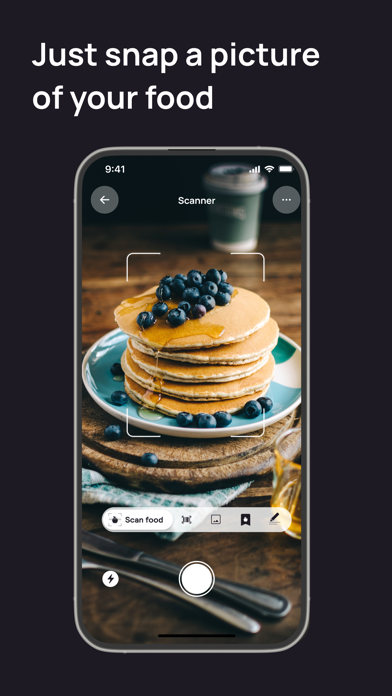
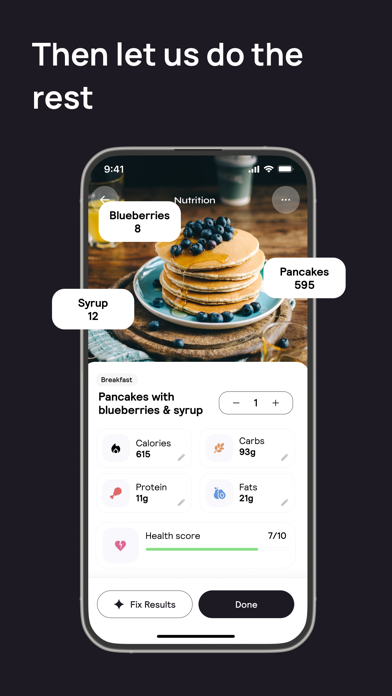
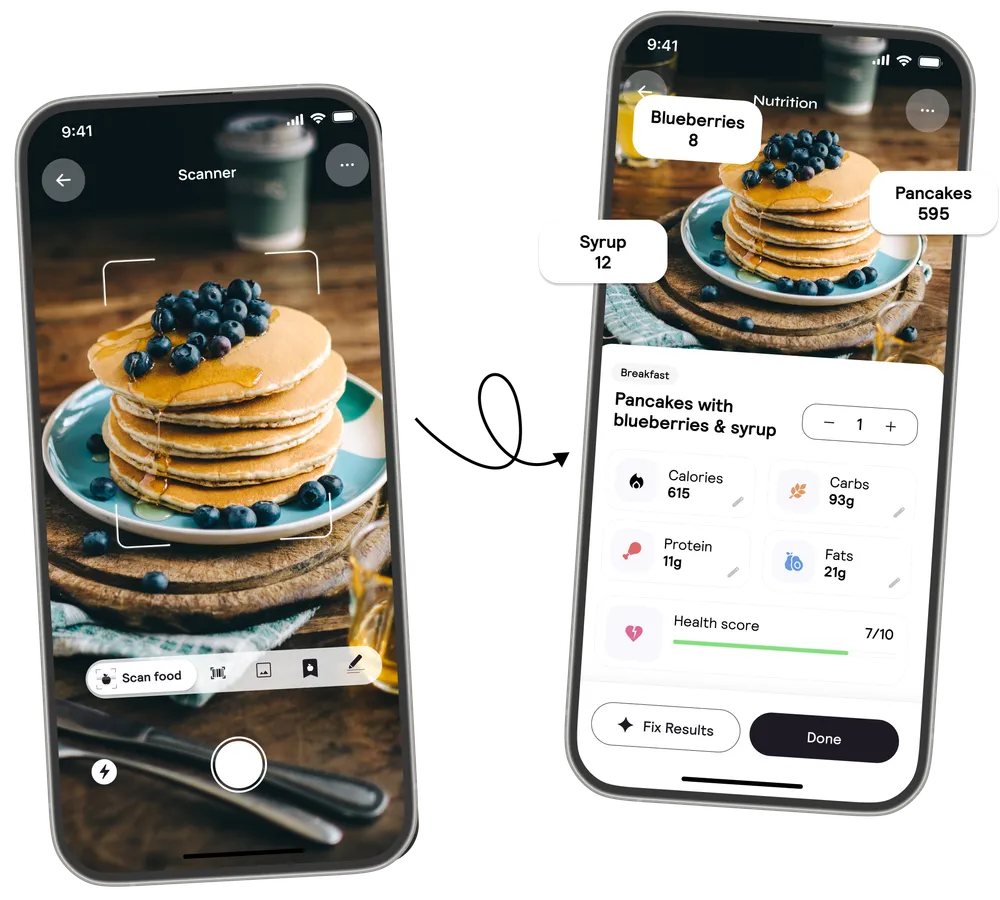
The visible loop is capture → inspect → correct → finish → revisit the day. In the Apple promotional sequence, a camera preview leads narratively to a nutrition sheet; the hero composition repeats the same pancake scene across scanner and result devices. Neither asset shows network processing, confidence intervals, error recovery or the precise moment a diary entry is committed.[22][27]
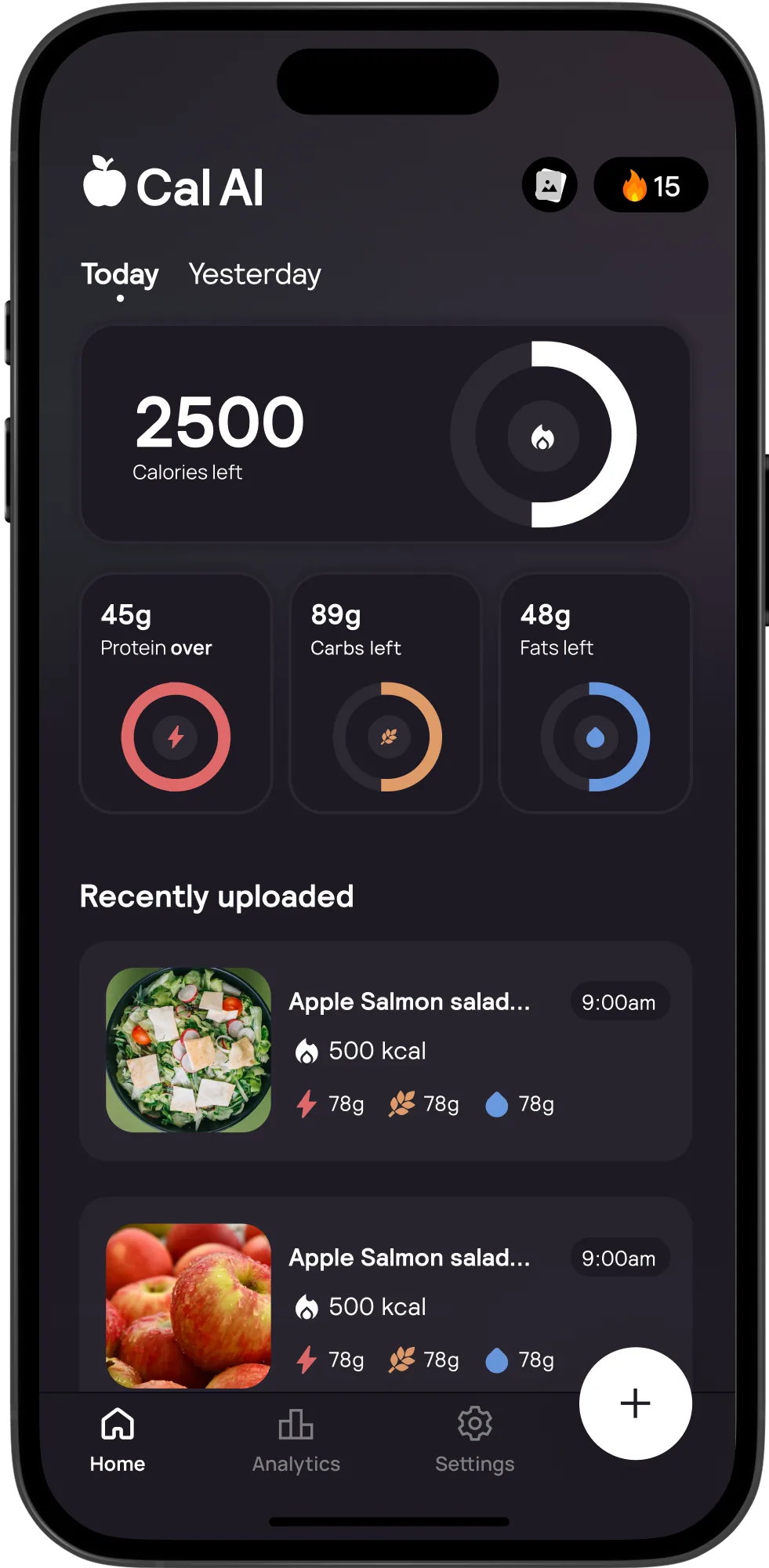
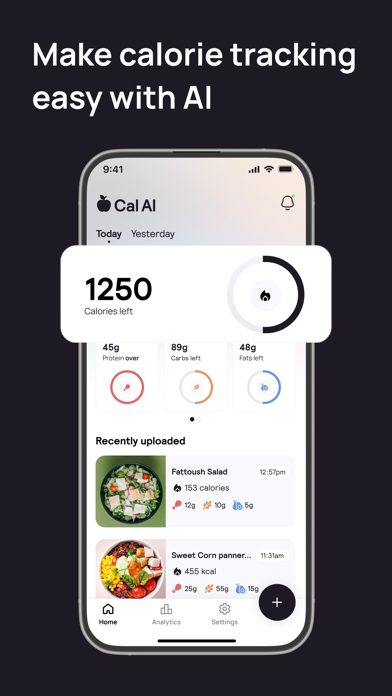
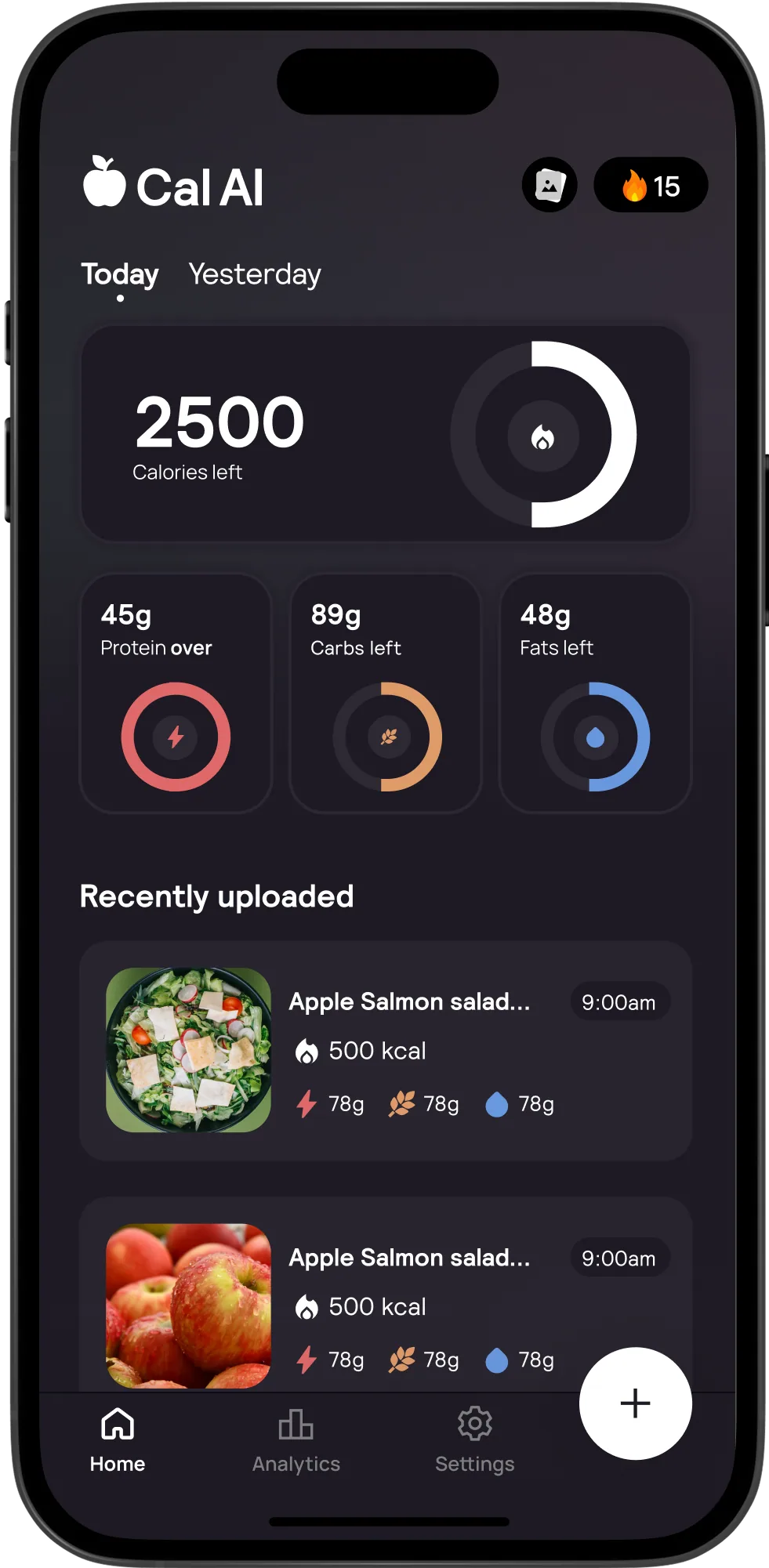
The home hierarchy makes remaining allowance the focal point. Smaller macro rings and a photo-led recent history sit beneath it. Design interpretation: the interface prioritizes the next eating decision over database administration. A useful test would ask users whether they can distinguish consumed, remaining and over-target quantities without opening another view. The artwork itself is not evidence that every user understands those states.[21]
The product should not be reduced to “take a picture.” A correction affordance, manual entry escape route, reusable objects and a photo-comparison surface are all visible. Competitive evaluation should therefore compare completed, corrected records and returning-user work, not just the initial capture gesture.[23][31][26]
3. Information architecture and visual variants
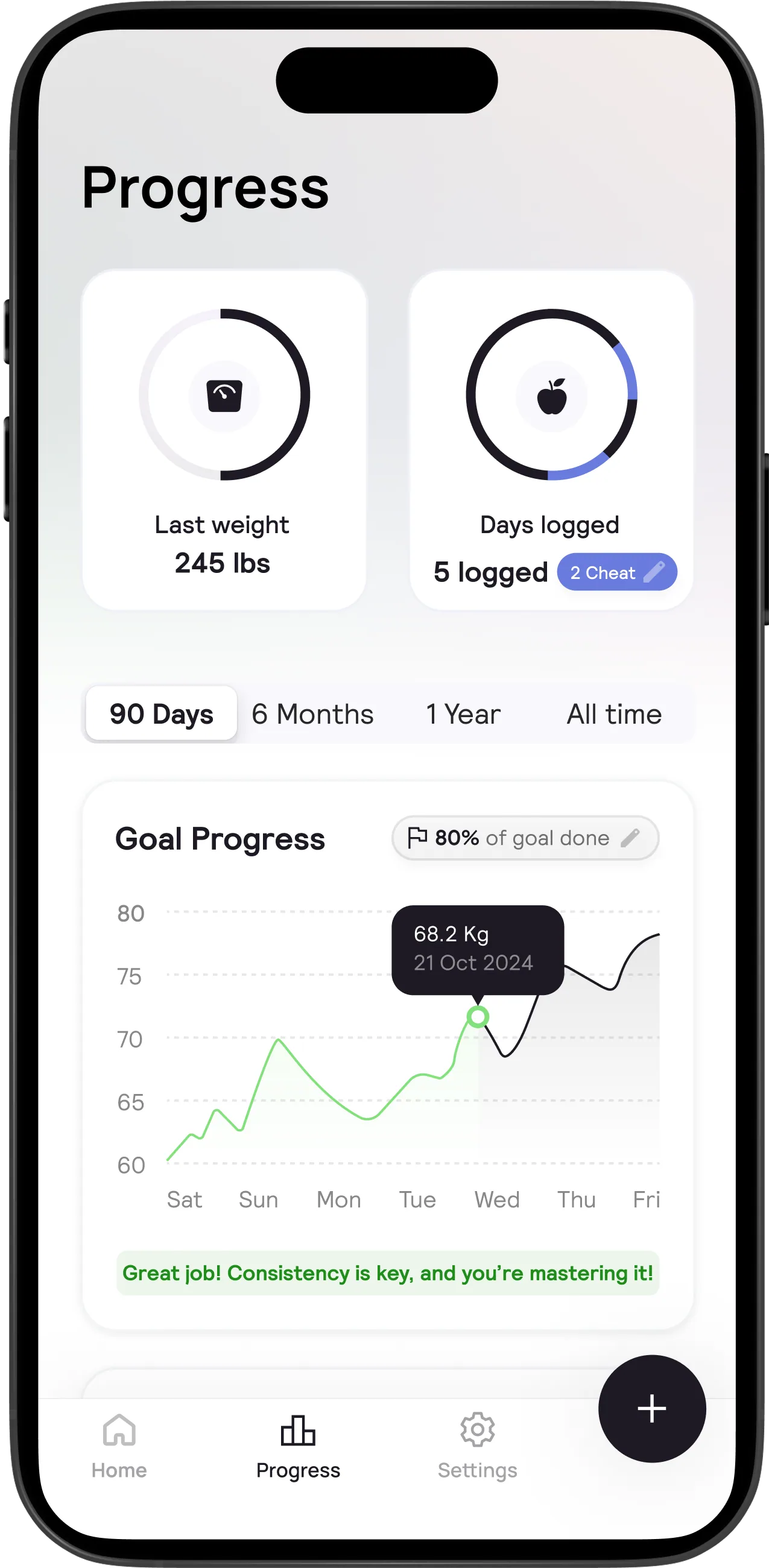
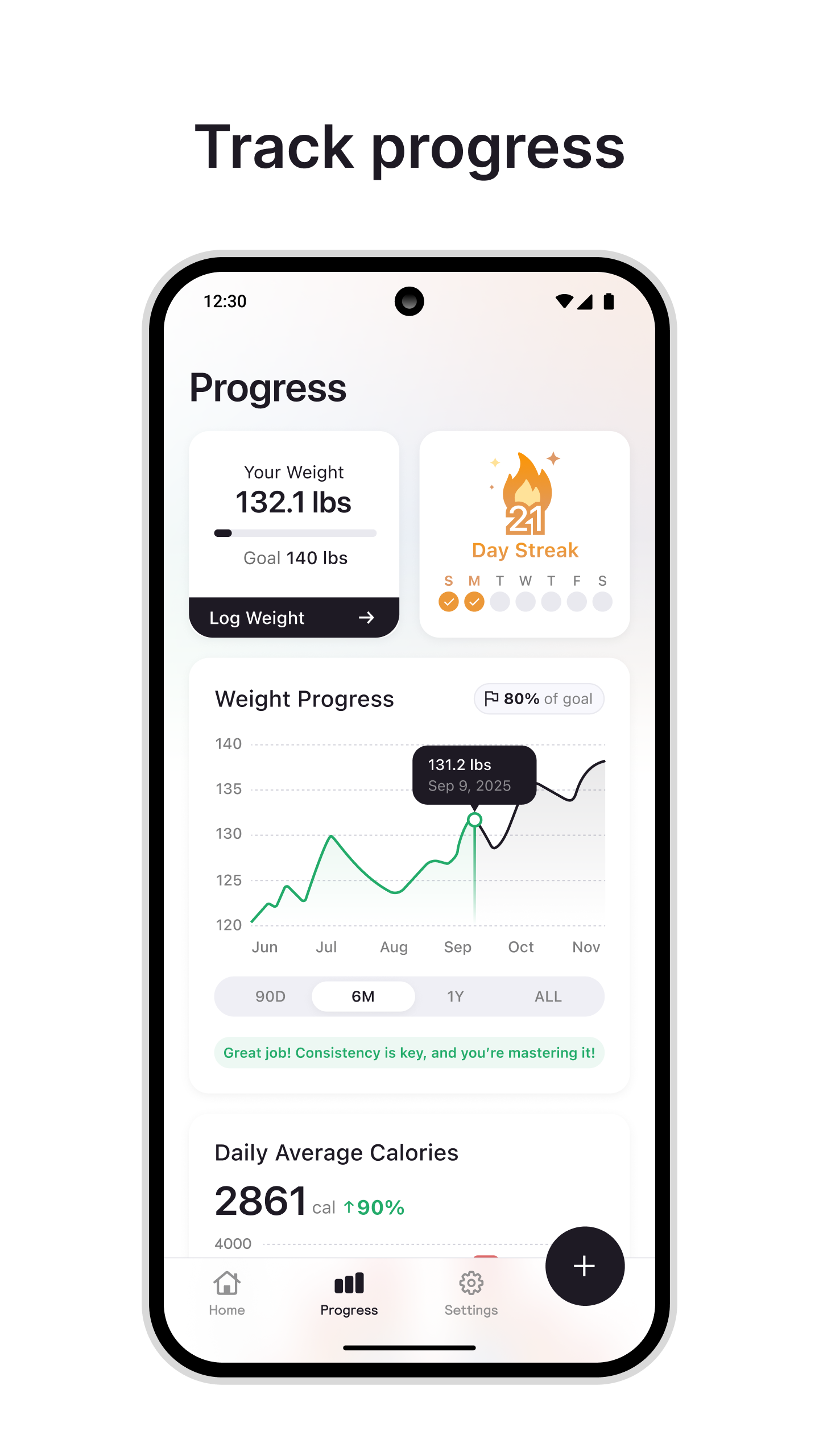
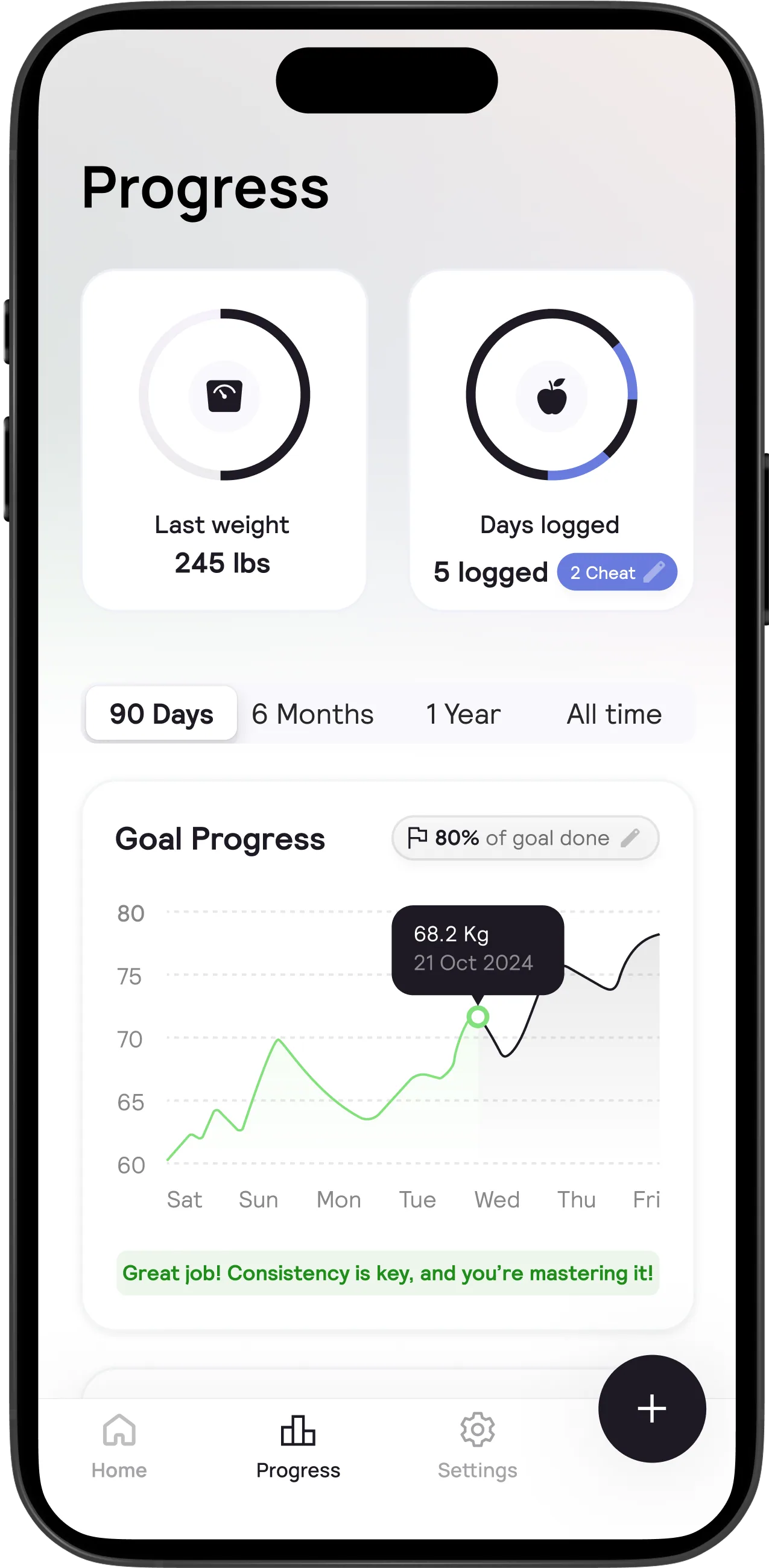
The inspected materials show Home, an Analytics or Progress area, Settings and a prominent plus button. The dark-home art preserves the calorie/macro hierarchy but uses different sample content and styling. The website progress image contains days-logged and cheat-day indicators; the Android-marketed progress image instead emphasizes a weight card, Log Weight and a streak. These are variant observations, not evidence of a release chronology.[29][28][25]
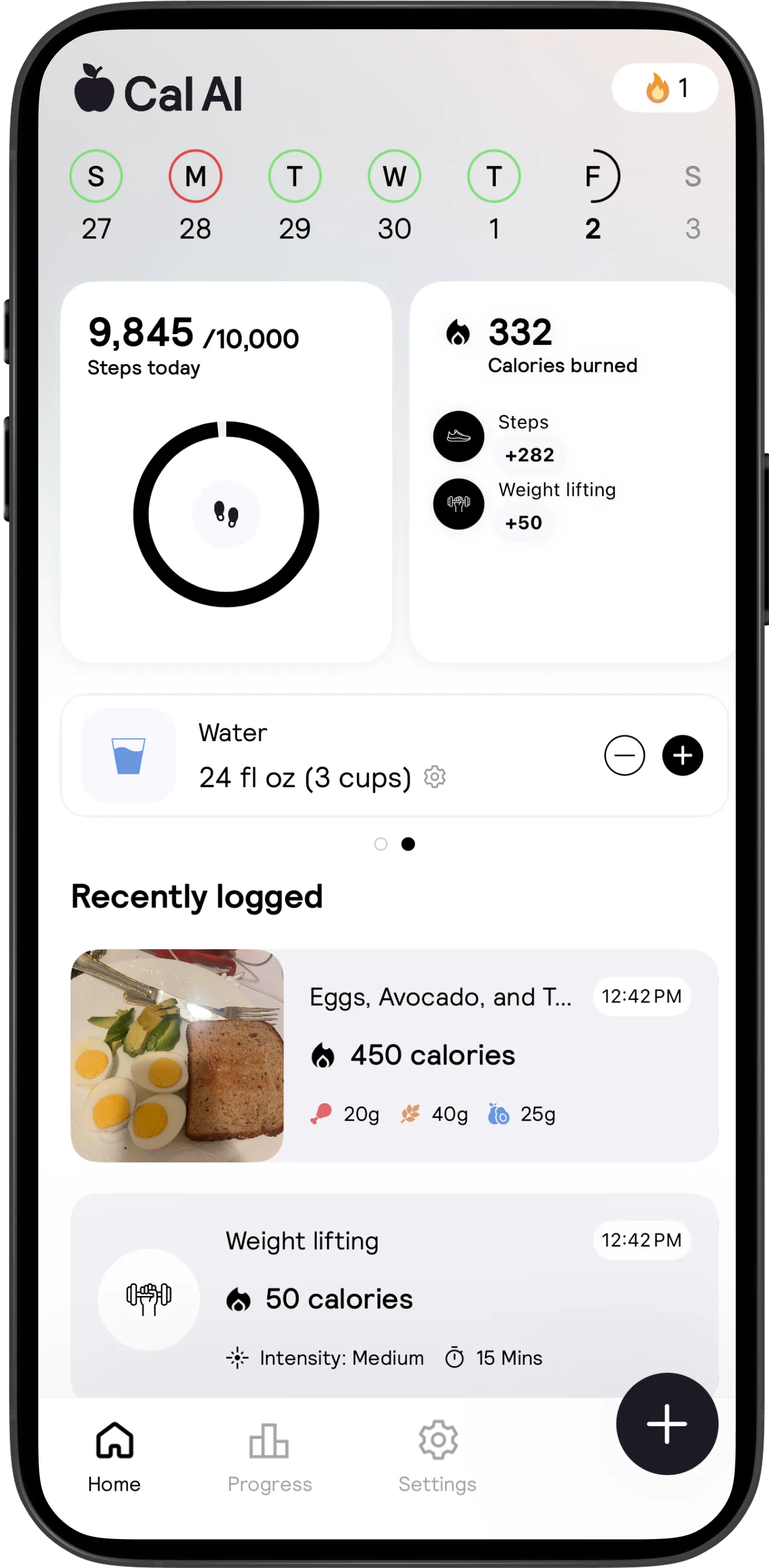
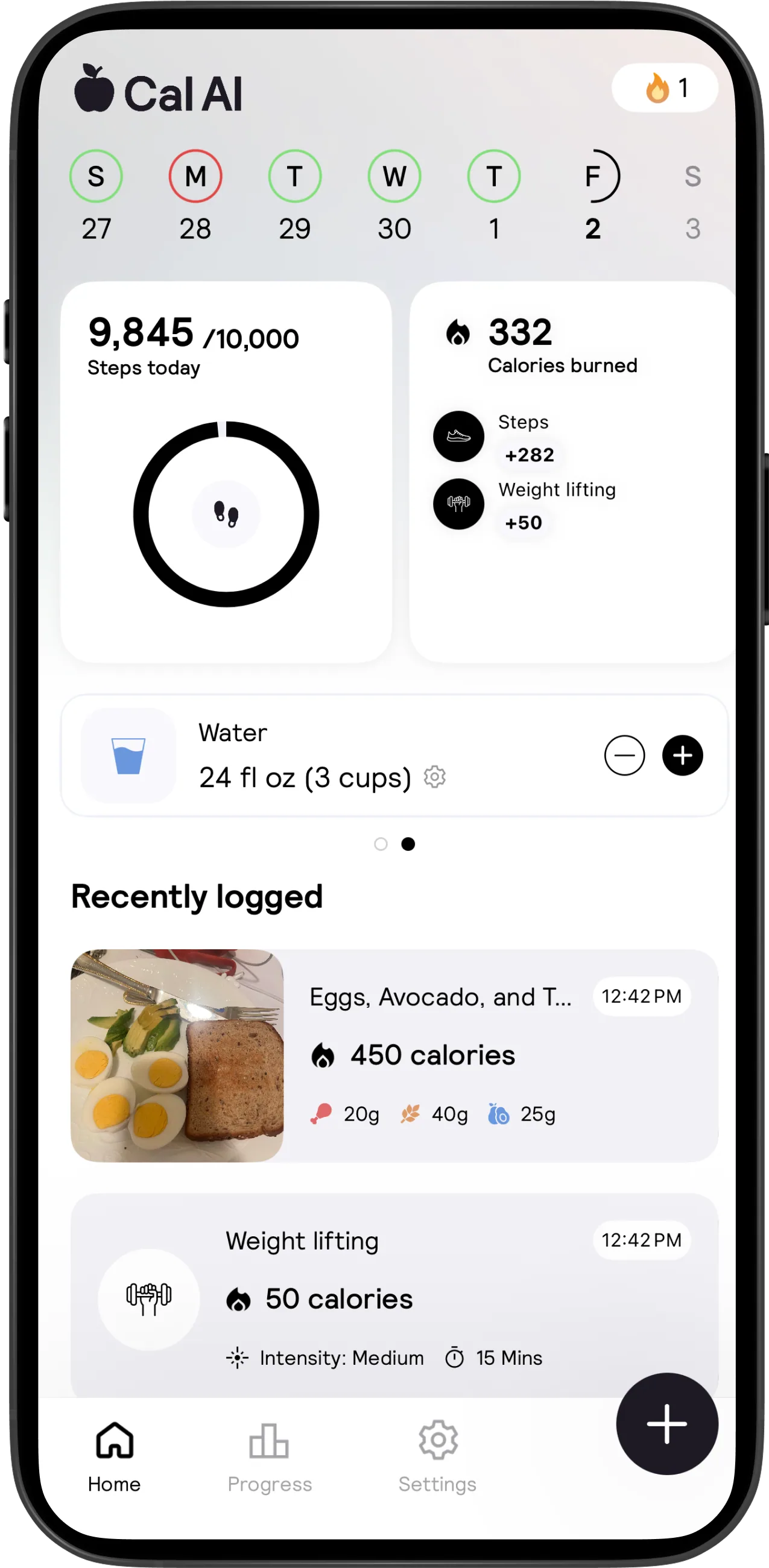
The home activity image combines steps, exercise calories, water and mixed recent food/exercise entries. Two dots suggest an additional dashboard page. The actual swipe behavior was not exercised, and a dot does not establish which gesture or animation the shipped build uses.[32]
For inventory purposes, app.json separates native surfaces from external operational surfaces. It includes documented paywall, connection and export functions even where no screenshot was available, and explicitly labels Apple/Google cancellation, email privacy requests and web billing as external. This avoids presenting an OS subscription page as a Cal AI-native screen.
Design interpretation: the apparent three-area shell is compact, but the breadth hidden behind plus, Settings and horizontal dashboard pages could make secondary functions difficult to discover. Test finding saved foods, water configuration and export from a fresh launch. Do not assume an attractive dashboard implies shallow navigation or a low correction cost.
4. Acquisition: photo, search, barcode, labels and descriptions
The camera artwork shows a central food frame, shutter, flash, back and overflow controls. Its bottom strip names Scan food and contains additional icons. Only the named mode is safe to identify visually; interpreting each tiny icon as a specific feature would go beyond the image.[22]
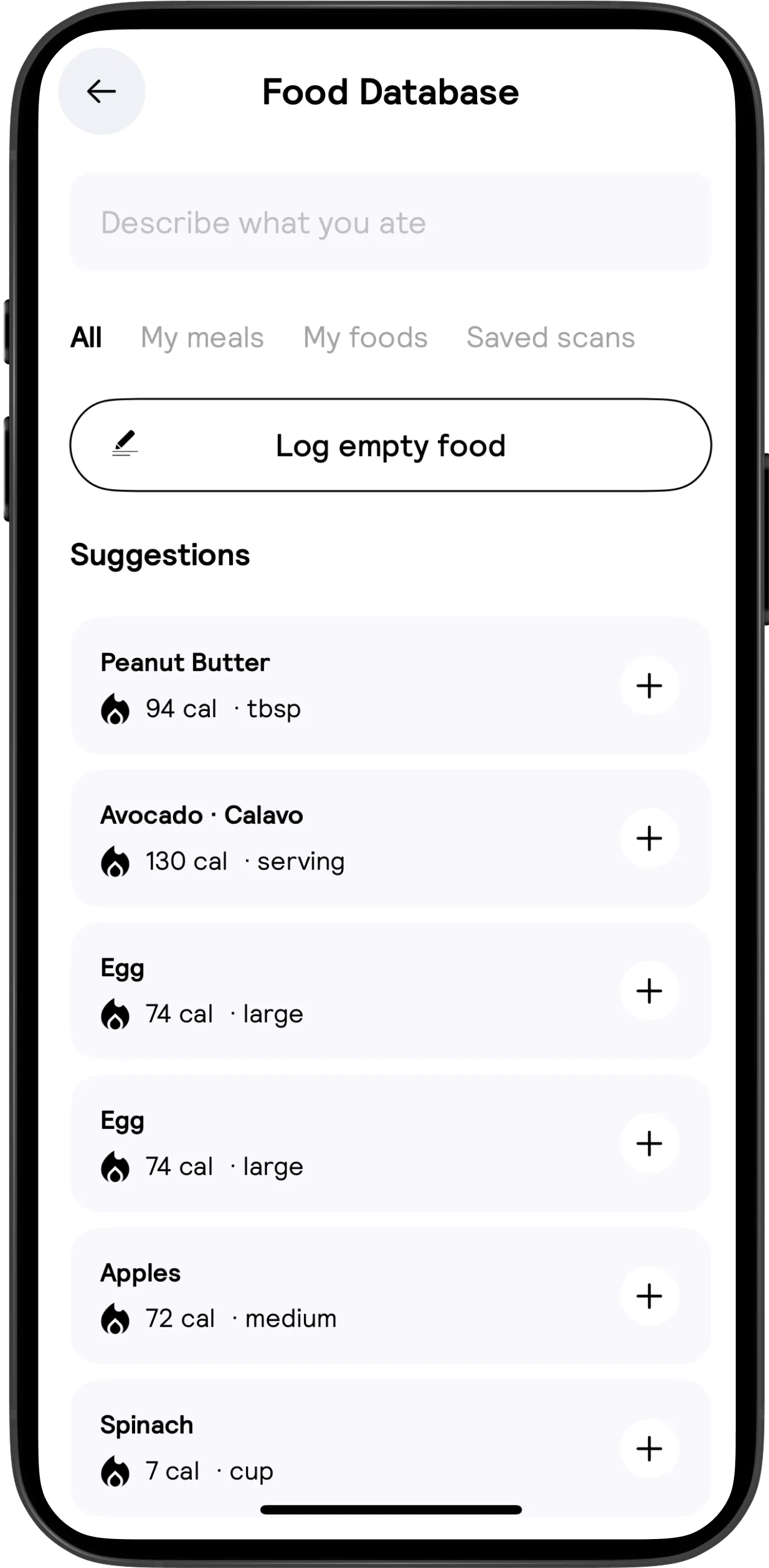
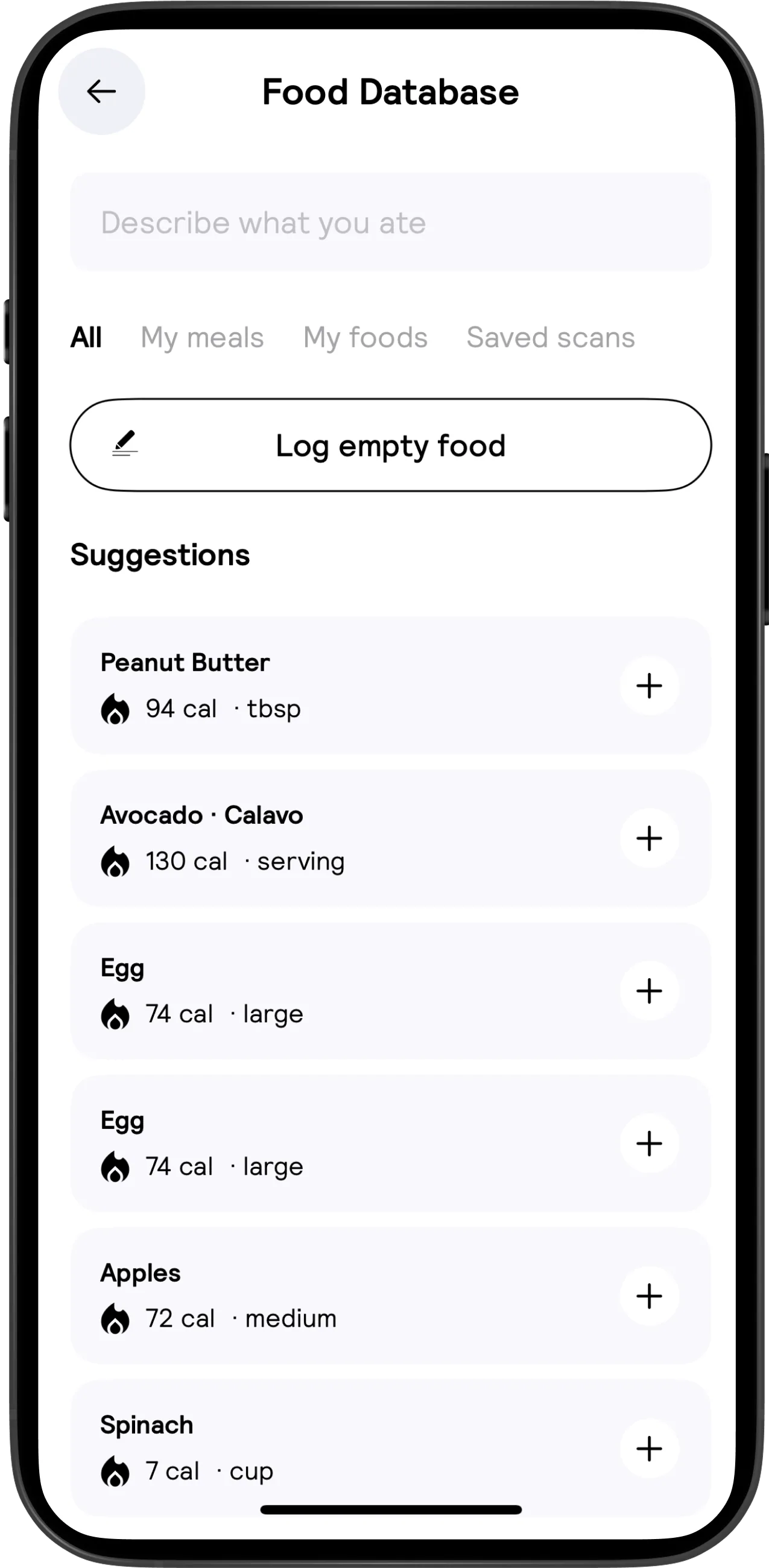
The Food Database visual is unusually informative. It displays All, My meals, My foods and Saved scans, a description/search field, Log empty food and suggestion rows with serving units and plus controls. It does not show a query result state, selected portion sheet or failed search. Repeated generic suggestions in the supplied image should not be treated as measured database duplication.[31]
The official accessibility statement confirms non-camera alternatives: searchable foods, recently eaten items and manual entry.[9] It also explicitly recognizes that camera-led nutrition and label scanning may not be fully accessible to blind or low-vision users.[17] The statement describes compatibility goals; it is not an independent accessibility audit.
Barcode scanning is documented, but the available help does not provide a complete unknown-code flow.[1] Label scanning is also documented; no label-specific recognition/error screen was inspected.[9] For packaged food, a native test should compare the returned product, regional label, portion unit and serving amount before asserting that barcode identification eliminates manual checking.
A 2025 vendor article recommends describing hidden ingredients and explains that Fix Results accepts a description of what was wrong. It claims roughly 90% image accuracy, whereas the newer FAQ claims roughly 80%[2]; neither provides a reproducible benchmark. The article's “free” framing should not override the current App Store statement that food-scanning analysis results require a subscription.[16][3]
For voice evidence see app.json → voice_logging.[5] The disclosure does not establish a dedicated microphone interface, operating-system dictation or matching behavior on both platforms. Treat this as an unverified interaction, not a demonstrated flow.
5. Correction is the trust-critical workflow
The Apple nutrition image shows a serving stepper, editable nutrient cards, a health score and distinct Fix Results and Done actions. Ingredient callouts extending beyond the phone frame are promotional overlays. They cannot be assumed to be tappable in-app ingredient chips.[23]
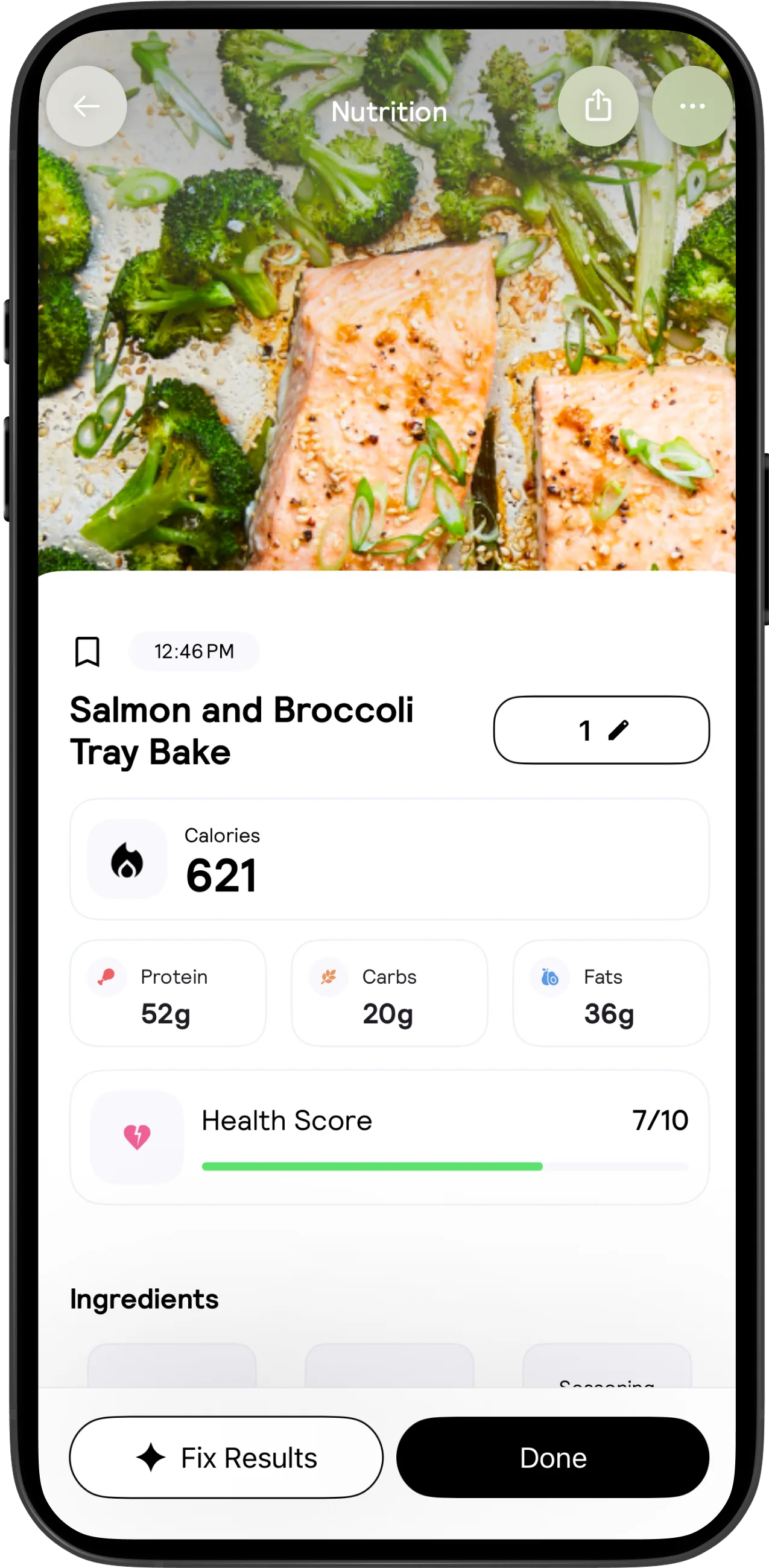
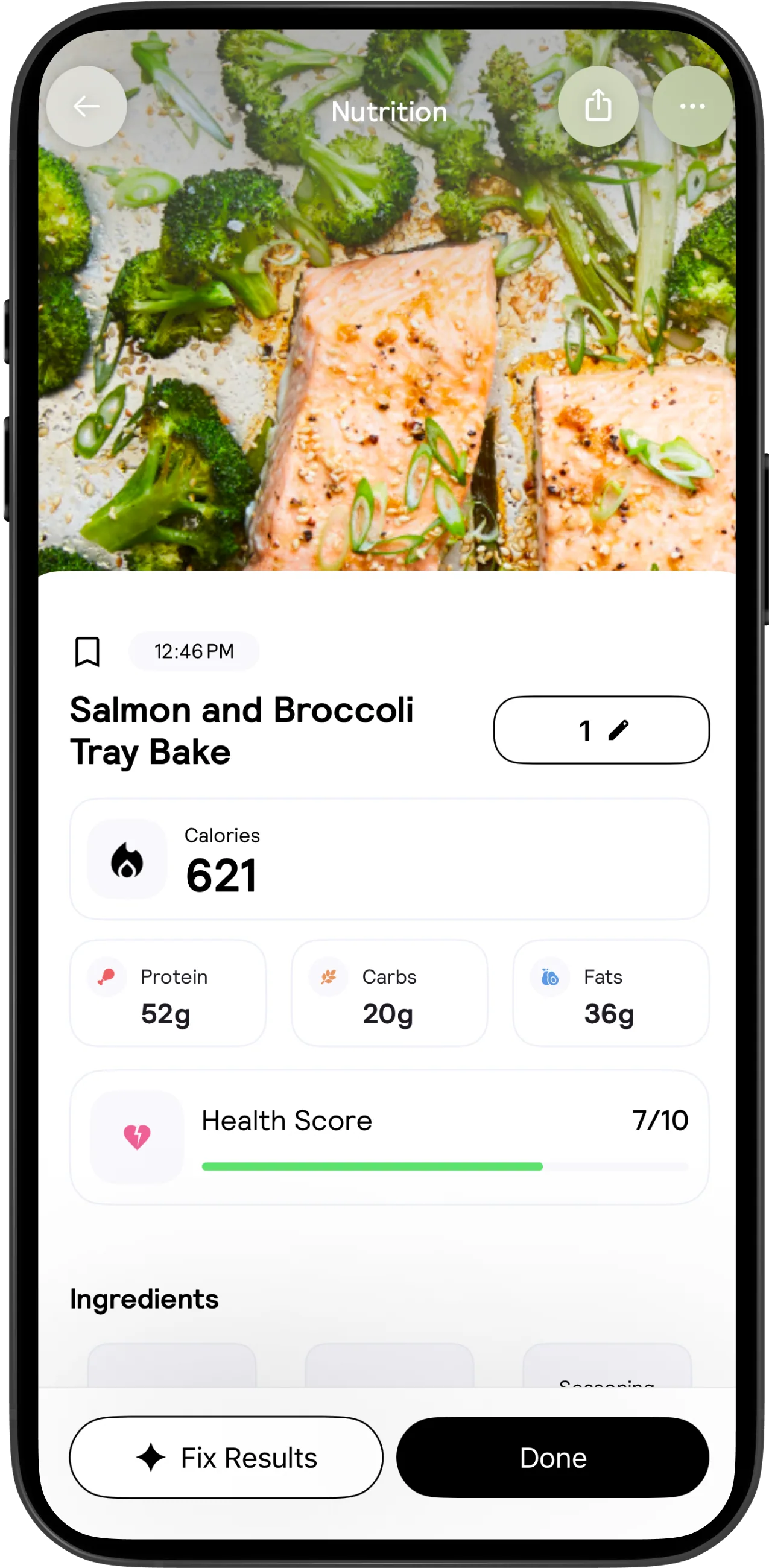
The website's expanded result variant instead shows an editable serving value, bookmark, timestamp, share/overflow header, calories, macro cards and the beginning of an Ingredients section. Its bottom correction/finish actions remain visible. This is better evidence for the existence of multiple correction affordances than for their exact ordering in the current build.[30]
Design interpretation: manual nutrient edits and AI-assisted repairs serve different jobs. Changing the amount eaten is not the same as correcting a mistaken ingredient. A robust evaluation needs at least four cases: wrong quantity, wrong food identity, omitted oil/sauce and correct meal with one deliberately overridden nutrient. Check whether an edit updates calories, macros and the ingredient list consistently, then reopen the record.
Durability is the major unresolved issue. A vendor statement that feedback improves AI does not establish that a user's repaired meal becomes a stable personal template. The test should distinguish reopening the original entry, reusing a saved object, duplicating into another day and scanning the same plate again. Log any re-estimation separately from a failure to save. No such native test was performed here.
The health score is visible but its formula and explanation are not established by these sources. Its compact numeric presentation can invite a stronger interpretation than the underlying estimate warrants. Test whether users can discover what drives the score and whether manual edits affect it; do not infer nutritional or medical validity from the presence of a score.[30]
6. Returning users, reusable objects and recipes
Cal AI's reuse taxonomy suggests more than a single favorites list: meals, foods and saved scans coexist, while a bookmark is visible on a result. Google Play also advertises memory for frequent meals. However, none of this establishes object ownership, template-versus-snapshot behavior, multi-select logging or copying an entire day.[31][4]
A useful hands-on sequence would save a corrected meal, log it on another date, change its serving, then edit the original reusable object. Inspect all historical diary entries. If a shared recipe update changes past records, the product needs a clear explanation; if it does not, users need to understand why old entries remain unchanged. These are test hypotheses, not reported defects.
Custom recipe creation is advertised, but no primary help walkthrough establishes ingredient search, yield, cooked weight, serving count, duplicate ingredients or batch edits. The structured recipe flow stops at the unknown entry point rather than inventing a recipe builder. Recipe URL import and cross-date copy are marked not-found, meaning unresolved rather than unavailable.[1]
A vendor article also claims meal planning without a screen-level example. Because the claim is older and appears inside a comparison article, it is recorded as limited evidence rather than promoted into a fully implemented planner, grocery-list system or recurring meal calendar.[16]
7. Goals, nutrient depth and review
The official research-reference page explicitly covers registration/goal calculations, micronutrient targets, and daily macronutrient splits. This is important: it would be incorrect to label Cal AI categorically “macros only.” The page does not enumerate the full tracked nutrient set or establish food-level completeness, editable limits, dietary defaults or the target editor's navigation.[15]
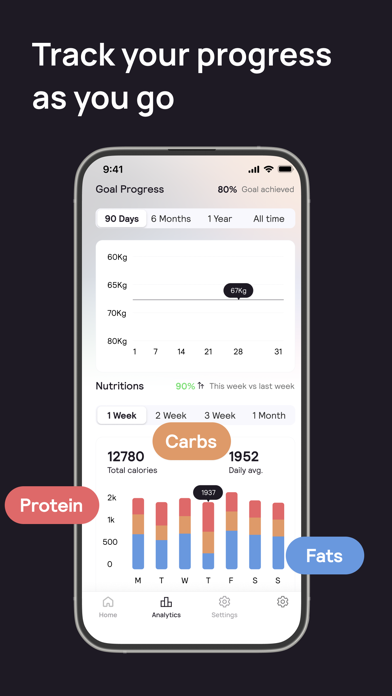
The Apple analytics artwork presents distinct weight and nutrition date controls, a weight chart, weekly stacked nutrient bars and summary quantities. The Android-marketed progress view offers Log Weight, a streak and weight-range controls. These visuals support retrospective review, not a documented adaptive expenditure algorithm or guided weekly recalibration.[24][25]
The website progress variant includes a goal-edit pencil and a cheat-day chip. The meanings of “cheat,” the percentage-complete calculation and whether weight is raw or smoothed remain unknown. Do not assume that a forecast-like line proves prediction, that a goal pencil opens macro editing, or that the depicted sample values constitute a coherent real user record.[28]
Design interpretation: reviewing progress and changing a plan should be evaluated as separate tasks. Ask users to explain a recent weight change, then adjust only the desired target without rewriting historical budgets. Test partially logged days, changing units, travel dates and a stalled week. These cases reveal whether the interface communicates uncertainty rather than merely drawing an attractive chart.
8. Activity, hydration and integration boundaries
The activity visual shows a step total against a goal, calories burned by activity type, a water counter with minus/plus and a gear, and a weight-lifting entry containing intensity and duration. It supports exercise recording as part of the nutrition diary. It does not establish a comprehensive workout library, progressive programming or strength-training set analytics.[32]
Connection instructions and duplicate-step constraints are consolidated in app.json → calai-f-health.[2] Direct wearable connections, Health Connect support and nutrient/weight read-write directions remain unverified.
The Washington policy permits categories of connected health-device data broader than the visible step UI. Privacy-policy scope is not a shipping integration catalog. In particular, references to physiological or glucose information do not prove an available glucose dashboard or a named device partnership.[7]
Design interpretation: any energy-budget comparison should test whether imported steps, manually logged exercise and imported workouts are additive, deduplicated or configurable. Hydration needs its own test: increment size, unit conversion, accidental decrement, daily reset and retention after relaunch. Do not assume the water gear configures a goal merely because a gear is present.
9. Social interaction and progress images
Groups are more than a speculative social feature: the community guidelines describe posts, comments, reactions, automated review, reporting, restrictions and an appeal path. Long-pressing a post then choosing Report is documented. The same guidelines warn that public material can remain visible in saved or indexed copies after deletion.[8]
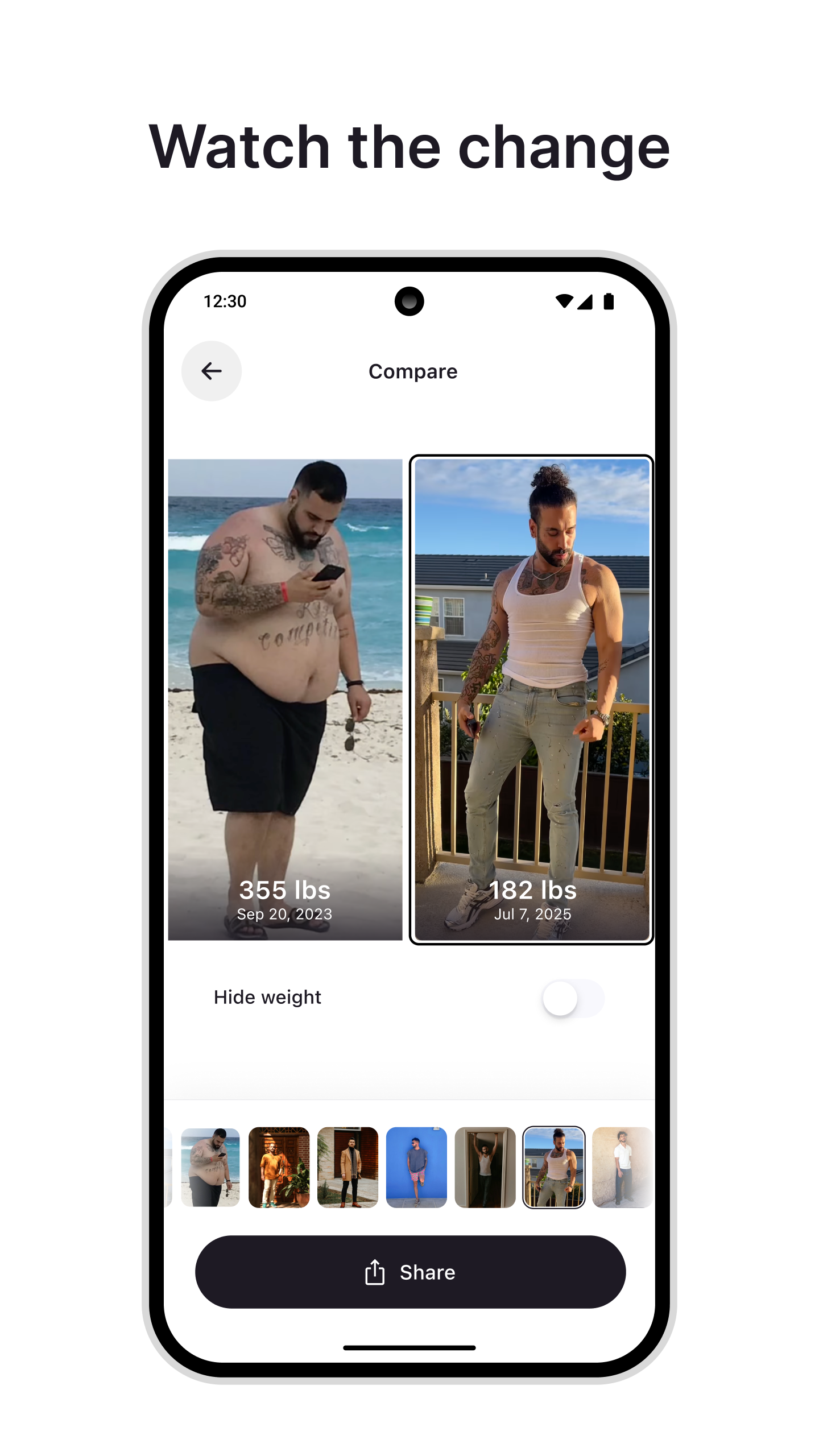
The progress-photo comparison image shows two selected pictures, weight/date overlays, a thumbnail strip, a Hide weight switch and Share. That is a genuine inspected surface, but sharing destinations, permissions, default audience and metadata handling were not observed.[26]
Design interpretation: selective concealment is useful but narrower than privacy. Hiding weight does not remove a face, room, date or other identifying context. Test the export preview and group audience separately, using synthetic photos. Community accountability, photo sharing and personal tracking should not be collapsed into one uniformly private workflow.
10. Subscription, recovery, export and deletion
Analysis results are explicitly subscription-gated in the iOS description. The store's free-download label therefore does not establish a usable free scanner. No universal price is quoted: multiple channels and promotional/legacy purchase options make a single unqualified number misleading.[3]
Restoration evidence is consolidated in app.json → calai-f-restore.[2] A useful design distinction is app identity versus store entitlement: recovering one need not resolve the other. The native reauthentication destination has no inspected appearance or verified navigation; it is not the public website login.
For Apple billing, cancellation happens through Apple subscriptions; Apple documents the canceled/no-button state and receipt/account troubleshooting. For Google Play billing, cancellation uses the selected subscription and confirmation flow; Google says paid access normally continues through the period already purchased. Uninstalling is not cancellation.[18][19]
Direct web subscribers have a separate Manage Subscription email form. The public login page offers Google and Apple sign-in, but no authenticated food diary was inspected. Thus “web account surface exists” is defensible; “full web nutrition app” is not.[14][10]
Export troubleshooting is consolidated in app.json → calai-f-export; the export entry path and resulting document remain unobserved.[2]
Separately, the privacy notice provides jurisdiction-dependent access, portability and deletion requests via privacy@calai.app, with retention and legal exceptions.[5]
Those rights are not proof of instant CSV export or a completed native deletion flow.
Google Play's developer-provided safety disclosure says data is encrypted in transit and deletion can be requested. It is a disclosure, not a security audit. The terms characterize nutritional results as approximations, disclaim professional advice and include a broad user-content license mentioning AI training. Product trust review should include how these boundaries are communicated before upload, rather than only in legal pages.[20][6]
11. Design conclusions and verification priorities
Strongest evidenced patterns: a remaining-budget hierarchy; image-led diary recognition; visible correction adjacent to completion; reusable-food categories; progress at multiple time scales; a separate activity/water dashboard; and a photo-sharing concealment control. Their value is architectural, not proof of usability or nutrition accuracy.[21][23][31]
The highest-value next research is a correction-and-return study, not another happy-path scan demo. Instrument a synthetic account with known meal amounts and record the final stored values after reopening, reuse and synchronization. Count repair interactions and distinguish model misidentification from UI or persistence problems. This dossier deliberately supplies no invented timings, success percentages or benchmark results.
Next, inspect target editing and micronutrient coverage, then recipe semantics and health-data reconciliation. Only after those tasks should a feature-parity comparison rank conveniences such as widgets or fasting timers. Public-source silence on those features is not enough to award a competitor a categorical advantage.
Finally, verify subscription entry/recovery, export contents and deletion separately on both platforms. Capture the actual gate displayed for manual search, saved meals, barcode, photo results and export. Do not make a purchase or destructive privacy request without explicit approval. The fourteen questions in app.json turn these gaps into a concrete hands-on checklist.
12. Evidence gaps and retrieval notes
No account was created, no subscription purchased and no native application operated. Public official help, legal/accessibility pages, store listings, machine-readable Apple metadata, homepage embedded feature data and official image assets were retrieved. Search results for a public API documentation endpoint led to DNS failure; an archive availability check returned no snapshot. That snippet was not used to infer the native app's API or behavior.
Official-video discovery did not establish an identity-verified native walkthrough. Generic same-name tutorials included unrelated calendar products; those were excluded. Vendor-linked Instagram yielded only a minimal page and TikTok returned HTTP 403. Three YouTube embeds in the Google Play HTML belonged to suggested competitor apps, confirmed through YouTube metadata, and were excluded. This is an honest coverage gap, not a claim that no official video exists anywhere.
The annotated images retain the vendor's original art; analyst numbered markers and notes are added only in separate derivative files. Promotional ingredient bubbles, device frames and floating labels remain explicitly identified as marketing. Their inspected visible controls are useful design references, but they do not prove the current runtime, subscription state or full end-to-end transition sequence.
Sources
[1] https://www.calai.app — Cal AI | Download Today [2] https://www.calai.app/faq — FAQ | Cal AI [3] https://apps.apple.com/us/app/cal-ai-calorie-tracker/id6480417616 — âCal AI - Calorie Tracker App - App Store [4] https://play.google.com/store/apps/details?hl=en_US&id=com.viraldevelopment.calai — Cal AI - Food Calorie Tracker - Apps on Google Play [5] https://calai.app/privacy — Cal AI | Privacy Notice [6] https://www.calai.app/tos — Cal AI | Terms of Service [7] https://www.calai.app/washington-health-data — Cal AI | Washington Consumer Health Data Privacy Policy [8] https://www.calai.app/community-guidelines — Community Guidelines | Cal AI [9] https://www.calai.app/accessibility — Cal AI | Accessibility Statement [10] https://www.calai.app/login — Login | Cal AI [11] https://itunes.apple.com/lookup?id=6480417616&country=us — https://itunes.apple.com/lookup?id=6480417616&country=us [12] https://www.calai.app/blog — Blog | Cal AI [13] https://www.calai.app/press — Press | Cal AI [14] https://www.calai.app/manage-subscription — Cal AI | Download Today [15] https://www.calai.app/citations — Health Recommendations | Cal AI [16] https://www.calai.app/blog/best-free-calorie-and-macro-tracker — 14 Best Free Calorie And Macro Trackers for Meal Planning | Cal AI [17] https://www.calai.app/access — Cal AI | Accessibility Statement [18] https://support.apple.com/118428 — Cancel a subscription from Apple - Apple Support [19] https://support.google.com/googleplay/answer/7018481 — Cancel, pause, or change a subscription on Google Play - Android - Google Play Help [20] https://play.google.com/store/apps/datasafety?id=com.viraldevelopment.calai — Cal AI - Food Calorie Tracker - Apps on Google Play [21] https://is1-ssl.mzstatic.com/image/thumb/PurpleSource211/v4/66/dd/5c/66dd5cab-7622-7caf-84c1-5fc5c16f5b39/28f8bc10-b990-4c88-be57-5003ba5d6483_SS1Small__U00281_U0029.png/392x696bb.png — Cal AI official image: Daily calorie dashboard [22] https://is1-ssl.mzstatic.com/image/thumb/PurpleSource221/v4/33/52/fd/3352fd96-00a2-d63b-9362-f1fdaa21fe31/e93b538a-fce8-4568-94db-b2b5f69644e2_SS2Small__U00282_U0029.png/392x696bb.png — Cal AI official image: Photo scanner [23] https://is1-ssl.mzstatic.com/image/thumb/PurpleSource211/v4/9f/b6/cd/9fb6cdca-5494-1a6e-f352-f7ed45756b38/06c53f71-a783-49ef-aeb8-2716c4a2e083_SS3Small__U00281_U0029.png/392x696bb.png — Cal AI official image: Nutrition result and correction [24] https://is1-ssl.mzstatic.com/image/thumb/PurpleSource221/v4/16/ca/3b/16ca3b16-fdd8-74e6-f0f6-b6070ee8547c/4ff1e0d2-b596-4b09-a8c0-99accd0d5c85_SS2Small__U00283_U0029.png/392x696bb.png — Cal AI official image: Weight and nutrition analytics [25] https://play-lh.googleusercontent.com/_LKArRkRzv59CX2VrC3TU0syd_oIdskYI8RV3SgVAbdHYrnd8g1-HhXlvsMTuXxNbtnCkDHR854br-s7ubiWdg=s0 — Cal AI official image: Android-marketed progress dashboard [26] https://play-lh.googleusercontent.com/l4MpxdkI78j3j9gyGCACcj9GWAryGMrF9n4_VbaQvNNDTpYJw7yRlFTFVC21xXNX-rz23MWkbrCFIpxzP_eK4Kc=s0 — Cal AI official image: Progress-photo comparison [27] https://www.calai.app/hero-image.webp — Cal AI official image: Scanner-to-result marketing pair [28] https://www.calai.app/food-db.webp — Cal AI official image: Website progress design variant [29] https://www.calai.app/dark-iphone-preview.webp — Cal AI official image: Dark home design variant [30] https://www.calai.app/analyzed.webp — Cal AI official image: Expanded nutrition result [31] https://www.calai.app/search-food-db.webp — Cal AI official image: Food database and reuse entry [32] https://www.calai.app/water.webp — Cal AI official image: Activity and water dashboard